

Guides · Comparison
October vs BoxBrownie: capture-to-listing or a photo editing service?
BoxBrownie is a pay-per-image editing service: you take the photos (or have them taken), upload them, and its human editors send them back within 24 hours, or 48 hours for virtual staging, at US prices of $1.60 per enhanced photo and $24 per staged photo as of October 27, 2026. October also handles the capture: its iPhone app walks you to each spot in every room, an AI image model draws each finished photo from that capture, and the photos plus an AI walkthrough video usually come back within a few hours, for $49 a place (up to 6 rooms) or $99 with the walkthrough.
By Emil Thomsen, Founder of October · Updated
Reading on Google? Add October to your Preferred Sources to see our guides more often.
The short answer
The two services start at different points. BoxBrownie assumes you already have photos and need them edited. October assumes you have an iPhone and a space, and need the photos taken and made: its AI draws each finished photo from your own capture. Which one fits depends on what you have when you start.
- Choose BoxBrownie if you (or a photographer) already shoot good brackets with a real camera, if you need floor plans, renders, day-to-dusk edits or copywriting, or if you want a human editor to follow custom instructions on each image.
- Choose October if nobody on the job is a photographer, if you want the listing live fast, or if you also want a walkthrough video from the same visit.
- Use both if it suits you: you own the photos October delivers, so you can send any of them to BoxBrownie for an edit October doesn't offer, such as a twilight sky or a floor plan.
Side by side
| BoxBrownie | October | |
|---|---|---|
| What it is | Online editing service for property photos you upload | iPhone app that guides the capture; an AI image model draws the finished photos from it, and an AI video model makes the walkthrough |
| Who takes the photos | You or your photographer, with any camera; BoxBrownie also has a free iPhone camera app, SnapSnapSnap | You, with the October app on an iPhone 12 or newer; the app shows where to stand and takes the photos |
| Who edits | Human editors, according to BoxBrownie | No one edits your frames: an AI image model draws each photo new from your capture, keeping the room, with daylight light and loose items left out; checked against the capture and redrawn if the room changed |
| Photo price | $1.60 per image enhancement | $49 a place, up to 6 rooms, three spots per room |
| Video | No walkthrough video service listed; 360° virtual tours are offered | Walkthrough video included at $99 a place (HD) or $199 (4K) |
| Virtual staging | $24 per image, 48 hours | $29 per room, every delivered photo of that room; Scandinavian, Modern or Classic |
| Removing furniture or items | $4–$8 per image (item removal and virtual cleaning) | Small loose items left out of the AI-drawn photos as standard; a fully emptied room is $19 per room |
| Day to dusk, floor plans, renders | Yes: day to dusk $4, floor plan redraws $24–$32, renders from $280 | Not offered |
| Turnaround | Standard edits within 24 hours; staging 48 hours | Usually within a few hours; photos arrive room by room |
| Free to try | 3 image enhancements and 1 day-to-dusk edit | First place free (up to 6 rooms, photos and walkthrough) |
| Billing | Pay as you go, no subscription | Pay per place, or Start $149/month (2 places) or Pro $399/month (6 places) |
BoxBrownie's prices are from its pricing page with the region set to United States, read on October 27, 2026. In August 2026 Shhots and Bella Virtual Staging, both competitors, recorded list prices of $2 and $30 on the same page, and Shhots saw the service pages 20% lower, which it read as a promotion; on October 27 the pricing page itself showed the lower figures, with no promotion named. Check the price at checkout. October's prices are on our pricing page.
What one listing costs with each
Take a six-room home. October takes photos from three spots in each room, so that is up to 18 finished photos. Here is the same job priced both ways, using BoxBrownie's US prices.
| Job | BoxBrownie | October |
|---|---|---|
| 18 edited photos | 18 × $1.60 = $28.80, plus your own time or a photographer to take them | $49 for the place, capture guided by the app |
| 18 photos + walkthrough video | Photos $28.80; no walkthrough service listed | $99 (HD) or $199 (4K) |
| Stage 2 rooms, 3 photos each | 6 × $24 = $144 | 2 × $29 = $58 |
| Empty 1 room, 3 photos | 3 × $8 = $24 (standard item removal) | $19 |
BoxBrownie's per-image price is lower for plain editing if you already have good photos. The comparison changes once you count the capture itself. Hiring a photographer is a separate cost, covered in our real estate photography cost guide. Staging also works differently: BoxBrownie charges per image and October charges per room, so the gap grows with the number of photos per room.
Where BoxBrownie is the better choice
- You already shoot with a real camera. If you or your photographer deliver bracketed exposures from a full-frame camera, a human editor blending them is exactly what you need, and $1.60 an image is hard to beat.
- You need the extras. Floor plan redraws ($24–$32), day-to-dusk ($4), renders, 360° staging and listing copy are all on BoxBrownie's menu. October offers none of them.
- You don't have a recent iPhone. BoxBrownie edits photos from any camera. October runs only on iPhone 12 and newer; there is no Android app yet.
- You want per-image instructions. BoxBrownie says its editors are real people and that it fixes a standard edit for free if it isn't right. Bella's October 2026 rate check lists unlimited staging revisions within two months.
- Scale and familiarity. BoxBrownie says it serves more than 250,000 property professionals in 138 countries, and many brokerages already have accounts.
BoxBrownie also has its own capture app. SnapSnapSnap is free, takes several exposures per shot and merges them, and sends photos to BoxBrownie for editing. As of October 2026 it has a 4.2 rating from 64 reviews on the App Store, and its listing mentions no video features.
Where October is the better choice
- Nobody on the job is a photographer. The app shows the photographer's spot with an arrow and the distance, keeps the phone level and takes the photos itself when the shot is right. If a shot is wrong, it says so on the spot.
- Speed. Photos usually come back within a few hours, room by room while you carry on, instead of the next day or two days later for staging.
- Video from the same walk. The walkthrough video (1920×1080 HD, or 4K upscaled from the same film) is AI-generated motion (Kling) between each room's finished photos, with no extra visit and no extra service to book. It is not filmed footage.
- Staging priced per room. At $29 a room for every photo of that room, staging several angles costs less than paying per image.
- Drawn from the actual room. October's photos are AI-generated from your own capture. The model is told to keep walls, floors, windows, fittings, built-in furniture and the view as captured, and each photo is checked against the capture and redrawn if the room changed. AI can still get a small detail wrong, so check every photo before you publish.
 As captured
 Delivered by October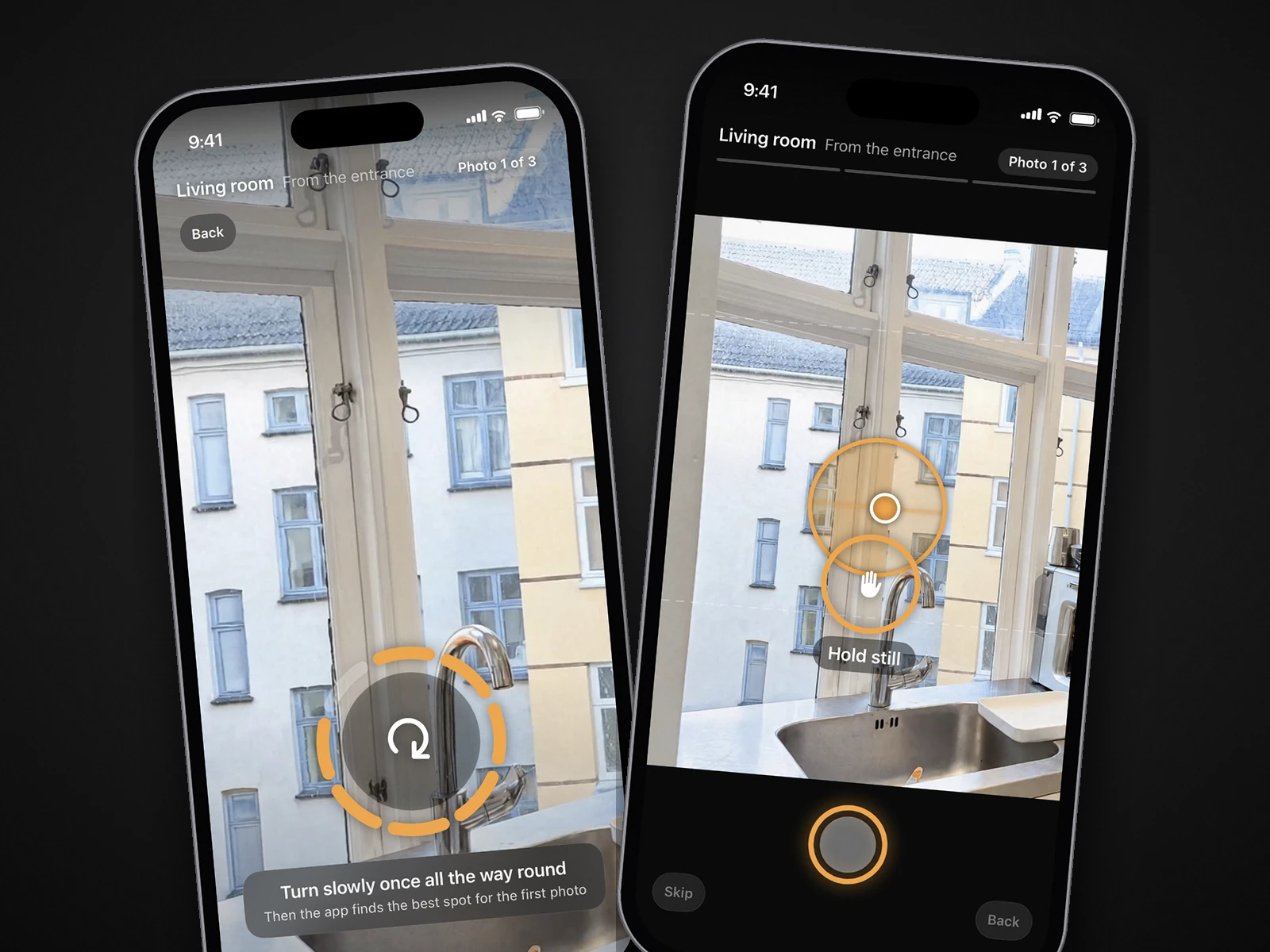
Edits, disclosure and MLS rules
Some edits need a disclosure and some don't, and that applies to both services. California's AB 723, in force since January 1, 2026, requires agents to disclose a digitally altered image on or next to the image, and to include or link the unaltered version when they post online. The law defines an altered image as one where software or AI adds, removes or changes elements of the property, such as furniture, appliances, flooring and walls. Adjusting lighting, sharpening, white balance, colour, angle, straightening, cropping and exposure doesn't count (Senate Judiciary analysis).
- Usually no disclosure: light, colour, exposure and straightening, which covers BoxBrownie's image enhancement. It does not cover October's photos: each one is a new AI-generated image, so label it as AI-altered or digitally altered where your MLS or state requires (CRMLS Rule 11.5.2 accepts either).
- Disclosure needed: virtual staging and emptied rooms from either service, and furniture removal. San Diego MLS lists removing furniture, fixtures or appliances as an alteration and adds 'when in doubt, disclosure is strongly recommended' (SDMLS).
- Check your MLS: sky replacement and day-to-dusk change what is visible from the property. October's standard photos carry no label on the image, and its download includes the unaltered original of every photo, so you can link or provide it where your MLS or state requires.
It matters in practice. HousingWire reported an analysis by Coraly of just under 40,000 listing photos from Zillow, Redfin, Realtor.com and Homes.com: 10.8% showed signs of digital manipulation, and more than 90% of those had no disclosure (HousingWire). More in our guide to California AB 723 and to AI photo editing and MLS rules.
Questions
Does BoxBrownie use AI or human editors?
BoxBrownie says its edits are done by human editors. Standard edits come back within 24 hours and virtual staging within 48 hours, according to its website.
Is October cheaper than BoxBrownie?
For editing photos you already have, BoxBrownie's $1.60 per image is cheaper. Once the photos still need to be taken, or you want a walkthrough video or several staged angles of a room, October's $49 a place (or $99 with the walkthrough) and $29 per staged room usually cost less. Your first place with October is free.
Can I send October photos to BoxBrownie?
Yes. You own the photos October delivers and can use them wherever you like, including sending them to another editor for something October doesn't offer, like a floor plan or a twilight edit.
Does BoxBrownie have an iPhone app?
Yes. SnapSnapSnap is BoxBrownie's free iPhone camera app. It takes several exposures per shot and sends photos to BoxBrownie for paid editing. Its App Store listing mentions no video features.
Does October make floor plans?
No. October delivers AI-generated photos drawn from your capture and an AI walkthrough video. For floor plans, use a floor plan service or a 3D tour app; see our guide to October vs Matterport and Zillow 3D Home.
Sources
- BoxBrownie: homepage (human editors, 24 h / 48 h turnaround, 250,000+ customers, 138 countries, free trial)
- BoxBrownie: pricing page, United States region (enhancement $1.60, day to dusk $4, staging $24, item removal $4–$8, floor plans $24–$32; read October 27, 2026)
- Shhots: BoxBrownie alternatives (US$ list prices and 20% lower service-page prices, captured August 2026; a competitor)
- Bella Virtual Staging: BoxBrownie virtual staging (US$ list prices, August 2026; a competitor)
- Bella Virtual Staging: best virtual staging companies 2026 (rates and revision terms rechecked October 2026; a competitor)
- App Store: SnapSnapSnap by BoxBrownie.com (rating, features)
- BoxBrownie: SnapSnapSnap is here (multiple exposures per shot)
- California Senate Judiciary Committee: AB 723 analysis (definition and exemptions)
- San Diego MLS: AB 723 digitally altered images compliance
- HousingWire: most AI-altered listings go undisclosed (Coraly analysis; AB 723 effective January 1, 2026)