

Guides · Comparison
October vs a Real Estate Photographer vs DIY: Which to Choose
Hire a professional real estate photographer when the listing needs what a phone walk can't give you: drone aerials, real twilight shots, a floor plan or 3D tour, or a magazine-grade shoot of a luxury or very large home. Do it yourself with an iPhone and an editing app ($0 to $2 a photo) when the listing is a rental or a lower-priced home, you have the time to shoot two or three level angles of every room, and you can wait hours to a day for the edits. Use October when you need clean listing photos and a walkthrough video, usually within a few hours, for $49 to $199 a place: you or your team capture the rooms with an iPhone without learning where to stand, and an AI image model draws each finished photo from that capture, keeping the room's layout, fixed features and view.
By Emil Thomsen, Founder of October · Updated
Reading on Google? Add October to your Preferred Sources to see our guides more often.
Photographer vs DIY vs October at a glance
The three aren't competing for every listing. A photographer sells a person, professional gear and a range of extras. DIY means you shoot with the iPhone's own camera or a camera app and either edit the photos yourself or send them to an editing service per photo. October sells speed and price on the core job: the app does the photographer's part on site, and an AI image model draws finished photos of every room from that capture, with an AI walkthrough video made from them. Here is how they compare as of October 2026.
| Professional photographer | DIY: iPhone + editing app | October | |
|---|---|---|---|
| Typical price | $150–$500 per listing; typical standard package $200 (PropPhoto) | $0–$2 a photo: Snapseed is free, Exposio $0.99 an HDR photo, SnapSnapSnap US$1.60, Ovvy and Realty Pro Shots $2 (Oct 2026 listings) | $49 photos, $99 with walkthrough, $199 with 4K walkthrough, per place of up to 6 rooms |
| Who is on site | The photographer | You | You or your team, with an iPhone 12 or newer |
| Booking | Scheduled ahead around the photographer | None | None; capture when the space is ready |
| Your time | Letting them in; Snappr's real estate bookings average 98 minutes | The eight steps in our iPhone how-to guide: prep, camera settings, two or three level angles of every main room, then editing or uploading | A few minutes per room; the app finds the spots, levels the phone and takes the photos |
| Delivery | 24–48 hours with most photographers; same-day delivery often adds a rush fee (PropPhoto) | Instant for in-app HDR (Exposio); hours to a day for an editing service (Ovvy 12 hours or less, Realty Pro Shots same day if submitted by 6pm CST, BoxBrownie 24 hours) | Usually within a few hours, room by room |
| Quality risk | Low; you are paying for judgement and gear | Highest: camera height, a level phone, the lens, light and the room are all on you, and an editing app fixes exposure, not framing | Low on framing and light (the app guides and checks each shot). The photos are AI-generated from your capture and no human review is promised, so check each one before you publish |
| Walkthrough video | Add-on; standalone $195 (PropPhoto) | Shoot and cut it yourself; the editing apps here list photos only | Included at $99: AI-generated motion between the finished photos, HD or 4K (upscaled) |
| Drone aerials | Yes, with an FAA Part 107 licensed pilot | No | No |
| Twilight | Real twilight set $200–$750 (PhotoUp) | A day-to-dusk edit, US$4 at BoxBrownie, which counts as an altered image | No |
| Floor plan or 3D tour | Available as add-ons | Zillow 3D Home is free for a tour; floor plans need a 360° camera | No; virtual tours are listed as coming soon |
| Virtual staging | Usually a separate service | Per photo through the editing services | Empty room $19, staged $29 per room |
| Fixed features | Depends on the editor | Depends on you and the app; sky replacement and object removal are a tap away | Kept as captured: the AI is told to keep walls, floors, windows, fittings, built-in furniture and the view, and each photo is checked and redrawn if the room changed; AI can still get a small detail wrong |
| Who it suits | Luxury, land, views, and listings that expect extras | Rentals, low-fee listings, and anyone who enjoys the craft and has the time | Agents, hosts and businesses who list often and want photos and video within hours without the photographer's skills |
| First job | Paid | Free to try; Ovvy gives 20 free photos, Exposio shoots free with a watermark | First place free |
When a professional photographer is the better choice
Be clear-eyed about this: for some listings a photographer is worth every dollar, and neither DIY nor October is trying to replace them there.
- You need aerials. Lots, land, waterfront and views often sell from the air. Flying commercially in the US needs an FAA Remote Pilot Certificate under Part 107, which means passing a knowledge exam and recurrent training every 24 months. A drone add-on typically costs $50–$250 depending on the state (PhotoUp). Neither a phone app nor October flies drones. The rules, prices and shots are in our drone real estate photography guide.
- You want real twilight shots. A twilight set costs $200–$750 (PhotoUp) because it means a second visit at dusk with the lights staged. October doesn't shoot twilight; a DIY day-to-dusk edit is a simulated sky that may need a disclosure. What an iPhone can and can't do at dusk is in our guide to twilight photos with an iPhone.
- You need a floor plan or a 3D tour. A 2D floor plan has a standalone price of $205 (PropPhoto), and a scanned 3D tour runs about $450–$750 for a 1,000–2,500 sq ft home (The Future 3D). October makes photos and walkthrough videos, not floor plans or 3D models.
- It's a luxury or magazine-grade listing. A photographer can bring lighting, lenses and an eye for details like styling and exterior hero shots. Interestingly, Redfin's 2013 study found that above $1 million, professionally photographed homes sold at prices similar to homes with amateur photos. The case for a pro at the top end is expectations and your brand, not a measured price effect.
- Nobody can be there. A photographer can let themselves in with a lockbox. DIY and October both need a person with an iPhone on site to walk the rooms.
- The home is very large and you only list a few a year. October counts one place per started 6 rooms, so a 14-room home is 3 places ($147 photos, $297 with a walkthrough). That is still below most photographer packages, but you also spend the time walking every room.
When DIY is enough
An iPhone 12 or newer has the hardware for listing photos; what it lacks is the photographer's judgement about where to stand and how to hold it. If you are willing to supply that yourself, DIY is the cheapest route by far.
- The listing doesn't carry a photo budget. A rental, a room, a low-fee sale. With Snapseed you pay nothing; with an in-app HDR camera such as Exposio you pay $0.99 a photo; with an editing service behind a camera app (SnapSnapSnap US$1.60, Ovvy or Realty Pro Shots $2 a photo) a 25-photo listing is about $40–$50.
- You have the time and will follow the method. Our how-to guide is eight steps: prep the room, turn on Grid and Level, stand in a corner or doorway, hold the phone at chest height and level, start at 1× and go to 0.5× only when the room doesn't fit, let HDR handle the windows, take two or three angles per main room, export large landscape JPEGs. Skip the level step and the walls lean; skip the height step and the room is mostly floor.
- You can wait for the edits. In-app HDR is instant, but the services with human editors take hours to a day: Ovvy says 12 hours or less for most photos, Realty Pro Shots delivers the same day if you submit by 6pm CST, BoxBrownie and SnapSnapSnap 24 hours.
- You only need photos. The editing apps compared in our apps roundup list photos only; a walkthrough video means shooting and cutting it yourself.
- You will watch the edits. Sky replacement, day-to-dusk and object removal are one tap in several apps and count as altered images under rules like California's AB 723. Light, colour and straightening are fine everywhere.
Where DIY stops being enough: when the photos keep coming back tilted or dark, when a listing has to go live today and the editing service needs until tomorrow, or when you list often enough that the hour per home adds up. Sharpness and level framing are worth more than most people think. In Redfin's 2013 data, listings whose photos were among the sharpest 10% sold at or above list price 44% of the time, against 13% for average sharpness.
When October is the better fit
October was built for the listings that otherwise go live with whatever a phone caught, because a photographer didn't fit the budget or the timeline, and nobody had time to learn the DIY method.
- You list often. On the Start plan ($149 a month) two places with walkthroughs cost $74.50 each; on Pro ($399 a month for six) they cost $66.50 each.
- Time matters more than extras. No booking: capture at a viewing, on the day the seller hands over the keys, or between two rental guests, and the photos usually come in room by room within a few hours.
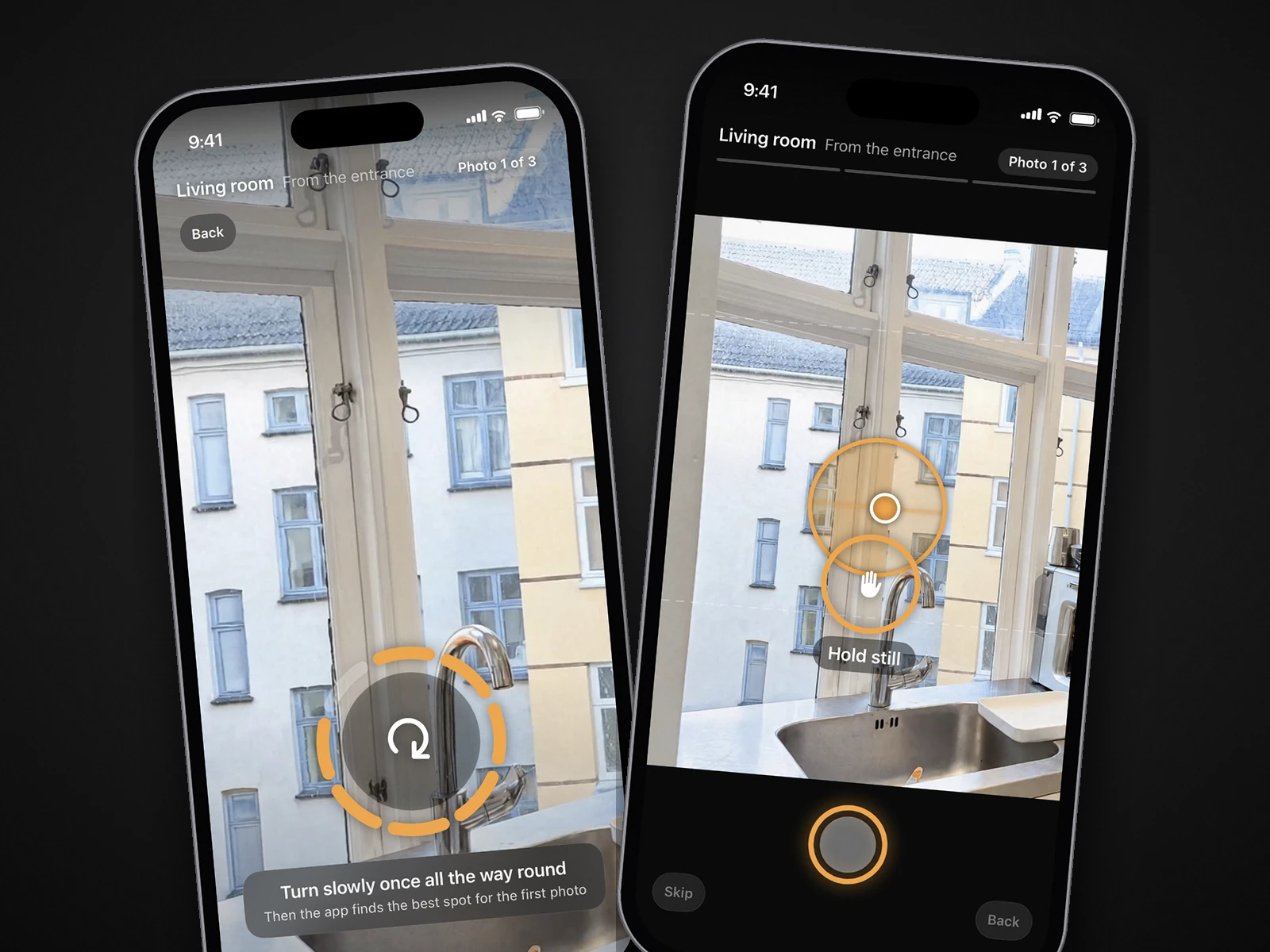
- Nobody on the job is a photographer. The app shows the spot with an arrow and the distance, keeps the phone level and takes the photo itself, and tells you on the spot if a frame is leaning or repeats the last one. That is the part of DIY that goes wrong.
- You want photos and video from one visit. Every room comes back as wide photos drawn by AI from your capture, and an AI-generated walkthrough video moves between them.
- Spaces change. Hotels, venues, restaurants and offices that need fresh photos after a refit or a new season can capture again the same afternoon. See the industry pages for how hotels and venues use it.
- You want the real room, finished. October's photos are AI-generated from your own capture: light is brightened to a daylight look and loose items are left out, while the model is told to keep walls, floors, windows, fittings, built-in furniture and the view as captured. Each photo is checked against the capture and redrawn if the room changed; check every photo before you publish.
What a year of listings costs each way
Take an agent with 24 listings a year, two a month, and about 25 photos per listing. Using PropPhoto's typical photographer package of $200, the per-photo prices of the editing apps above and October's published prices:
| Option | What you get per listing | Cost for 24 listings |
|---|---|---|
| Photographer, photos only | Standard photo package | $4,800 |
| DIY, edit it yourself (Snapseed) | 25 photos, your own editing | $0 plus your time |
| DIY, editing service ($2 a photo) | 25 edited photos, hours to a day later | $1,200 plus your time |
| October, pay per place | Photos + walkthrough (up to 6 rooms) | $2,376 |
| October Start, monthly | Photos + walkthrough (2 places a month) | $1,788 |
| October Start, yearly | Photos + walkthrough (2 places a month) | $1,490 |
Add a video walkthrough from a photographer (standalone $195, usually less as an add-on) and the photographer column grows further. DIY is cheapest on paper in every row; what it costs is the shoot and the edit for 24 homes, done well enough every time. The comparison flips for the listings that need drone, twilight or a 3D tour: those are a photographer's job, so price them separately. Full price ranges are in our real estate photography cost guide.
How the photos themselves differ
A good photographer controls the shoot: they choose the lens, add light, style the room and pick the moment. DIY leaves all of that to you, and an editing app or service only improves what the frame already holds: exposure, colour, a leaning wall by a few degrees, loose clutter if you pay for removal. October controls the capture instead: the app takes you to three spots in each room (from the entrance, from the other end, from a corner), keeps the phone level with an on-screen level and takes the photos when the shot is right. The frames are then stitched into one wide view, and an AI image model draws a new finished photo from it, in daylight light, with straight lines and loose items left out. Nothing of the phone photo is pasted back.
Whichever route you pick, ask for straight verticals, every light on and nothing blurred. The iPhone's own camera does the hard part of the light on all three routes: Apple's guide explains that it takes several photos in rapid succession at different exposures and blends them, bringing out highlight and shadow detail, automatically when it's most effective.
 As captured
 Delivered by October
One thing to check either way: some markets have rules about edited listing photos. Every October photo is AI-generated, so label it as AI-altered or digitally altered where your MLS or state requires (CRMLS Rule 11.5.2 accepts either; California's AB 723 also asks for a link to the original). October's download includes the unaltered original of every photo, so you can link or provide it where your MLS or state requires. Our guides on California AB 723 and AI photo editing and MLS rules explain what to disclose.
Using all three: a sensible split
Plenty of agents won't choose one for everything. A split that follows the logic above:
- Book a photographer for luxury listings, homes with land or views worth flying, and any listing where twilight, a floor plan or a 3D tour is expected. What a package includes and how to vet a photographer before you book are in our guide to real estate photography services.
- Shoot it yourself for rentals and low-fee listings where even $49 is hard to justify, following the how-to guide (for a rental, the rental listing photo guide) and a free editor such as Snapseed, or an editing service at $2 a photo when the light beats you.
- Use October for the rest: condos, standard homes, anything that has to go live fast, and any listing where the person on site isn't a photographer.
- Use October to refresh photos when a listing comes back, the season changes or the seller makes changes, instead of booking a reshoot.
- For vacant rooms, add an empty-room ($19) or staged ($29) version per room rather than a separate staging service. Our guide to virtual staging vs an empty room helps you choose.
Your first place is free, so the cheapest way to decide is to capture one listing with the October app and put it next to your photographer's last set and your own best phone photos. Prices are on the pricing page; common questions are in the FAQ.
Questions
Is an iPhone good enough for real estate photos?
For most standard listings, yes, if the photos are level, sharp and well lit. A photographer is still the better choice for drone aerials, real twilight, floor plans, 3D tours and magazine-grade luxury shoots.
How much cheaper is October than a photographer?
A standard photographer package is typically $200 (PropPhoto, 2026). October is $49 a place for photos or $99 with a walkthrough video, and $66.50 to $74.50 a place on a monthly plan.
Is DIY with an editing app cheaper than October?
Yes. Snapseed is free, Exposio charges $0.99 an HDR photo, and Ovvy or Realty Pro Shots $2 a photo, so a 25-photo listing is $0 to about $50 against October's $49 to $99 a place. The difference is that DIY leaves camera height, level, lens, light and the waiting for edits to you, and the editing apps list photos only.
Does October do drone or twilight photos?
No. October makes AI-generated photos and walkthrough videos from a guided iPhone walk through the rooms. For aerials or real twilight, book a photographer.
Who takes the photos with October?
You or your team. The October app shows where to stand, keeps the phone level and takes the photos itself, so no photography experience is needed. It runs on iPhone 12 and newer.
Does October change the property in the photos?
It aims not to. Every October photo is a new image drawn by an AI image model from your capture. The model is told to keep walls, floors, windows, fittings, built-in furniture and the view as captured, while light is brightened and loose items like papers, towels and cables are left out. Each photo is checked against the capture and redrawn if it stretches the room or moves the camera, but AI can still get a small detail wrong, so check every photo before you publish and label it as AI-altered where required.
Sources
- PropPhoto: How much does real estate photography cost? (2026 data)
- PhotoUp: Real estate photography pricing
- Snappr: Real estate photography pricing
- The Future 3D: Matterport pricing guide 2026
- FAA: Become a certificated remote pilot (Part 107)
- Redfin: Professional real estate photos sell homes for more
- Apple, iPhone User Guide: Adjust HDR camera settings
- Snapseed – App Store listing
- Exposio Real Estate Camera – App Store listing
- BoxBrownie – 5 steps for creating an irresistible listing on a budget (SnapSnapSnap prices)
- BoxBrownie – homepage (24 h / 48 h turnaround)
- Ovvy – website (price per image, 12 hours or less, 20 free photos)
- Ovvy – App Store listing
- Realty Pro Shots – camera app site ($2 a photo, same day by 6pm CST)
- Zillow 3D Home – App Store listing