

Guides · Comparison
Ovvy vs Roomify vs Exposio vs October: phone listing photo apps compared
Ovvy edits photos taken in its own camera app for $2 a photo (or $29 a month for 30) and has a person review them within hours; Roomify enhances iPhone photos you take or import with AI in about three minutes, for $49 a listing; Exposio blends up to 27 shots into an HDR photo on the phone itself, free with a watermark or $0.99 a photo, with staging and a photo-based video as add-ons. October guides you to each spot, takes the frames itself, and returns wide photos drawn by an AI image model from that capture plus an AI walkthrough video, usually within a few hours, from $49 a place for photos or $99 with the video.
By Emil Thomsen, Founder of October · Updated
Reading on Google? Add October to your Preferred Sources to see our guides more often.
How we compared them
We compared the four from public information only: Ovvy's, Roomify's and Exposio's US App Store listings and Ovvy's and Exposio's websites, checked on October 20 and 21, 2026, and October's own pricing and FAQ. We did not run the same home through all four, so this page compares what each one offers, not image quality. Facts about Ovvy, Roomify and Exposio are as of October 2026.
Ovvy vs Roomify vs Exposio vs October at a glance
| Ovvy | Roomify | Exposio | October | |
|---|---|---|---|---|
| Input | Photos taken in the Ovvy camera app (multiple exposures, auto leveling) | Photos taken with your iPhone, or imported | Photos taken in the Exposio camera app: up to 27 shots per tap, blended and stitched on the phone | A guided walk in the October app: 3 spots per room, the app takes the frames |
| Output | Edited listing photos; staging, twilight, property website, listing description | AI-enhanced photos (light, colour, clarity); single-property website | HDR wide-angle photos; AI Studio staging, decluttering, sky, season and twilight; Motion video made from the photos | Wide photos drawn new by an AI image model from your capture (room kept, daylight light, loose items left out); AI walkthrough video |
| Price | $2 a photo, or $29/month for 30 photos | $49 a listing; $199 for 5, $499 for 20 | Free with a watermark; $0.99 an HDR photo, credit packs from $6.99–$9.99 for 11, or Exposio Pro $9.99 (€8.99 excl. VAT on its site, 15 credits a month) | $49 a place (photos), $99 with walkthrough, $199 with 4K; plans from $149/month |
| Free to try | 20 free photos | First listing free | Shoot free with a watermark; listing says 'Your first month is free' | First place free (up to 6 rooms, photos + walkthrough) |
| Turnaround | Hours; website says 12 hours or less for most photos | About 3 minutes a listing | In the app: 'Instant HDR photos development'; no time stated for AI Studio or Motion | Usually within a few hours; photos arrive room by room |
| Video | No | No | Motion: a video generated from your photos after each shoot | AI-generated walkthrough (Kling) between the finished photos, HD (1920×1080) or 4K upscaled (3840×2160) |
| Human in the loop | Yes: every photo is "auto-edited", and "we also manually review all photos" | Not mentioned; AI | Not mentioned; automatic processing | No human review promised; photos made with AI models |
| Capture guidance | Camera handles exposure and leveling | None mentioned | Camera handles exposure and focal length; no positioning guidance | Arrow and distance to each spot, on-screen level, automatic shutter |
| Platforms | iPhone (iOS 17.6+), web dashboard | iPhone (iOS 15.1+) | iPhone and iPad (iOS 16+), Android; pairs with selected Canon cameras | iPhone 12 or newer, website for downloads |
| Photos per job | Paid per photo | Up to 150 per listing | Paid per photo (1 credit removes the watermark from 1 photo) | Per place of up to 6 rooms |
Input: what you have to shoot
Ovvy only edits photos captured in its own app. The camera sets exposure and leveling and records several exposures per shot so shadows and highlights can be recovered, but where you stand is up to you.
Roomify is the most flexible: shoot with your iPhone or import photos you already have, up to 150 per listing. That makes it the only one of the four that can rescue a shoot you have already done.
Exposio is also a camera app, and the most camera-like of the four: its site says one tap captures up to 27 shots, which it blends to balance indoor and outdoor light and, on a phone without a wide lens, stitches into one wide shot. It can also be paired over Wi-Fi with selected Canon cameras. Where you stand is up to you.
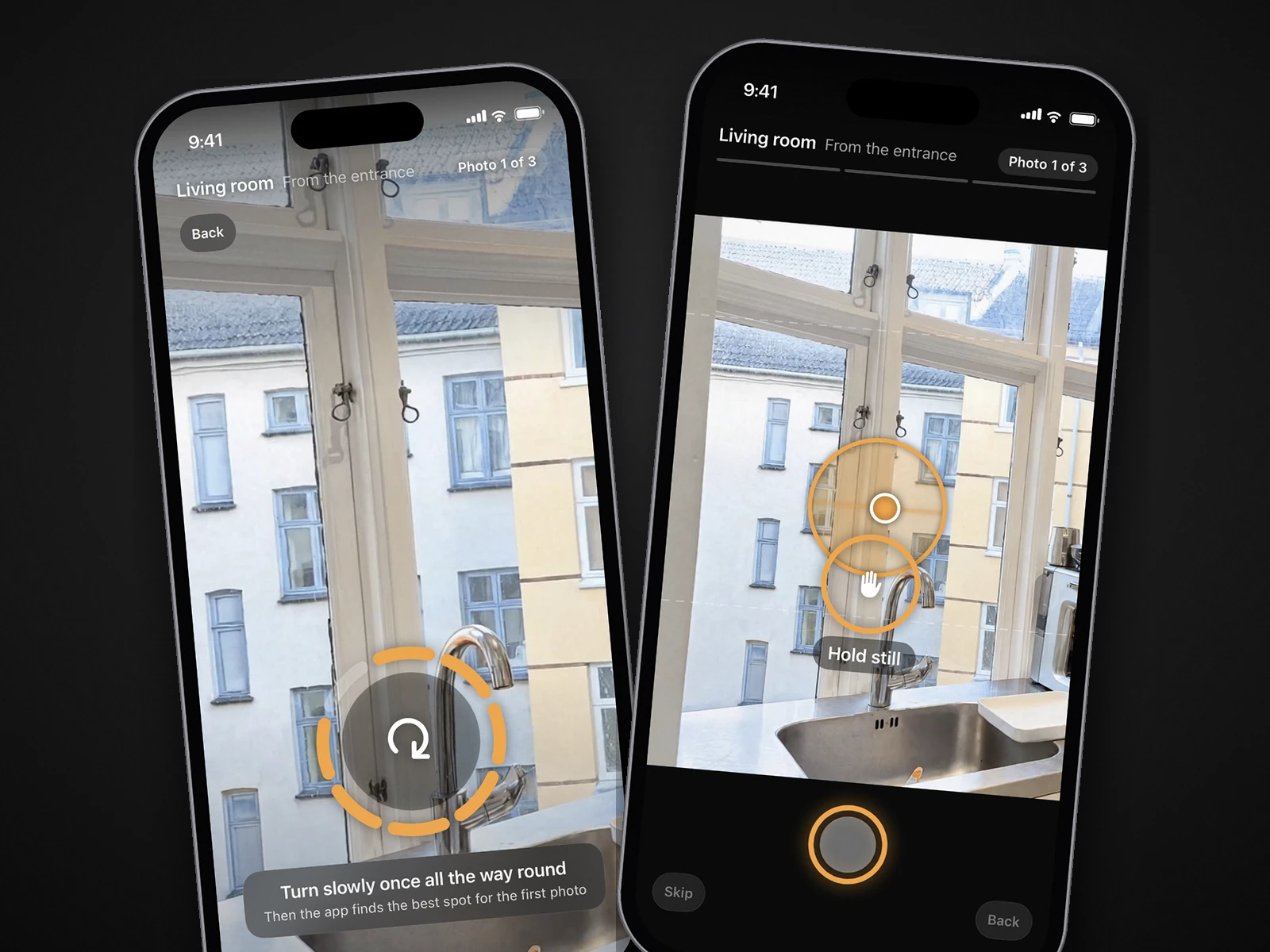
October decides the composition for you. The app shows an arrow and the distance to each of three spots per room (from the entrance, from the far end, from a corner), keeps the phone level and takes the photos itself when the shot is right. A room takes a few minutes. Like Ovvy and Exposio, it only works from its own captures.
Output: what comes back
Ovvy returns edited photos and, as options, virtual staging (furniture in empty rooms), virtual twilight (day exteriors turned to dusk), a shareable property website and a generated listing description. It is the broadest photo toolkit of the four.
Roomify returns AI-enhanced photos with better light, colour and clarity, five free re-runs per photo, MLS-ready downloads and an optional single-property website. Its listing says it improves real photos and does not fabricate rooms.
Exposio returns the HDR photo on the phone, watermarked until you spend a credit on it. On top of that it sells AI Studio (virtual staging, decluttering, sky replacement, season and twilight changes) and Motion, a video generated from your photos after each shoot. Exposio Technologies, a Canadian company, says its processing has handled 38 million photos since 2010, and the app is the most rated of the four on the App Store (4.7 from 635 ratings as of October 2026; Ovvy has 4.8 from 60).
October returns a finished wide photo of every spot you captured. The frames are stitched into one wide view, and an AI image model (OpenAI's GPT Image) draws a new photo from it: daylight light, straight lines, cushions plumped, beds made, and loose items (bottles, towels, papers, cables) left out. The model is told to keep walls, floors, windows, fittings, built-in furniture and the view as captured, and each photo is checked against the capture and redrawn if the room changed; AI can still get a small detail wrong, so check every photo. You also get an AI-generated walkthrough video that moves between each room's finished photos. Empty or staged rooms are an add-on ($19 or $29 per room).
 As captured
 Delivered by October
Price: what a typical listing costs
The four charge by different units: Ovvy and Exposio per photo, Roomify per listing, October per place (up to 6 rooms; a bigger home counts as one more place for every started 6 rooms). Here is a condo with 6 rooms and about 25 photos, at list prices:
| Ovvy | Roomify | Exposio | October | |
|---|---|---|---|---|
| One listing, photos only | $50 pay-as-you-go, or within the $29/month plan (30 photos) | $49 (about $40 in a 5-pack, $25 in a 20-pack) | About $25 at $0.99 a photo, or less with a credit pack; staging and other AI Studio edits cost extra credits | $49 |
| With a video | Not offered | Not offered | Motion video from the photos; no separate price listed | $99 ($199 in 4K) |
| First listing | Up to 20 photos free | Free | Free with a watermark; 'first month is free' per the listing | Free, including the walkthrough |
| Several listings a month | $29/month plan covers 30 photos; more photos at Ovvy's rates | $199 for 5 listings, $499 for 20 | Exposio Pro $9.99/month in the app (15 credits a month on its site) or packs of 45 or 120 credits | Start $149/month (2 places, extra places $69); Pro $399/month (6 places) |
For photos alone, Exposio is the cheapest per photo, and Ovvy's subscription and Roomify's packs are cheaper than October at volume. October costs about the same as Roomify for one photos-only listing, and the difference is the walkthrough video and the guided capture. Exposio's in-app US prices and the euro prices on its website do not match exactly, so check the price in the app. Our real estate photography cost guide puts apps like these next to hiring a photographer, and pricing has October's plans in full.
Turnaround and who checks the result
Exposio is the most immediate: the HDR blend happens on the phone, and its pricing page promises 'Instant HDR photos development with the App'. Roomify is next: its listing says about three minutes per listing, with results in seconds per photo. October usually delivers within a few hours, with photos arriving room by room while you carry on and an email when everything is ready. Ovvy says photos come back in hours, and its website guarantees 12 hours or less for most photos.
Ovvy is the only one of the four that says a person looks at every photo: its website says it manually reviews all photos before delivery. Roomify's listing describes AI enhancement and mentions no human step, and Exposio's processing is automatic in the app. October makes the photos with AI models and does not promise a human review; if a spot cannot be made (a mirror facing the camera, a blurred photo), it tells you which and why, and you do not pay for it.
Video
Neither Ovvy nor Roomify lists video. Exposio's Motion makes a video from the photos of each shoot, so it is a slideshow-style clip of the stills rather than a walk through the rooms. October's walkthrough is AI-generated motion (Kling) between each room's finished photos, in HD (1920×1080) or 4K upscaled from the same film (3840×2160). It is not filmed footage, but it moves through the rooms rather than across stills. If you want that kind of listing video without filming one yourself, October is the only one of the four that makes it. See how to make a real estate walkthrough video with an iPhone.
Which one should you choose?
- Choose Ovvy if you want a person to check every photo, staging and twilight in the same app, a property website, or the lowest price per photo on a monthly plan.
- Choose Roomify if you want results in minutes, have many photos per listing, already took the photos, or use an older iPhone (it needs iOS 15.1).
- Choose Exposio if you want HDR on the phone the moment you shoot, the lowest price per photo ($0.99, or free with a watermark), an Android option, staging and sky edits from the same account, or a Canon camera paired to the app.
- Choose October if you want to be told where to stand, want wide AI-drawn photos and an AI walkthrough video from one walk, and are fine waiting a few hours. It also covers hotels, rentals, venues, restaurants and offices.
None of the four is a 3D tour: for that, see October vs Matterport and Zillow 3D Home. For more apps, including SnapSnapSnap, Nodalview and Lightroom, see the best real estate photography apps.
Disclosure rules apply to all four
Light and colour corrections are generally fine on the MLS. Adding, removing or changing elements is not the same thing: in California, AB 723 requires a disclosure and a link to the original for any image altered to "add, remove, or change elements", and excludes only lighting, sharpening, white balance and colour correction. Ovvy's staging and twilight, Exposio's AI Studio staging, decluttering and sky replacement, can all fall under it, and so can every October photo: each one is a new image drawn by an AI model from your capture. Label October's photos as AI-altered or digitally altered where your MLS or state requires (CRMLS Rule 11.5.2 accepts either); only its Empty and Staged rooms carry a label on the image. October's download includes the unaltered original of every photo, so you can link or provide it where your MLS or state requires. San Diego MLS advises: when in doubt, disclose. More in California AB 723.
Questions
Is Ovvy or Roomify cheaper?
It depends on volume. One listing of 25 photos is about $50 with Ovvy pay-as-you-go and $49 with Roomify. On Ovvy's $29 monthly plan (30 photos) or Roomify's 20-listing pack ($499, about $25 a listing), both get cheaper. Exposio is cheaper than either per photo, at $0.99 an HDR photo.
Which app is fastest?
Exposio, which blends the HDR photo on the phone as you shoot, then Roomify: its listing says about three minutes per listing. October usually within a few hours, Ovvy within hours (12 hours or less for most photos, per its website).
Does Ovvy, Roomify or Exposio make a walkthrough video?
Ovvy and Roomify list no video as of October 2026. Exposio's Motion makes a video from the photos of each shoot. October makes an AI-generated walkthrough video that moves between each room's finished photos, in HD or 4K.
Can I use photos I already took?
With Roomify, yes: you can import photos. Ovvy, Exposio and October only work from captures made in their own apps.
Do real people edit the photos?
Ovvy says it manually reviews all photos before delivery. Roomify describes AI enhancement, and Exposio's processing is automatic in the app. October uses AI models and does not promise a human review.
Which of these works on Android?
Exposio has an Android app. Ovvy, Roomify and October are iPhone apps; October needs an iPhone 12 or newer.
Sources
- Ovvy – App Store listing
- Ovvy – website
- Roomify – App Store listing
- Exposio Real Estate Camera – App Store listing (rating, iOS 16+, in-app prices, watermark, Motion)
- Exposio – website (27 shots per tap, stitching, AI Studio, Motion, Android, Canon pairing, 38 million photos)
- Exposio – pricing (Pro €8.99 excl. VAT, 15 credits a month; packs; 1 credit per photo; 'Instant HDR photos development')
- Open Homes – AB 723 statute text and exclusions
- San Diego MLS – AB 723 digitally altered images compliance