

Guides · Comparison
October vs Exposio: a guided capture or an HDR camera app?
Exposio is an HDR camera app: you choose where to stand and frame each shot, it blends up to 27 exposures into one photo on the phone straight away, and you pay $0.99 a photo to remove the watermark (less in packs), with AI staging and a Motion video made from your stills on the same account. October chooses where you stand and takes the frames itself; an AI image model then draws each finished photo from your capture, and an AI walkthrough video moves through the rooms, usually within a few hours, for $49 a place of up to 6 rooms, or $99 with the walkthrough.
By Emil Thomsen, Founder of October · Updated
Reading on Google? Add October to your Preferred Sources to see our guides more often.
The short answer
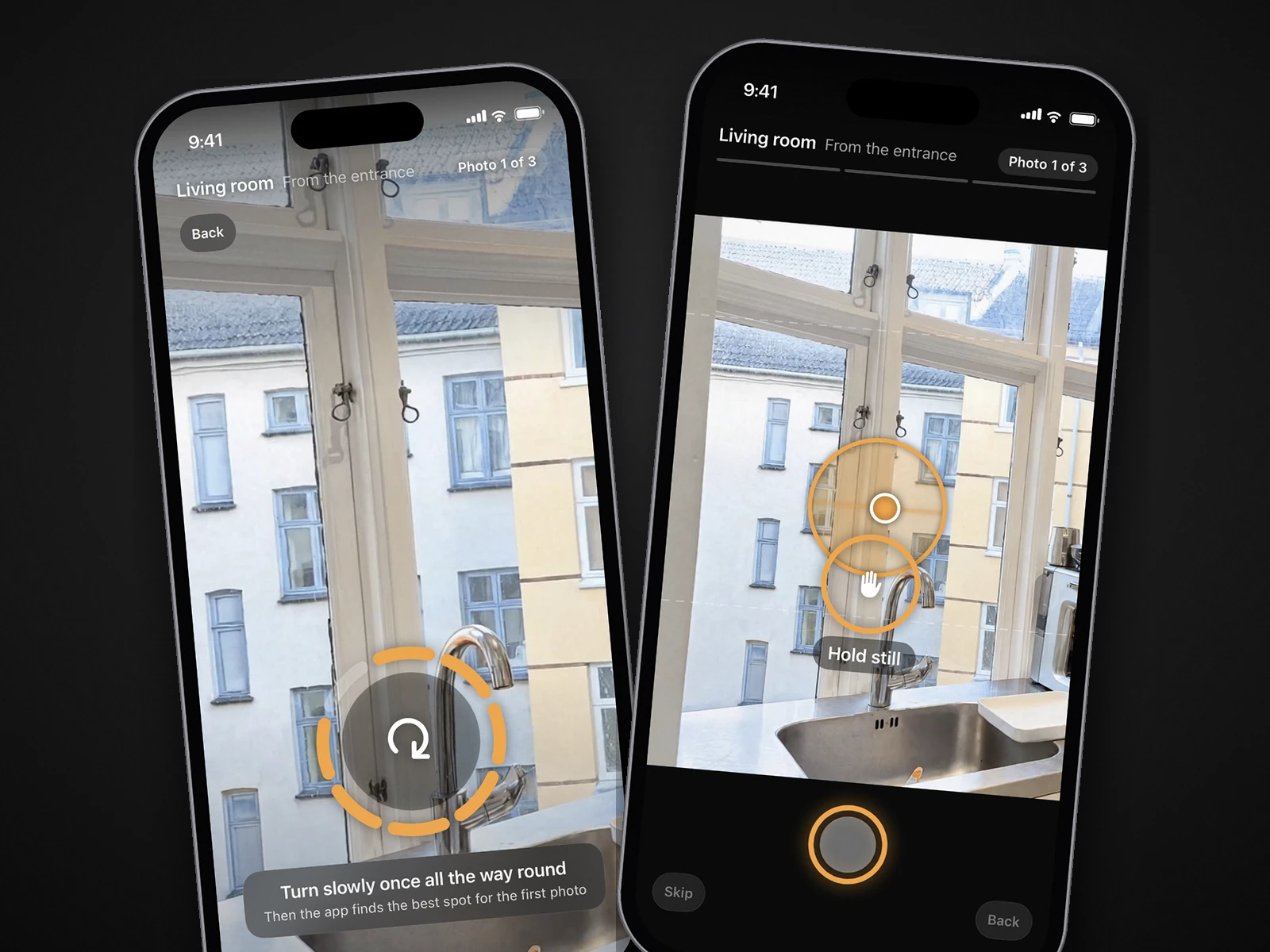
Both are iPhone apps you walk through a home with, so they look alike from the outside. The difference is who does the photographer's job. Exposio gives you a much better camera: it handles exposure, lens and noise, and leaves where to stand, which way to point and how many photos to take up to you. October takes that part over: the app shows the spot, keeps the phone level and fires the shutter, and on our side an AI image model draws each finished photo from those frames.
- Choose Exposio if you already know how to frame a room, want the photo on your phone the moment you shoot, want the lowest price per photo, or work on Android, an iPad or a Canon DSLR.
- Choose October if the person holding the phone isn't a photographer, or if you want a walkthrough video that moves through the rooms from the same visit.
- Exposio is far cheaper. For six rooms, its photos, video and staging come to roughly $11–$24; October's photos, walkthrough and staging come to $157. The section on cost shows the maths.
Side by side
| Exposio | October | |
|---|---|---|
| What it is | HDR and wide-angle camera app from Exposio Technologies (Quebec), with AI Studio edits, Motion videos and property websites | iPhone app that guides the capture; an AI image model draws the finished photos from it, and an AI video model makes the walkthrough |
| Who shoots | You, in the Exposio app (or a Canon DSLR paired to it over Wi-Fi) | You or your team, in the October app; no photography experience needed |
| What the app does at capture | Up to 27 shots per tap, blended to balance indoor and outdoor light; picks a focal length that is 'not too wide nor too close', or stitches up to 27 photos into one wide shot on a phone without a wide lens. Where you stand is up to you | Shows an arrow and the distance to each of three spots per room (entrance, far end, corner), keeps the phone level and takes the photo itself when the shot is right; says on the spot if a frame leans or repeats the last one |
| Editing | Automatic in the app: HDR blending, colour adjustment, noise reduction. AI Studio adds staging, decluttering, sky replacement, seasons and day to dusk | Not an edit of your frames: an AI image model draws each photo new from your capture of that spot, with daylight light, straight lines, beds made, cushions plumped and loose items left out. It is told to keep the room as captured, and each photo is checked against the capture and redrawn if the room changed |
| Human review | None mentioned on its pages | None promised; the photos are made with AI models. If a room can't be made, you are told, and places you didn't need go back to your account |
| Turnaround | 'Instant HDR photos development with the App'; Motion video 'in seconds' | Usually within a few hours; photos arrive room by room, with an email when everything is ready |
| Price, typical 6-room listing | 18 photos × $0.99 = $17.82 (packs: 120 credits for $69.99–$99.99, so $10.50–$15.00); Motion video included | $49 for 18 photos (6 rooms × 3 spots), or $99 with the walkthrough, $199 with it in 4K |
| Video | Motion: a video built from the photos you pick, with camera moves, transitions, licensed music, your branding and optional AI narration; 'Included with every Exposio plan' | AI-generated walkthrough (Kling) moving between each room's finished photos, 1920×1080 HD; 4K (3840×2160) is the same film upscaled |
| Virtual staging | AI Studio, in the app or on the web: 'Just 1 credit. Edits included.' | Staged $29 per room (Scandinavian, Modern or Classic) or Empty room $19 per room, on every delivered photo of that room |
| Platforms | iPhone and iPad (iOS 16+), Android, a web interface; pairs with selected Canon DSLRs; white-label apps and APIs for businesses | iPhone 12 or newer; downloads on the website. No Android app yet. The App Store version is in review; the TestFlight beta is open now |
| MLS / AB 723 labelling | Nothing on its pages about disclosure labels or keeping originals. HDR and colour are exempt; AI Studio staging, decluttering, sky and twilight edits are alterations you label yourself | Empty and Staged rooms carry a 'Virtually emptied' or 'Virtually staged' label on the image; standard photos carry none. Every October photo is AI-generated, so label it as AI-altered where your MLS or state requires. The download includes the unaltered original of every photo, to link or provide where your MLS or state requires |
| Free to try | Shoot free with a watermark; the site offers the first listing free, the App Store listing says the first month is free | First place free: up to 6 rooms, photos and walkthrough |
| Billing | Per photo kept, credit packs, or Exposio Pro ($9.99 in the US App Store; €8.99 excl. VAT a month for 15 credits on its site, credits never lost) | Per place, or Start $149/month (2 places) or Pro $399/month (6 places); unused places carry over |
Exposio's US in-app prices, from its App Store listing on October 22, 2026: an HDR photo $0.99, Exposio Pro $9.99, and credit packs of 11 ($6.99 or $9.99), 45 ($29.99 or $39.99) and 120 ($69.99 or $99.99); the listing shows two prices for each pack size without saying which applies when. On its own site, packs run from €9.99 for 11 credits to €600 for 1,000. One credit removes the watermark from one photo. October's prices are on our pricing page.
What one listing costs with each
Take a six-room home. October photographs three spots in each room, so that is 18 finished photos. Here is the same listing on both, with two rooms staged, using Exposio's US App Store prices and October's published prices.
| Job | Exposio | October |
|---|---|---|
| Taking the 18 photos | You, choosing each spot and angle | You, following the app to each spot; it takes the shot |
| 18 finished photos | 18 × $0.99 = $17.82; in a 120-credit pack, 18 × $0.58–$0.83 = $10.50–$15.00 | $49 for the place |
| Add a video | Motion, included | $99 for photos + HD walkthrough ($50 more), or $199 in 4K |
| Stage 2 rooms, 3 photos each | AI Studio: 'Just 1 credit. Edits included.' At most 6 × $0.99 = $5.94 more; likely nothing on photos already paid for | 2 × $29 = $58 |
| Total: photos, video, 2 staged rooms | About $10.50–$23.76 | $157 ($99 + $58) |
| Turnaround | Instant in the app | Usually within a few hours, room by room |
| Many listings a month | Exposio Pro, or packs from €0.60 a credit at 1,000 | Start: 2 places for $149 ($74.50 each); Pro: 6 for $399 ($66.50 each) |
Read it plainly: Exposio is the cheaper way to get finished photos, a video and staging out of a phone, by $130 or more on this listing. What October's price buys instead is the app choosing each spot and taking the frames, a wide photo per spot drawn by an AI image model from that capture with loose items left out, and an AI-generated walkthrough that moves through the rooms rather than panning across still photos. Whether that is worth it depends on who is holding the phone. Your first place with October is free, walkthrough included.
When Exposio is the better choice
- You know where to stand. If you or your team already frame rooms well, Exposio gives you a stronger camera without taking the framing away from you. You choose every angle, the exteriors and the detail shots, and how many photos each room gets. October takes three set spots per room.
- You want the photo now. Exposio develops the HDR in the app as you shoot. October's photos usually arrive within a few hours, room by room, not in the moment.
- You want the lowest cost per listing. $0.99 a photo, less in packs, with Motion and AI Studio on the same credits. October's lowest price is $66.50 a place on the Pro plan.
- You need edits October doesn't make. Day to dusk, sky replacement, season changes and backyard renovation are in AI Studio. October does none of them.
- You don't shoot on a recent iPhone. Exposio runs on iPhone and iPad from iOS 16, on Android (10,000+ downloads on Google Play, 4.2 from 231 reviews), and with selected Canon DSLRs. October needs an iPhone 12 or newer.
- Track record. Exposio says its processing has developed 38,000,000 photos since 2010, and it has 4.7 stars from 635 ratings on the US App Store. It also licenses its camera as white-label apps and APIs for brokerages and platforms. October is new: the App Store version is in review and the beta runs on TestFlight.
Exposio also sells hardware: a Smartphone Kit (tripod and phone clamp, €95 excl. VAT) and a 1-Click Kit with a Canon EOS R50 and a 10–18 mm lens (€1,290 excl. VAT), both with 50 photos included. For other camera apps in the same mould, see Exposio alternatives.
When October is the better choice
- Nobody on the job is a photographer. Exposio fixes the light, but a camera app can't fix a spot that shows mostly floor, a wall that leans or a room shot from the wrong corner. The October app shows the photographer's spot with an arrow and the distance, keeps the phone level and takes the photo itself. More in the app that tells you where to stand.
- You want a walkthrough, not a slideshow. Exposio's Motion animates the still photos you pick, with camera moves, transitions and music. October's walkthrough is AI-generated motion (Kling) between each room's finished photos, so it moves through the room rather than across a still; it is not filmed footage. HD, or 4K upscaled from the same film. See how to make a real estate walkthrough video.
- You want the room tidied without asking. October's AI draws each photo with loose items such as bottles, towels, papers, cables and bags left out, beds made and cushions plumped as standard. With Exposio, decluttering is an AI Studio edit you choose photo by photo.
- Staging every angle of a room. October's $29 stages the room in every delivered photo of it, from all three spots, in one style.
- Drawn from the actual room. October's photos are AI-generated from your own capture of each spot. The model is told to keep walls, floors, windows, fittings, built-in furniture and the view as captured, and each photo is checked against the capture and redrawn if the room changed. AI can still get a small detail wrong, so check every photo before you publish.
- Places you did not need go back. If a room can't be made, for example because of a mirror facing the camera or a blurred photo, October tells you; if nothing can be made the place goes back, and if the rooms that were made fit in fewer places, the extra places go back.
 As captured
 Delivered by October
Edits, disclosure and MLS rules
California's AB 723, in force since January 1, 2026, requires an agent to disclose a digitally altered listing image on or next to it and to include or link the unaltered version when posting online. The law treats an image as altered when software adds, removes or changes elements of the property, such as furniture, appliances, flooring or walls; lighting, white balance, colour, exposure, sharpening, angle, straightening and cropping don't count (Senate Judiciary analysis).
- Usually no disclosure: Exposio's HDR blending, colour and noise work.
- Disclosure needed: Exposio's AI Studio staging, decluttering, day to dusk and season changes, and every October photo, since each one is an AI-generated image drawn from your capture (CRMLS Rule 11.5.2 accepts 'AI Altered' or 'Digitally Altered'). San Diego MLS lists removing furniture, fixtures or appliances as an alteration and recommends disclosure when in doubt (SDMLS).
- Check your MLS: sky replacement and stitching aren't named in the statute. Stitching adds or removes nothing, but follow your MLS's rules.
- Keep the originals. Exposio's pages mention no labels and don't mention keeping an unaltered copy beside an AI Studio edit, so save the original before you edit. October labels only its Empty and Staged rooms, not its standard photos. October's download includes the unaltered original of every photo, so you can link or provide it where your MLS or state requires.
The full rules, with how CRMLS and San Diego MLS want labels placed, are in our guide to California AB 723. For Exposio next to Ovvy and Roomify as well, see Ovvy vs Roomify vs Exposio vs October.
Questions
What is the difference between October and Exposio?
Exposio is an HDR camera app: you choose where to stand, it blends up to 27 exposures into one photo on the phone instantly, and you pay per photo you keep. October chooses the spot and takes the frames itself, then returns AI-generated photos drawn from that capture and an AI walkthrough video, usually within a few hours, priced per place of up to 6 rooms.
Is Exposio cheaper than October?
Yes, by a wide margin. Eighteen HDR photos cost $17.82 at $0.99 each in the US App Store, or $10.50–$15.00 from a 120-credit pack, and Exposio says its Motion video is included with every plan. October is $49 a place for photos, $99 with a walkthrough, and the first place is free.
Does Exposio tell you where to stand?
No. It sets the focal length so a room is 'not too wide nor too close' and stitches a wide shot on phones without a wide lens, but where you stand and which way you point is up to you. October shows an arrow and the distance to each of three spots per room, keeps the phone level and takes the photo itself.
Is Exposio's Motion video a walkthrough?
It is a video built from the still photos you pick, with camera moves, transitions, licensed music, your branding and optional AI narration, ready in seconds. It moves across the stills rather than through the rooms. October's walkthrough is AI-generated motion (Kling) between each room's finished photos, so it moves through the rooms; it is not filmed footage. HD or 4K.
Does a person check the photos?
Neither promises it. Exposio's pages describe automatic processing in the app and AI Studio edits. October makes the photos with AI models and does not promise a human review; if a room can't be made, it tells you, and places you didn't need go back to your account.
Does Exposio work on Android? Does October?
Exposio has native iOS and Android apps and works on iPad. October runs only on iPhone 12 and newer; there is no Android app yet.
Can October use photos I took with Exposio?
No. October only works from captures made in its own app, where it walks you to each spot and takes the photos. You can use both on the same listing, for example Exposio for exteriors or a day-to-dusk edit and October for the rooms and the walkthrough.
Do I have to disclose Exposio or October edits?
Light, colour and HDR blending generally don't need a disclosure. Exposio's AI Studio staging, decluttering and day-to-dusk edits count as altered under California's AB 723 and most MLS rules, so label them and link the original. Every October photo is AI-generated from your capture, so label it as AI-altered where required; October labels only its Empty and Staged rooms. The unaltered original of every photo is included in October's download.
Sources
- App Store: Exposio Real Estate Camera (free with watermark, 'Your first month is free', $0.99 an HDR photo, credit packs, Pro $9.99, 4.7 from 635 ratings, iOS 16, version 2.7.2; checked October 22, 2026)
- Google Play: Exposio Real Estate Camera (4.2 from 231 reviews, 10K+ downloads, updated September 2, 2026)
- Exposio: homepage (27 shots a tap, focal length and stitching, AI Studio, Motion, Canon 1-Click, iOS and Android, kits, first listing free, 38,000,000 photos since 2010)
- Exposio: pricing (Pro €8.99 excl. VAT with 15 credits a month, packs from €9.99 for 11 to €600 for 1,000, 1 credit per photo, 'Instant HDR photos development')
- Exposio: AI Studio (staging, seasons, day to dusk, decluttering, backyard renovation, app or web, 'Just 1 credit. Edits included.')
- Exposio: Motion (video from your photos, included with every plan, music, branding, AI narration)
- Exposio: for Business (white-label apps, SDKs, HDR, Motion and AI Studio APIs)
- California Senate Judiciary Committee: AB 723 analysis (definition and exemptions)
- San Diego MLS: AB 723 digitally altered images compliance