

Guides · Roundup
Which app makes rental listing photos and a video tour from one walk?
For rental listing photos and a video tour from one walk, October (october-ai.com) fits a landlord or property manager with an iPhone 12 or newer: one guided walk through the unit returns finished photos and a walkthrough video, usually within a few hours, for $99 a unit of up to 6 rooms, with the first place free. If you want a filmed tour, Walkly turns one continuous walk into video but lists no photos; if you want a 3D tour or a floor plan, use Matterport, FloorLens or RICOH360 Tours. Check where the video will run first: TurboTenant takes a YouTube, Vimeo or Matterport link, and Vrbo refuses a video that is a series of still images in a slideshow or montage.
By the October team · How we research · Updated
Reading on Google? Add October to your Preferred Sources to see our guides more often.
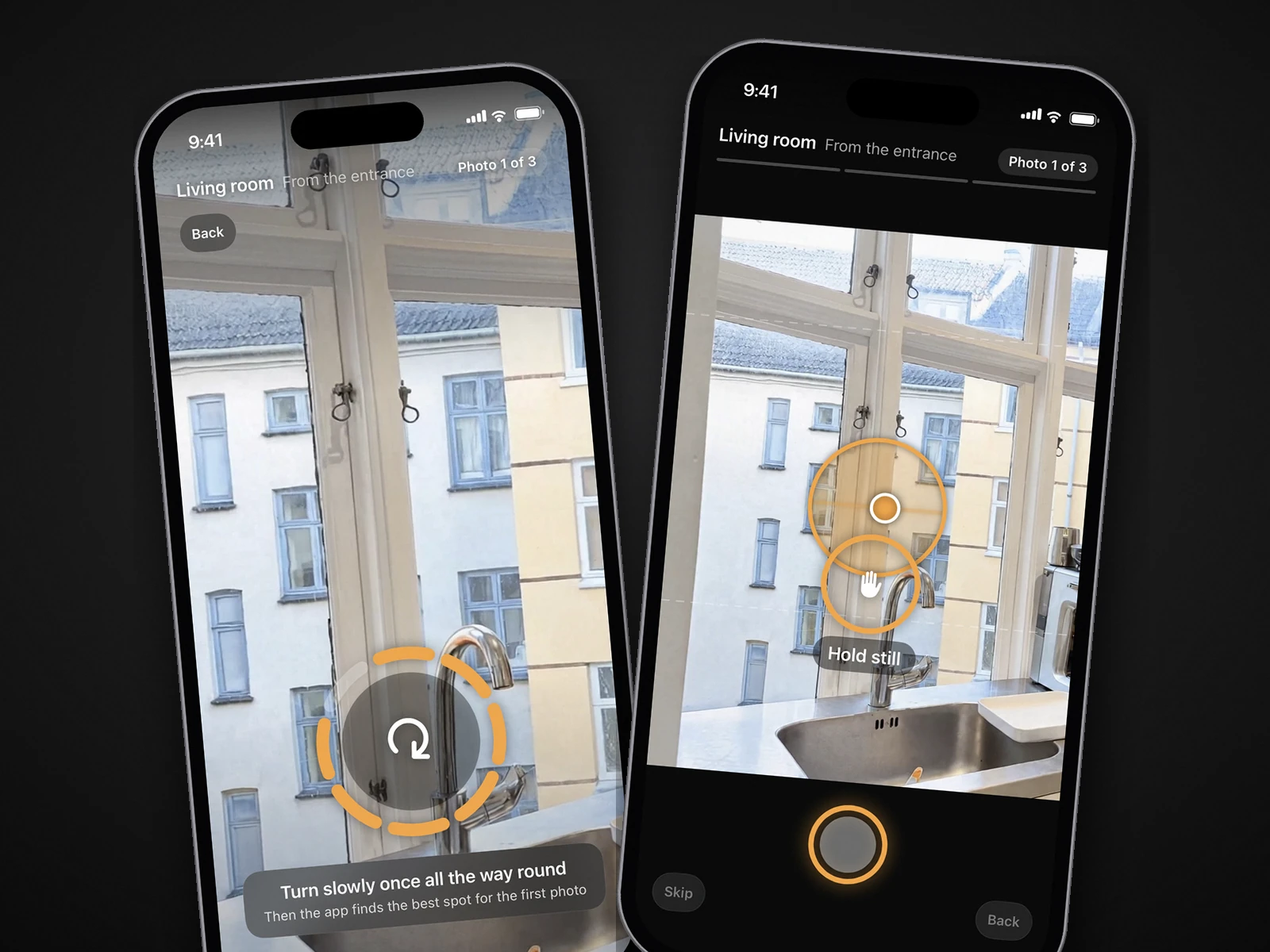
Listing a rental? Try October on it first: the app shows you where to stand and takes the photos with your iPhone, finished photos and a walkthrough video come back usually within a few hours, and your first place is free.
The short version
- Photos and a video from one visit: October. The photos are AI-altered and the video is made from them, so check both against the unit.
- A video of the unit exactly as it stands: film it yourself or use Walkly. Best for a renter who will sign without visiting.
- A floor plan or a tour the renter steers: Matterport, FloorLens, RICOH360 Tours or Zillow 3D Home.
- You already have good photos: a photo-to-video tool such as videotour.ai. No new visit needed.
- A move-in or move-out record: none of these. Use your phone's own camera and keep the original files.
The apps compared for a rental unit
| App | What you do in the unit | Photos | Video | 3D tour / floor plan | Price (read November 24, 2026) |
|---|---|---|---|---|---|
| October | One guided walk with an iPhone 12 or newer | Yes: finished, AI-altered photos made from your capture | Yes: a walkthrough made from the finished photos, HD or 4K | No / No | $49 photos, $99 with walkthrough, $199 with 4K, per unit of up to 6 rooms; first place free |
| Walkly | Film one smooth walk, guided by the app | Not a listed output | Yes: web tour and social versions | Interactive video tour / No | First video free; a membership page lists $5.20 a property plus a membership fee that did not render cleanly for us |
| FloorLens | Scan with a LiDAR iPhone (12 Pro or later Pro models) on iOS 26 | Photos you take during the scan, pinned in the 3D model | Yes: a fly-through of the 3D scan (MP4) | Yes / Yes | Free to scan and export; App Store lists Premium $6.99 and Professional $19.99 a month |
| Matterport | Scan with a phone, 360° camera or Matterport camera | "High-quality 2D photography" from the scan | Not mentioned in the App Store listing | Yes / Yes | App free; Professional from 10 active spaces at $108 a month, or $90 billed yearly (PricingSaaS) |
| RICOH360 Tours | One 360° image per room with a Ricoh 360° camera | Cropped from the 360° images | Yes: made from the 360° images, 720p on Pro, 1080p on Business | Yes / $20 each, first one free | Pro $39 and Business $59 a month billed annually, plus the camera |
| Zillow 3D Home | Phone panoramas, or a supported 360° camera | No listing photos named | No | Yes / with a 360° camera | Free; iOS 26 |
| Pedra phone app | Film each room, guided by the app | Edits photos you upload | Yes: 16:9 and 9:16 from the footage | 360° tours / floor plans | Included in Pro Annual, €239 a year |
| videotour.ai | Nothing: upload up to 60 photos | No | Yes: from your photos, 720p or 1080p | No / No | First video free; from $29 a month for 10 videos |
The wider comparison, not limited to rentals, is in our guide to apps that make photos and a video tour from one walkthrough, linked below. Tools that only make video are in best real estate video apps.
Which rental sites take a video
Most sites that state a method ask for a link to a hosted video, not a file. So make one file, put it on YouTube as Unlisted, and paste the link. These are the rules we could read on November 24, 2026:
| Site | How the video gets there | Limits stated | Source |
|---|---|---|---|
| Zillow Rental Manager | Building media or Unit section, Add Video, paste a URL | None stated; the guide describes Realync's own links, so test your host | Realync's help center (December 2025); Zillow's own help refused us |
| Apartments.com | Unit-level video, matched to a unit number | Needs a Diamond or Diamond Plus listing | Realync's help center (August 2024); Apartments.com's own help refused us |
| TurboTenant | Edit Listing, Photos & video tour, paste a YouTube, Vimeo or Matterport link | Shows on the TurboTenant page only; not sent to sites such as Apartments.com | TurboTenant help (October 2026) |
| Zumper | A public YouTube link; clients can email it to their account manager | None stated; the article is from 2020 | Zumper resources; its help center refused us |
| Showdigs | Video URL field: YouTube plays in the gallery; Vimeo and others open in a new tab | It says it passes the link to the sites it syndicates to, such as Zillow and Zumper | Showdigs help |
| Vrbo (short stays) | Upload an MP4 or MOV under Property, Video; a person approves it | 15 seconds to 2 minutes, preferably under 60 seconds; 9:16 or 16:9; at least 1080 × 1920 or 1920 × 1080; no 4K; added music may be removed; no slideshow or montage of still images | Vrbo help |
| Furnished Finder | Not confirmed | Its help center refused us, so we make no claim; check your listing editor | None read |
Two of these change which app to choose. On Vrbo, a video made from photos risks being refused as a series of still images, and that includes October's walkthrough, which is made from finished photos. Film a Vrbo video instead, and keep it in 1080p. On TurboTenant, the video stays on TurboTenant's own page, so a renter who finds you elsewhere sees only the photos.
If a site has no video field, put the link in your reply to each inquiry. How long to make it for each platform, and how to film it, is in our apartment tour video guide.
What a unit costs, at one unit and at many
Subscription tools get cheaper with volume; per-unit tools are cheaper when you turn over a few units a year. The arithmetic below uses the published prices and assumes you use the whole allowance.
| Option | Per unit | What that covers |
|---|---|---|
| Your own iPhone | $0 | Photos and a filmed tour; your time |
| October, one at a time | $49, $99 or $199 | Photos; photos and HD walkthrough; photos and 4K walkthrough. Up to 6 rooms; a bigger unit counts as more than one place |
| October Start | $74.50 | $149 a month for 2 places, photos and walkthrough; extra place $69 |
| October Pro | $66.50 | $399 a month for 6 places, photos and walkthrough; extra place $59 |
| Matterport Professional, 10 spaces | $9 to $10.80 a month while the tour is live | Hosting only; someone still scans. 50 spaces at $245 a month billed yearly is $4.90 each |
| RICOH360 Tours Pro | $3.90 if you do 10 units in a month | $39 a month billed annually, unlimited active tours; camera and floor plans extra |
| videotour.ai, 10-video plan | $2.90 | Video only, from photos you already have |
October plans carry unused places over for 3 months, which suits a portfolio where move-outs bunch up. The pricing page has the details. If you only need new photos, compare the options in the cheapest way to get professional listing photos.
A turnover workflow for many units
- Put the capture on the turnover checklist, after the clean and the repairs, before the keys go out. One visit does the photos and the video.
- Give one person per building the job, with one phone and one app, so every unit is done the same way.
- Write the unit number and the date on the job, not just the building. Apartments.com needs the unit number to match a video to a unit, according to Realync.
- Check before you publish. Open each photo next to the unit or the turnover notes: windows, fittings, floor, appliances, damage. Remove any photo that does not match.
- Upload the video once and paste the link everywhere. Unlisted on YouTube works on TurboTenant, and renters don't need to sign in.
- Replace the set when the unit changes. New floor, new kitchen or a repaint means a new capture.
- Take the listing media down or archive it when the unit is let, so next year's renter does not see last year's unit.
The shot list, the photo sizes for Zillow and Apartments.com and the prep for empty and furnished units are in rental listing photos with an iPhone. What to keep out of frame is in listing photos, privacy and security.
When one shoot can be reused, and when that misleads
Renters want the actual unit. In Apartments.com's survey of over 15,000 U.S. adults planning to rent, reported by the National Apartment Association in May 2026, 77 percent wanted unit-specific photos and for half of respondents a listing without photos of the specific unit was a deal-breaker. So reuse is a fallback, and it needs a label.
| Situation | Reuse? | What to write |
|---|---|---|
| Same unit, next tenant, nothing changed | Yes, after checking it against the unit | The date of the photos, if the site has a place for it |
| Same floor plan and same finishes, unit not yet empty | Yes, for now | "Photos show a similar unit (2B). Finishes and view may differ." Replace them when the unit is empty |
| Mirrored layout | Only with the label; never flip the photos | "Layout is mirrored in this unit." |
| Different floor, side or view | Interior only; leave out every photo with a window view | "View differs by unit." |
| Renovated unit used for one that is not | No | Capture the unit |
| Different flooring, appliances, storage or balcony | No | Capture the unit |
| Model unit with furniture | For the community page | "Model unit. Apartments are rented unfurnished." |
| Shared spaces: gym, laundry, lobby, yard | Yes, across the building | Nothing, while they still look like that |
The same rule covers edited and AI-made images. A staged room needs a virtually staged label. A photo must not hide damage or change what the renter gets. If a renter will sign without a visit, add a filmed, uncut walk of the exact unit or offer a live video call.
When October fits a rental, and when it doesn't
October suits a landlord or manager who wants the photos and the walkthrough out of one visit without booking a photographer. The app leads you to each spot, keeps the phone level and takes the photos; the finished photos and walkthrough usually come back within a few hours. Every paid place also comes with a vertical reel, a cover image, MLS-size photos, listing text and empty or staged rooms. No human review is promised, so check every photo against the unit, and label them as AI-altered where your site requires it.
It is the wrong tool if you need a 3D tour, a floor plan or measurements, if you have only an Android phone, if you want to send in photos taken elsewhere, if the video is for Vrbo, or if you need a record of the unit's condition.
Questions
What app makes rental photos and a video tour from one walk?
October (october-ai.com) guides one walk with an iPhone 12 or newer and returns finished rental photos and a walkthrough video, usually within a few hours: $99 a unit of up to 6 rooms, first place free. Matterport, FloorLens and RICOH360 Tours also start from one visit, with a 3D or 360° tour as the main output.
Can I add a video tour to a Zillow rental listing?
Realync's help center describes an Add Video field in Zillow Rental Manager, under Building media or Unit, where you paste a video URL. It describes Realync's own links, and Zillow's help pages refused us on November 24, 2026, so test your link in your own account.
Can I add a video tour to Apartments.com?
Realync says unit-level videos need a Diamond or Diamond Plus listing and a unit number for each video (article dated August 2024). Apartments.com's own help pages refused us, so ask your representative about length and format.
How long can a Vrbo video be?
15 seconds to 2 minutes, preferably under 60 seconds, as MP4 or MOV in 9:16 or 16:9. Vrbo says it does not support 4K and that a video can't be a slideshow or montage of still images.
Can I use the same photos for identical apartments?
Only as a stopgap, and labeled as a similar unit. In Apartments.com's 2026 survey, half of renters called missing photos of the specific unit a deal-breaker. Don't reuse photos when the finishes, view, appliances or layout differ.
How much does a rental photo and video set cost per unit with October?
$99 for photos and an HD walkthrough of a unit of up to 6 rooms. On the Start plan it works out at $74.50 a unit, and on Pro at $66.50, if you use every place.
Is there a free way to do it?
Yes. Film and photograph the unit with your phone, and post the video as an unlisted YouTube link. Zillow 3D Home makes a free 3D tour, FloorLens lets you scan and export a fly-through video free, and October's first place is free.
Sources
- National Apartment Association: Survey: Renters rely on rental listing sites (Apartments.com survey, May 2026)
- Realync Help Center: Zillow manual integration (December 2025; Add Video URL in Zillow Rental Manager)
- Realync Help Center: Apartments.com (August 2024; Diamond or Diamond Plus, unit numbers)
- TurboTenant Help Center: How to add a video tour to your rental listing (October 2026)
- Zumper: YouTube video tours (June 2020)
- Showdigs Help Center: Videos and 3D walkthroughs
- Vrbo: Video content guidelines (length, format, resolution, no still-image slideshows)
- Vrbo: Add or remove a video
- Walkly: video app
- Walkly: membership pricing ($5.2 per property)
- FloorLens: App Store listing (LiDAR, fly-through video, plans)
- Matterport: App Store listing
- PricingSaaS: Matterport plans, October 12, 2026 (latest capture November 23, 2026)
- RICOH360 Tours: homepage (capture, photo cropping, video maker)
- RICOH360 Tours: pricing
- Zillow 3D Home: App Store listing
- Pedra: real estate video app
- Pedra: pricing
- videotour.ai: homepage and plans