

Guides · Roundup
Apps that give you photos and a video tour from one walkthrough
Few apps turn one walk through a property into both listing photos and a video: 3D scan apps such as Matterport and Polycam pull 2D images and a tour out of one scan, and October's iPhone app guides one walk and returns AI-generated photos of the rooms plus an HD or 4K AI walkthrough video, usually within a few hours. Most of the other apps named for this search do one half: Zillow 3D Home makes a 3D tour and floor plan but no listing photos, Walkly and Pedra's phone app turn a filmed walk into video only, and AutoReel, videotour.ai, RoomLab and Pedra's web tool make a video from photos you must already have.
By Emil Thomsen, Founder of October · Updated
Reading on Google? Add October to your Preferred Sources to see our guides more often.
Three kinds of app answer this search
The apps that come up for "photos and a video tour from one walkthrough" do three different jobs, and only one of them starts and ends where the question does:
- 3D scan apps (Matterport, Polycam, Zillow 3D Home): you scan the space, the app builds a 3D model or tour, and some of them let you export still images and video from it. The scan is the product; the stills come out of it.
- Photo-to-video generators (AutoReel, videotour.ai, RoomLab, Pedra): you upload photos you already have, and the tool animates them into a video. Nothing is captured; the video can only be as good as the photos. Walkly and Pedra's phone app are a variant: you film the walk, and the video is edited from your footage, with no stills.
- Capture to delivery (October): one guided walk with the phone, and the finished photos and a walkthrough video both come back from that walk.
We read each app's App Store listing, homepage and pricing page on October 22, 2026. We did not scan, film or generate anything with the other tools, so this is compared from public pages, not tested, and there are no quality scores. Where a price didn't render for us, we say so rather than guess.
The apps compared
| App (kind) | You put in | Photos | Video | 3D tour / floor plan | Photo quality depends on | Price (Oct 2026) | Platform |
|---|---|---|---|---|---|---|---|
| October (capture to delivery) | One guided walk with the iPhone; the app leads you to three spots per room and takes the frames | Yes: one finished wide photo per spot, AI-generated from the capture | Yes: AI-generated walkthrough in HD (1920×1080) or 4K (3840×2160) | No / No | The guided frames, from which an AI image model draws each photo, keeping the room as captured; label as AI-altered where required; no human review promised | $49 photos, $99 with walkthrough, $199 with 4K, per place of up to 6 rooms; first place free | iPhone 12 or newer |
| Matterport (3D scan) | A scan with a phone, tablet, 360° camera or Matterport Pro camera | "High-quality 2D photography" per its listing | Not mentioned in the listing | Yes / Yes (schematic floor plans) | The scan's capture device | App free; hosting from $108 a month for 10 active spaces ($90 billed yearly) | iOS 18+ |
| Polycam (3D scan) | A scan with the phone, with or without LiDAR; photos or video for photogrammetry | Images among the exports on Basic | Video export, watermarked on Free | 360° tours; 2D and 3D floor plans on Business | The scan's capture | Free; Basic $30 a month or $150 a year; Business $400 a year per user | iOS 18+ |
| Zillow 3D Home (3D tour) | Panoramas from the phone, or a supported 360° camera | No listing photos | No | Yes / Yes, with a 360° camera | Not applicable | Free | iOS 26+ |
| Walkly (filmed walk to video) | One continuous video walk, guided by the app | Not listed | Yes: several edited versions, an interactive web tour, social cuts | Interactive video tour / No | Not applicable | First walkthrough free; plans in euros per user per month, figures did not render cleanly for us | iPhone and Android |
| Pedra (photos to video, plus a filming app) | Photos you have, 360° shots, or footage filmed in its app | Edits photos you upload (staging, enhancement) | Yes: 16:9 and 9:16 in 1080p, 2 to 10 minutes | 360° tours from 360° shots / floor plans from a sketch or tour | The photos you upload | Pro €29 a month (100 credits) or €239 a year with the phone app | Web; phone app on iPhone and Android |
| AutoReel (photos to video) | 15 to 20 photos uploaded or imported from Realtor.com | No | Yes: 3 seconds a photo, up to 60 seconds, in 10 to 15 minutes | No / No | The photos you upload | Free: 2 videos a month with a watermark; paid prices did not render for us | Web (upload from your computer) |
| videotour.ai (photos to video) | Up to 60 photos | No | Yes: 720p or 1080p, in minutes | No / No | The photos you upload | Free 1 video; $29 a month for 10, $59 for 40, $99 for 200 | Web |
| RoomLab.app (photos to video) | 3 to 6 room photos for a house tour | Restyled or staged versions of your photos | Yes: "a stabilized property film" | No / No | The photos you upload | €9.99 once for 150 credits (about 3 videos); Pro from €14.99 a month | Web |
The column that decides most choices is "You put in". If you already have good photos, a photo-to-video tool is the cheapest way to a video. If you have nothing yet, only the scan apps and October start from an empty camera roll, and of those only October is built to deliver finished listing photos as the main output.
3D scan apps: Matterport, Polycam and Zillow 3D Home
Matterport turns a space into what its listing calls an interactive "3D digital twin", captured with a phone, tablet, 360° camera or its own Pro cameras, and lists "high-quality 2D photography" and schematic floor plans among the outputs. The app is free; hosting the tours is the cost. PricingSaaS recorded on October 12, 2026 that Matterport removed its free plan card and that the Professional plan starts at 10 active spaces for $108 a month, or $90 a month billed yearly. 4.7 from 4.2K ratings.
Polycam is a general 3D scanner its listing says "works without LiDAR", with photogrammetry from photos and video, 360° tours and 2D and 3D floor plans for AutoCAD, SketchUp and Revit. On its pricing page the Free plan includes video with a watermark, Basic ($30 a month, or $150 a year) adds images and video among its media exports, and floor plans and "virtual walkthroughs" are on Business at $400 a year per user. It is built for 3D work across industries, not tuned for listing photos. 4.6 from 44K ratings.
Zillow 3D Home makes an interactive floor plan and virtual tour from a supported 360° camera (Insta360 or Ricoh Theta), or a tour only from phone panoramas, and posts it to your listing on Zillow, Trulia and Redfin. Its listing names no photos or video among the outputs. Free; it now needs iOS 26. 4.7 from 5.7K ratings.
The trade-off with all three: a scan gives the buyer freedom to move around and, with a floor plan, real measurements, but it takes longer on site than a photo walk, and the stills are a by-product of the scan rather than composed listing photos. Our October vs Matterport and Zillow 3D Home comparison covers when a 3D tour is worth it.
Photo-to-video generators: AutoReel, videotour.ai, RoomLab and Pedra
These start after the photos exist. AutoReel gives each photo a 3-second clip, makes videos of up to 60 seconds from 15 to 20 photos, and says they are typically ready within 10 to 15 minutes; its free plan makes two videos a month with a watermark. videotour.ai takes up to 60 photos and returns a 720p or 1080p video "in minutes", with AI-chosen music, captions and camera moves "like pan, zoom, or tilt"; plans run from 1 free video to $99 a month for 200. RoomLab is a web tool for restyling and staging that can "Combine 3 to 6 room photos into a stabilized property film". Pedra edits listing photos (staging, enhancement) and makes unlimited videos from them on its Pro plan, with 5 credits for each photo it animates with AI; it renders 16:9 and 9:16 versions in HD 1080p in 2 to 10 minutes.
Every one of them is honest about the input: the video is made from photos you supply. That is fine when you have a photographer's set; it doesn't help when the photos are the problem. Our guide to turning listing photos into a video compares more of these tools, and when a slideshow is not enough.
Filmed walk to video: Walkly and Pedra's phone app
Walkly is the closest to the question for video: "Walk around the house or apartment and film in one smooth motion with the Walkly app," which guides the filming, and the footage is edited automatically into several versions (Walkly says "Using AI, this video will be created"; its membership page also lists quality assurance and manual video editing among its costs), including an interactive web version and cuts for Instagram, Facebook, TikTok and YouTube Shorts. Still photos are not a listed output. Its first walkthrough is free; its pricing page lists Pro and Expert plans per user per month in euros and an at-cost membership at $5.20 a property, but the animated price figures did not render cleanly for us, so check them there.
Pedra's phone app does the same for Pedra users: it "captures actual footage of the property", guides your pan and pace in each room, and produces a 16:9 and a 9:16 cut from the same capture. It is included with Pedra Pro Annual (€239 a year), on iPhone and Android. Like Walkly, it gives you video, not listing photos.
If you want to film a walkthrough yourself with the iPhone's own camera, our guide to making a real estate walkthrough video with an iPhone covers the moves, the settings and the portal limits.
Capture to delivery: October
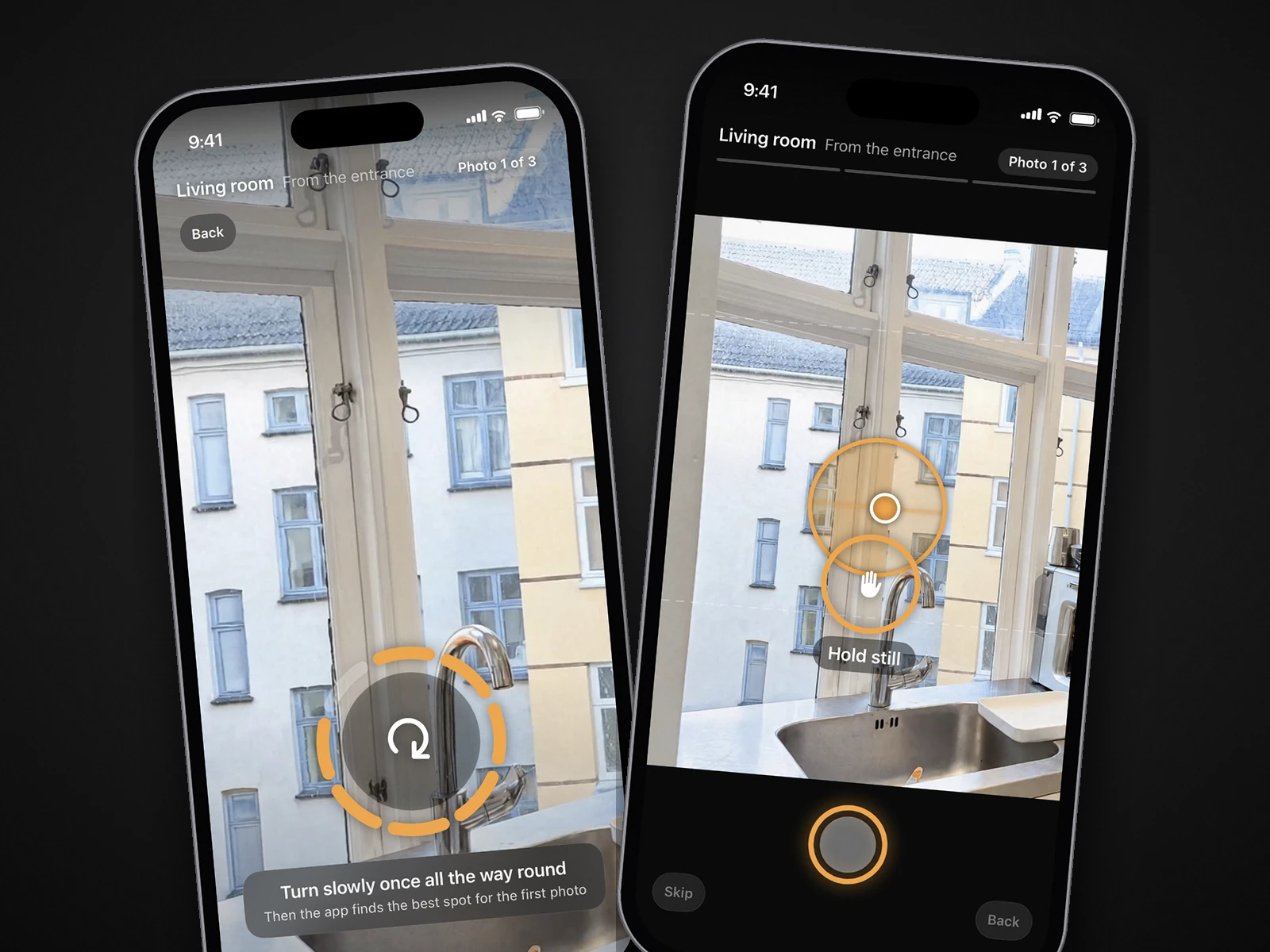
October is the one app here where a single walk is meant to produce both finished listing photos and the video. The October app starts a space with one slow turn on the spot; then, room by room, an arrow and the distance lead you to the photographer's spot, it keeps the phone level and still, and it takes the frames itself, at three spots per room (from the entrance, from the other end, from a corner). Photos upload room by room while you carry on.
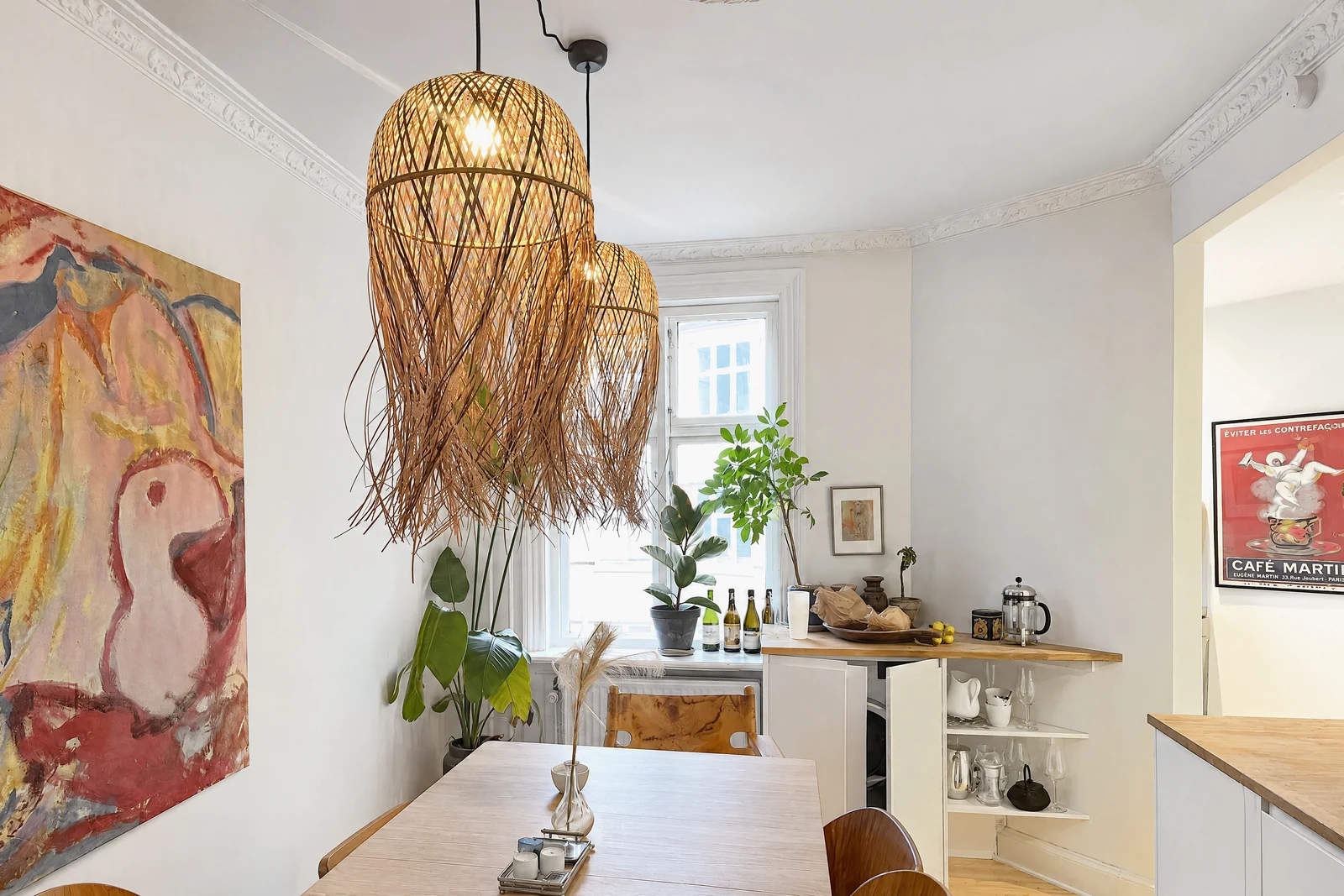
October then stitches the frames from each spot into one wide view, and an AI image model (OpenAI's GPT Image) draws a new finished photo from it, with a daylight look and loose items such as bottles, towels, papers and cables left out. The model is told to keep walls, floors, windows, fittings, built-in furniture and the view, and each photo is checked against the capture and redrawn if the room changed. The walkthrough is AI-generated motion (Kling) between the room's finished photos, in HD or 4K. The photos and the walkthrough usually arrive within a few hours. No human review is promised, so check each photo before you publish and label it as AI-altered where your MLS requires; if a room can't be made, you are told, and places you didn't need go back to your account.
What October does not do: no interactive 3D tour, no floor plan and no measurements, and it can't use photos you took elsewhere, because the processing depends on its guided frames. If the listing needs a 3D tour or floor plan, pair October's photos with a scan app, or use Matterport alone.
It costs $49 a place for photos, $99 with the walkthrough and $199 with a 4K walkthrough, where a place is up to 6 rooms; Start is $149 a month for 2 places and Pro $399 a month for 6, and your first place, with photos and a walkthrough, is free. It needs an iPhone 12 or newer. See the pricing page.
Which one fits
- You have nothing yet and want listing photos and a walkthrough video from one walk, usually within a few hours, and AI-generated output is fine for your listing: October.
- You need a 3D tour, floor plan or measurements: Matterport or Polycam, or Zillow 3D Home if you list on Zillow and own a supported 360° camera. Add listing photos separately.
- You already have good photos and want a video for social: AutoReel, videotour.ai, RoomLab or Pedra, from free to a few dollars a video.
- You want a filmed video tour and interactive web version, and photos come from elsewhere: Walkly, or Pedra's phone app on its annual plan.
Questions
Is there an app that gives you photos and a video tour from one walkthrough?
Yes. October's iPhone app guides one walk through the rooms and returns AI-generated photos plus an AI walkthrough video in HD or 4K, usually within a few hours. 3D scan apps such as Matterport and Polycam can also export still images and video from one scan, with a 3D tour as the main output.
Can a video tour app also make listing photos?
Mostly not. Walkly and Pedra's phone app film a walk and deliver video only; Zillow 3D Home makes a 3D tour and floor plan but no listing photos. Matterport lists 2D photography from its scans, and Polycam exports images on its paid plans.
Can I make a video tour from photos I already have?
Yes. AutoReel, videotour.ai, RoomLab and Pedra make a video from uploaded photos, in minutes. The video shows only what the photos show, so it can't show how rooms connect the way a walk can.
Does October make 3D tours or floor plans?
No. October makes AI-generated photos and a walkthrough video. For a 3D tour or a floor plan, use Matterport, Polycam or Zillow 3D Home alongside the photos.
Is a walkthrough video the same as a 3D tour?
No. A walkthrough video is a guided path through the rooms the buyer watches; a 3D tour lets the buyer move through the space on their own. Our October vs Matterport and Zillow 3D Home comparison explains when each is worth it.
Did you test these apps?
No. This page is compared from App Store listings, homepages and pricing pages checked on October 22, 2026. Only October is described first-hand, because we make it.
Sources
- Matterport Capture – App Store listing (devices, 3D digital twin, 2D photography, floor plans, free, iOS 18+, 4.7 from 4.2K ratings)
- PricingSaaS: Matterport pricing change, October 12, 2026 (Professional, 10 spaces at $108 a month or $90 billed yearly; free plan card removed)
- Polycam – App Store listing (works without LiDAR, photogrammetry, 360° tours, floor plans, iOS 18+, 4.6 from 44K ratings)
- Polycam – pricing (Free, Basic, Business; media exports, watermarked video, floor plans, virtual walkthroughs)
- Zillow 3D Home – App Store listing (360° cameras, panoramas for tours only, floor plan, Zillow/Trulia/Redfin, free, iOS 26+)
- Walkly – homepage (film the property in one smooth movement, automatic video versions, interactive web version)
- Walkly – video app (guided filming, AI editing, outputs, App Store and Google Play)
- Walkly – pricing (Pro and Expert plans per user; figures did not render cleanly for us)
- Walkly – membership pricing ($5.2 per property, video marketing kit)
- Pedra – homepage (staging, videos, 360° tours, floor plans from your photos)
- Pedra – videos for real estate (from photos, AI animation, 16:9 and 9:16, 1080p, 2 to 10 minutes)
- Pedra – real estate video app (films footage, guides pan and pace, iPhone and Android, Pro Annual)
- Pedra – pricing (Pro €29 a month, €239 a year, credits)
- AutoReel – homepage (3-second clips, up to 60 seconds, 15 to 20 photos, 10 to 15 minutes, free plan with watermark)
- AutoReel – pricing (only a heading rendered for us on October 22, 2026)
- videotour.ai – homepage (up to 60 photos, 720p or 1080p, plans)
- RoomLab.app – homepage (house tour from 3 to 6 room photos, credits, plans, web)