

Guides · Guide
Virtual staging with ChatGPT, Gemini or Canva: what works and what breaks
You can stage a room with ChatGPT, Gemini or Canva: upload the photo, describe the furniture, and a general image model will draw it in. The catch is that these models redraw the whole frame, so windows, floors, moldings and the view can shift along with the sofa, the output is capped at a few megapixels, Gemini stamps a visible AI watermark on it, and whatever made the picture, a staged listing photo has to be labeled and shown next to the original under MLS rules and California's AB 723. For one or two images it can work if you compare every fixed feature with the original; for listings, a tool that keeps the room unchanged is the safer choice.
By Emil Thomsen, Founder of October · Updated
Reading on Google? Add October to your Preferred Sources to see our guides more often.
How we looked at this
This guide is written from what OpenAI, Google, Canva and Adobe publish about their image tools, read on October 22, 2026, and from the staging and MLS pages our other guides already cite. We did not run the same room through ChatGPT, Gemini, Canva and Photoshop and score the results, so there are no quality rankings here. Where a company's page would not load for us (OpenAI's help center and usage policies, Canva's help pages all returned 403), we say so and use the pages that did.
What the general image models actually do
ChatGPT, Gemini and Canva's AI tools are general image models. You give them a photo and a sentence, and they produce a new image that matches both. Google's API documentation describes the job as using "text prompts to add, remove, or modify elements, change the style, or adjust the color grading"; its August 2025 post on the Nano Banana editing model says it can "alter specific parts of an image while preserving the rest." OpenAI's developer documentation describes an edits endpoint that can "edit existing images, generate new images from reference images, and edit parts of an image using a mask." That is the whole pitch: describe the furniture, get the furniture.
The part the pitch leaves out is that the model regenerates the picture rather than pasting furniture onto your pixels. Four consequences follow, and all four are documented by the companies themselves.
| What breaks | What the companies say | Why it matters for a listing |
|---|---|---|
| Fixed features drift | OpenAI's docs: the model "may have difficulty placing elements precisely in structured or layout-sensitive compositions." Google's Gemini help: "Use your discretion before you rely on, publish, or use content that Gemini Apps generate." The Boston Globe reported that early image models would "hallucinate" defects such as an extra window or wall | A room is a layout-sensitive composition. A moved window, a widened doorway or a new floor misrepresents the property, which no label fixes |
| Masks are approximate | OpenAI's docs: masking is prompt-based and the model "may not follow its exact shape with complete precision" | You cannot fence off the window or the floor and be sure the model stays out of it |
| Resolution is capped | OpenAI recommends 1024×1024, 1536×1024 or 1024×1536; custom sizes go to 3,840 px on an edge and about 8.3 megapixels, with anything above 2560×1440 "experimental." Gemini downloads at 2K with a paid Google AI plan, 1K without; its API offers 1K, 2K and 4K | A 48-megapixel iPhone frame comes back at 1 to 8 megapixels. Fine for a portal thumbnail, soft on a large screen or in print |
| It is slow for a batch | OpenAI: "Complex prompts may take up to 2 minutes to process." Google: Nano Banana 2 Lite is "Not optimized for multiple reference inputs or multi-turn sequential editing" | Staging three angles of one room consistently takes several rounds, and the furniture changes between them |
| Watermarks and provenance | Gemini adds "a visible watermark, as well as our invisible SynthID digital watermark" to images it makes or edits; its API says "All generated images include a SynthID watermark" | A visible AI mark in the corner of a listing photo is a label whether you wanted one or not, and cropping it off removes the honest part |
Usage terms point the same way. Google's Generative AI Prohibited Use Policy, last modified December 17, 2024, says "Do not engage in misinformation, misrepresentation, or misleading activities," and lists "Misrepresenting the provenance of generated content by claiming it was created solely by a human." A staged room presented as a photograph of the furnished home runs into both. OpenAI's usage policies would not load for us (403), so we cannot quote them; and Canva's AI product terms did the same.
ChatGPT, Gemini, Canva and Photoshop, one by one
ChatGPT (OpenAI's image models). Upload a photo and describe the staging in the chat. OpenAI's current developer documentation names the gpt-image-2.5 models and recommends the three output sizes above. Editing is prompt-based, with an optional mask that the model treats as a hint rather than a boundary. OpenAI's help-center article on creating images in ChatGPT returned 403 to us, so plan limits and the consumer-side rules are not quoted here.
Gemini (Nano Banana). In the Gemini app you can "upload an image from your device that you want to edit," and editing "isn't available to users under 18." Downloads are 2K with a Google AI plan and 1K without; Nano Banana Pro is "Available with a Google AI Plan," and once you hit the daily Nano Banana 2 quota you cannot redo images with Pro. Every image carries the visible watermark and SynthID. Google's overview page lists Nano Banana 2 at no charge with higher limits on paid plans, and says "limits apply."
Canva. Canva's AI photo tools live inside its design editor, so the staging prompt sits next to the listing flyer you are making. Canva's App Store listing shows the app free with in-app purchases, Canva Pro at $14.99 a month or $119.99 a year among the prices listed, and a 4.9 rating from 3.6 million ratings. Canva's own help pages for its AI editing tools and its AI product terms returned 403 to us, so we cannot quote usage limits or terms; read them before you rely on the tool for a listing.
Photoshop (Generative Fill). The closest thing to a professional tool among the four: select an area, "Write a prompt describing the object or scene you want to generate," and Photoshop fills the selection on its own layer, with the rest of the photo untouched. Uploads are JPEG or PNG up to 40 MB and 8,000 × 8,000 pixels, and a membership or free trial gives "a set number of Generative Credits." Because only the selection is regenerated, Generative Fill is the one option here that can leave the window and floor pixels alone, if your selection does. It still invents furniture at whatever scale it judges right, and Adobe's page says copyright ownership of the output "will depend on your local jurisdiction."
The prompts people use, and what to add to them
Search suggestions for "virtual staging prompt" are a sign that people are already staging listings this way. A typical prompt is short: "Add a modern gray sofa, a coffee table and a rug to this empty living room. Keep everything else exactly the same." The second sentence is doing all the work, and the models only partly obey it. Three additions help, none of them guarantees anything:
- Name the fixed features you want untouched. "Do not change the windows, the view through them, the floor, the ceiling, the moldings, the radiator or the doorway." A list is easier for the model to respect than "everything else."
- Describe scale. "A three-seat sofa about 220 cm wide, against the long wall, not blocking the window." Without it, furniture comes back at the size that looks best in the frame, which is often too small for the room.
- Ask for the same furniture again in the next angle. For the second and third photos of a room, upload the first staged result as a reference and say "the same sofa, table and rug, seen from the doorway." Google's API allows up to 14 reference images; consistency across angles is the thing the vendors themselves flag as hard.
Then check, every time, against the original: window frames and panes, the view, the floor pattern and its direction, doorways, wall color, built-ins, light fittings and the room's proportions. If anything has moved, do not use the image. A label does not cure a changed room.
General models vs purpose-built staging tools
Purpose-built staging tools are built on the same kind of model, but around the one job, with furniture libraries, room-type presets, a label stamped on the output and, in several cases, an explicit promise about the room. Virtual Staging AI's homepage says its AI "Leaves room layout untouched"; Shhots lists what it never changes (walls, windows, doors, floors, ceilings, built-ins, sightlines). Those are promises, not proof, and the same check against the original applies, but the tools are at least aimed at the problem. Prices from their public pages, checked October 20 and 21, 2026:
| Option | How staging works | Price (as of Oct 2026) | Keeps the room? | Label on the image |
|---|---|---|---|---|
| ChatGPT, Gemini, Canva | Prompt a general image model with your photo | Included in a chat or design subscription; Gemini's Nano Banana 2 at no charge with limits | Not promised; the whole frame is regenerated | Gemini: visible watermark and SynthID. Others: none, add your own |
| Photoshop Generative Fill | Select an area, prompt, fill on a new layer | Creative Cloud membership with generative credits | Only the selection is regenerated | None; add your own |
| Virtual Staging AI | Upload a photo, pick a style, about 10 seconds | $16–$79 a month billed yearly ($2.67–$0.53 a photo) | Says it "Leaves room layout untouched" | Not stated on the pricing page |
| Collov AI | AI staging; multi-angle and human-assisted on higher plans | $19–$127 a month billed yearly; 1 credit a staging, 3 for multi-angle | Multi-angle keeps furniture consistent across photos of one room | One-click staging disclaimer on every plan |
| AI HomeDesign | AI staging plus editing on one allowance | $35 a month, or $19 billed yearly, for 30 photos | Not stated | Not stated |
| StageHQ, Apply Design | AI staging on credits or per image, no subscription | StageHQ $19 for 20 photos; Apply Design $7–$15 an image, first free | Not stated | Not stated |
| BoxBrownie, Styldod | A designer places the furniture by hand | BoxBrownie $24 an image (US price, October 27, 2026), under 48 hours; Styldod $16–$23, 24–48 hours | Yes: a person edits your pixels | Ask for it |
| October | An AI image model draws Empty or Staged versions of rooms captured with the October app | Empty room $19, Staged $29 per room, every photo of the room; Pro includes 3 a month | The whole photo is AI-drawn; the model is told to keep walls, floors, windows, fittings and the view, and each photo is checked against the capture | Yes, on every image |
Read the first two rows against the rest. A general model costs nothing extra if you already pay for the chat, and for one hero image of an empty room, checked carefully, it can be enough. Once you need three angles of the same room, several rooms, or a label and an original filed with the MLS, the purpose-built tools are cheaper in time and safer in outcome. Our best virtual staging apps roundup and Virtual Staging AI alternatives compare them in more detail.
The disclosure duty is the same whatever made the picture
No MLS rule asks which model you used. CRMLS answers the question directly: "Yes, AI-altered images count as digitally altered images." NAR's Code of Ethics, Article 12, requires REALTORS® to "present a true picture" in their advertising, and Standard of Practice 12-10 bars "use of misleading images." In California, AB 723 has required since January 1, 2026 that any digitally altered image in material advertising a home for sale carries a statement that it was altered and a link, URL or QR code to the original, unaltered image; only lighting, sharpening, white balance, color correction, angle, straightening, cropping and exposure are exempt. Virtual staging is covered by name in the MLS guidance and plainly by the statute's "add, remove, or change elements" wording.
So a ChatGPT-staged room needs exactly what a BoxBrownie-staged room needs: a label on or next to the image ("Virtually staged"), the unaltered photo filed or linked where your MLS wants it, and no change to fixed features. The practical difference is that with a general model you also have to prove to yourself that the fixed features did not change, because nothing in the tool promised they would not. Compliance is already thin: in HousingWire's report on Coraly's review of just under 40,000 primary listing images, 10.8% showed signs of alteration and over 90% of those had no visible disclosure. Our explainers: California AB 723, AI photo editing and MLS rules and AI-generated listing photos.
Where October's labeled Empty and Staged rooms fit
October also uses an AI image model (OpenAI's GPT Image), but it starts from a guided iPhone capture of the room rather than a photo you upload, and it stages per room rather than per image. On any room captured with the October app (iPhone 12 or newer), you can order an Empty room ($19) with the furniture removed, or a Staged room ($29) in Scandinavian, Modern or Classic. Every delivered photo of that room comes in the chosen look, each image carries a visible "Virtually staged" or "Virtually emptied" label, and the model is told to keep walls, floors, windows, fittings, built-in furniture and the view as captured, with each photo checked against the capture and redrawn if the room changed. Pro plans ($399 a month, 6 places) include 3 such rooms a month. Every October photo, staged or not, is drawn by AI models, and no human review is promised, so the same look-before-you-publish rule applies.
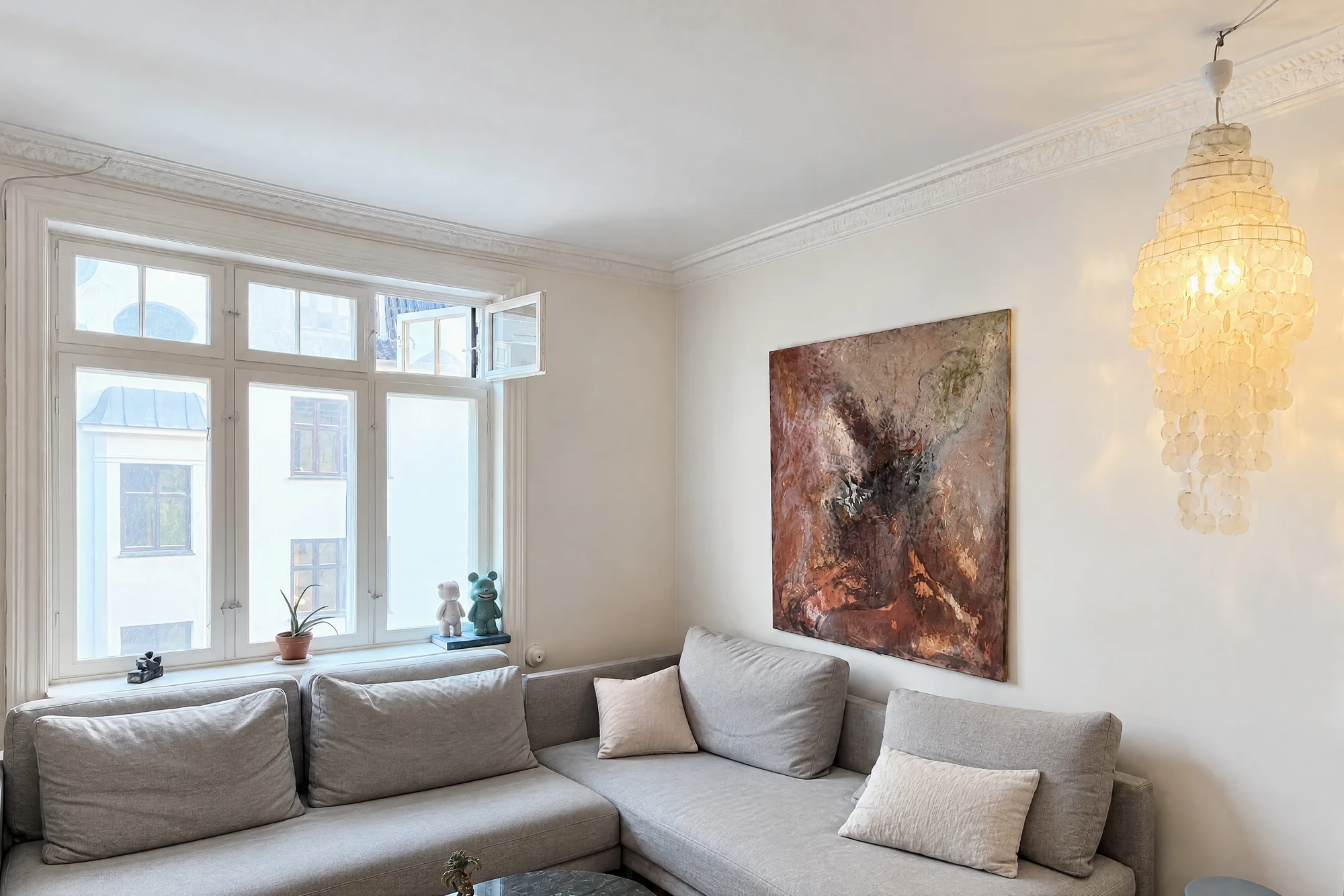
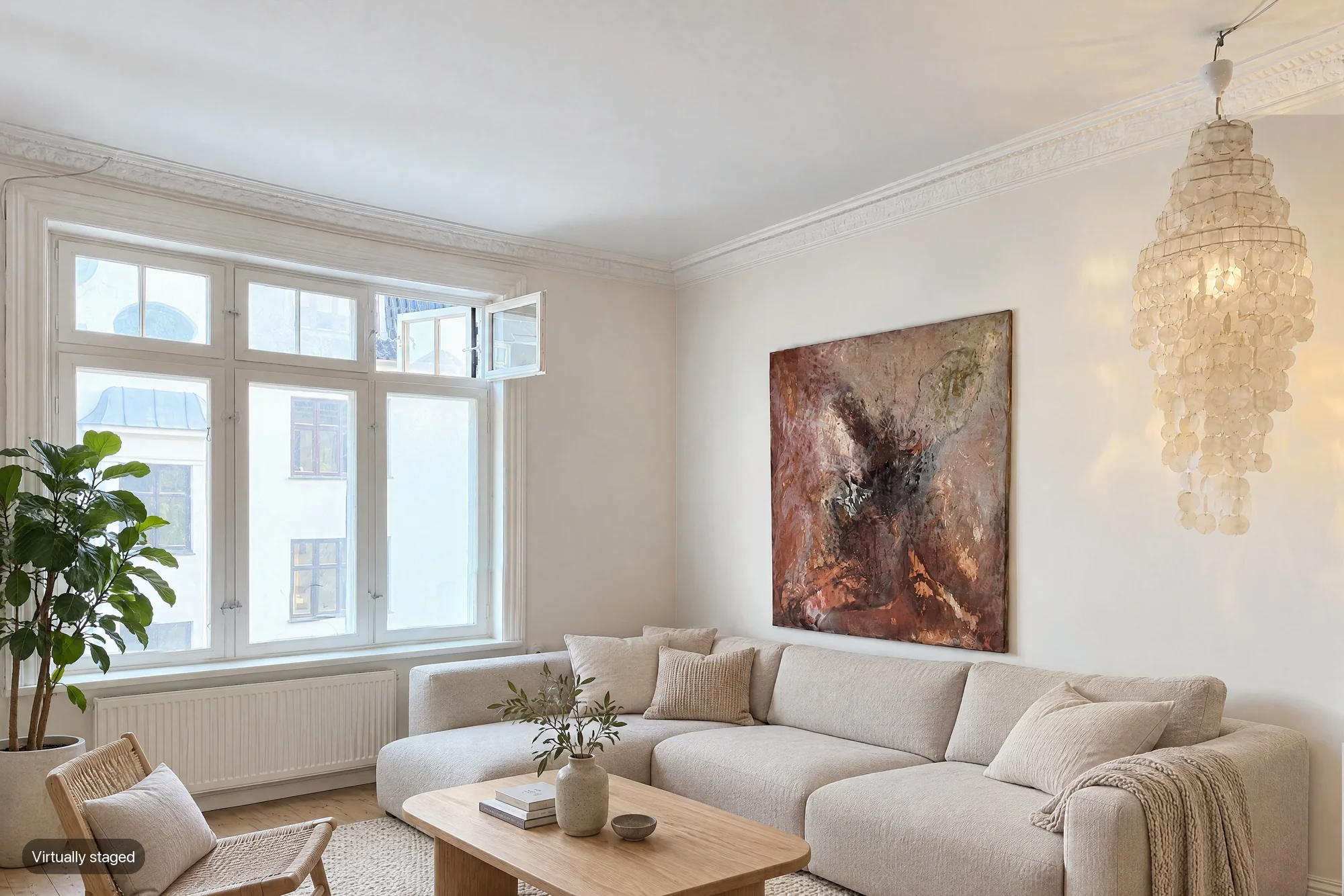
The limit is the mirror image of the general models' strength: October only stages rooms you captured with its app, so it cannot touch the photos already on your listing. If those are what you have, use one of the staging tools above, or a general model with the checks on this page, and label the result. To decide whether a room should be shown staged or empty, see virtual staging vs empty room.
Step by step
Start from a good, level, unaltered photo
Shoot the empty room in daylight with the phone level, and keep that original file. You will need it for the MLS and for the comparison at the end.
Write the prompt with the fixed features named
Describe the furniture, its scale and placement, then list what must not change: windows, view, floor, ceiling, moldings, doors, built-ins, wall color.
Generate, then compare side by side
Put the result next to the original at full size. Check every window pane, the view, the floor pattern, the doorways and the proportions. If anything moved, discard it.
Repeat for the other angles with the first result as reference
Upload the approved image with the next photo and ask for the same furniture seen from the new spot. Check that angle the same way.
Label it and file the original
Add "Virtually staged" on or next to each image, upload the unaltered photo where your MLS requires it, and in California add the link or QR code AB 723 asks for.
Decide if the next listing deserves a purpose-built tool
If you stage more than one room or angle, a staging tool or a service with a designer saves the checking, and October stages captured rooms per room with the label built in.
Questions
Can I use ChatGPT for virtual staging?
Yes. Upload the photo and describe the furniture, and OpenAI's image models will draw it in, at a recommended 1024×1024, 1536×1024 or 1024×1536 pixels. The model regenerates the whole frame, masks are treated as approximate, and OpenAI's own docs say it "may have difficulty placing elements precisely in structured or layout-sensitive compositions," so compare every fixed feature with the original and label the result.
Can I use Gemini or Nano Banana for virtual staging?
Yes, in the Gemini app: upload the photo and describe the change. Downloads are 2K with a Google AI plan and 1K without, editing is not available to users under 18, and every image carries a visible watermark plus Google's invisible SynthID mark. Google's help page tells you to "Use your discretion before you rely on, publish, or use content that Gemini Apps generate."
Can I do virtual staging in Canva?
Canva's AI photo tools can add or replace objects in a photo inside its editor, and the app is free with Canva Pro at $14.99 a month or $119.99 a year among the listed prices. Canva's help pages on usage limits and its AI terms returned 403 when we tried to read them, so check them yourself before you rely on the tool for a listing.
Is virtual staging with AI allowed on the MLS?
Yes, when it is labeled and the original is shown next to it, and the fixed features are unchanged. CRMLS says AI-altered images count as digitally altered images, and California's AB 723 requires a statement plus a link or QR code to the original. Changing walls, floors, windows or the view is banned in CRMLS even with a label.
What is the best virtual staging prompt?
Describe the furniture with scale and placement, then list what must not change: the windows, the view, the floor, the ceiling and moldings, the doors and built-ins. For the next angle, upload the first result as a reference and ask for the same furniture from the new spot. No prompt guarantees the room stays the same, so compare every result with the original.
What does October's staging cost, and can it stage my existing photos?
An Empty room is $19 and a Staged room $29 per room, covering every photo of that room, with a visible label on each image; Pro plans include 3 such rooms a month. October only stages rooms captured with its own app on an iPhone 12 or newer, so it cannot stage photos you upload.
Did you test ChatGPT, Gemini and Canva on a real room?
No. This page describes what OpenAI, Google, Canva and Adobe publish about their tools, read on October 22, 2026, and what the staging tools and MLS rules say. It is not a hands-on comparison.
Sources
- Google Gemini Apps Help: Generate and edit images with Gemini (upload to edit, 2K with a Google AI plan, 1K without, under-18 rule, Nano Banana Pro, daily quota, "Use your discretion")
- Google Gemini: image generation overview (visible watermark and SynthID, 2K, Nano Banana 2 at no charge, limits apply)
- Google: Nano Banana image editing model in the Gemini app, August 26, 2025 ("alter specific parts of an image while preserving the rest", visible watermark and SynthID)
- Google AI for Developers: Gemini API image generation (models, 1K/2K/4K, "add, remove, or modify elements", SynthID on all images, up to 14 reference images, Lite model limits)
- Google: Generative AI Prohibited Use Policy, last modified December 17, 2024 (misrepresentation, provenance)
- OpenAI developer docs: Image generation (gpt-image-2.5 models, edits endpoint, prompt-based masks, output sizes and limits, 2-minute latency, layout-sensitive compositions)
- OpenAI Help Center: Creating images in ChatGPT (returned 403 to us on October 22, 2026)
- OpenAI: Usage policies (returned 403 to us on October 22, 2026)
- App Store: Canva AI Photo & Video Editor (free with in-app purchases, Canva Pro prices, rating)
- Canva Help: Magic Edit (returned 403 to us on October 22, 2026)
- Adobe: Generative Fill in Photoshop (how it works, upload limits, generative credits, copyright note)
- Virtual Staging AI: pricing (four plans billed yearly, per-photo prices, 10 seconds)
- Virtual Staging AI: homepage ("Leaves room layout untouched")
- Collov AI: pricing (plans, credits per staging and multi-angle image, staging disclaimer)
- AI HomeDesign: pricing (Pro monthly and yearly, 30 photos)
- StageHQ: pricing (packs, never expire)
- Apply Design: pricing (coin prices, auto and DIY staging, first image free)
- BoxBrownie: virtual staging (designers, under 48 hours)
- BoxBrownie: pricing page, United States region (enhancement $1.60, day to dusk $4, staging $24, item removal $4–$8, floor plans $24–$32; read October 27, 2026)
- Styldod: virtual staging (per-image prices, 24–48 hours)
- Shhots: AI virtual staging (what is never changed)
- NAR: 2026 Code of Ethics and Standards of Practice (Article 12, SOP 12-10)
- CRMLS: Digitally Altered Images (Rule 11.5.2) FAQs, updated February 13, 2026 ("AI-altered images count as digitally altered images")
- California Legislature: AB 723 bill text (Business and Professions Code 10140.8, exemptions)
- HousingWire: Most AI-altered listings go undisclosed (Coraly study), June 2026
- The Boston Globe: Zillow's AI staging and redecorating tool, August 2026 (early models would "hallucinate" an extra window or wall)