

Guides · Guide
Zillow virtual staging: how Zillow's own staging works, who gets it, and the rules for staging your own photos
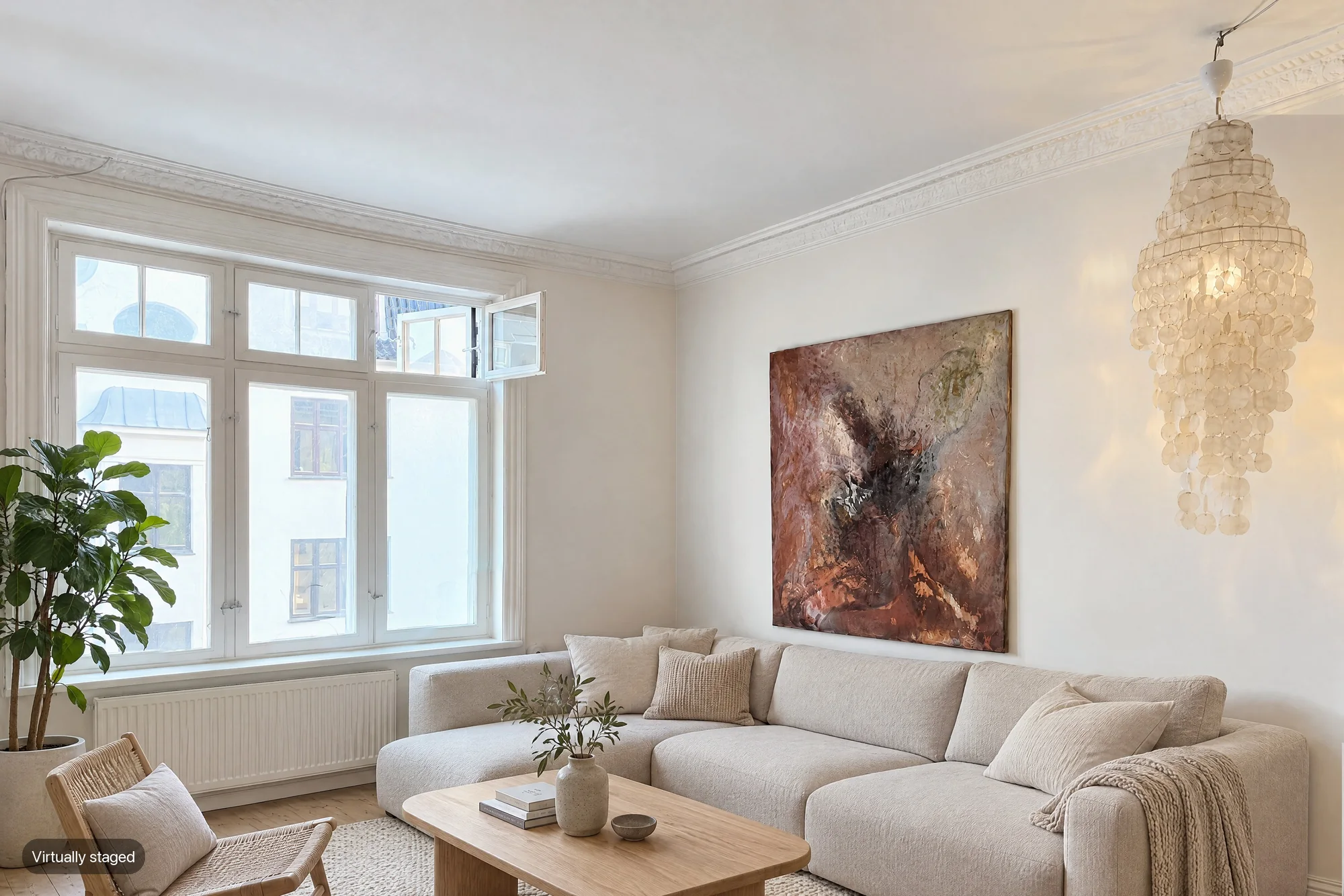
Zillow has its own AI virtual staging, but only on Zillow Showcase listings, the paid premium package an agent buys. Since September 2025, shoppers on those listings can tap a button on eligible room photos, pick one of eight styles, and see the room restaged, with a slider back to the original. On any other listing, you can upload your own virtually staged photos through the MLS, which feeds them to Zillow, as long as you follow your MLS's disclosure rule: usually a label, and often the unaltered original next to it.
By Emil Thomsen, Head of Customer Relations, October · Updated
Reading on Google? Add October to your Preferred Sources to see our guides more often.
Two different things people mean by "Zillow virtual staging"
The phrase covers two separate things.
- Zillow's built-in staging. A tool on Zillow itself, inside Showcase listings. The shopper uses it, and the listing photos stay as the agent uploaded them.
- Your own staged photos on Zillow. Photos you stage before listing, with any tool or service, that go to Zillow with the rest of your listing photos. Zillow says "a majority of Zillow's photos are provided by real estate agents through the MLS via a listing feed." So your MLS's rules decide what is allowed.
The rest of this guide takes them one at a time.
Zillow's built-in AI Virtual Staging
Zillow announced Virtual Staging on September 10, 2025. It is built on Virtual Staging AI, a company Zillow bought in October 2024.
- What shoppers see. A Virtual Staging icon on select featured room photos of a Showcase listing. Zillow's Showcase guide calls the button "Stage this space."
- Styles. Zillow lists eight: Modern, Scandinavian, Industrial, Midcentury, Luxury, Coastal, Farmhouse and Unfurnished (called "No furniture" on another Zillow page).
- Furnished rooms too. Zillow says the tool works on empty or furnished rooms, and removes the existing furniture before it applies a style.
- Whole rooms only. The style applies to the full room, not to single pieces of furniture. A circular arrow on the style card generates a new arrangement in the same style.
- Original kept. Shoppers can drag a slider to compare the original and the staged room. Zillow's Showcase guide says the slider works on some mobile devices.
- Speed. Zillow says a style takes about 20 to 30 seconds to appear.
Not every photo qualifies. Zillow's Showcase guide says the photo must be in the listing's Group by Room section and show a featured room type: living room, bedroom, dining room, home office, kids room or bathroom. Shoppers can use it in the Zillow app or in a desktop or mobile browser, though Zillow notes "not all browsers and versions may be supported."
Who gets Zillow's staging, and what it costs
Zillow's virtual staging page says it is "Available today on Zillow Showcase listings" and offered "at no extra cost." No extra cost means no extra cost on top of Showcase. Showcase itself is paid: the agent buys it from Zillow, and our Zillow Showcase guide covers what it includes and what agents report paying. The Boston Globe reported that one Boston broker paid $750 for a Showcase listing.
Who turns it on? Zillow's pages describe no switch for agents. The staging appears for shoppers on eligible photos of a Showcase listing, and the shopper chooses whether to use it. If your listing is not on Showcase, there is no Zillow staging button on it.
The staged versions are made by and for the shopper. They don't replace the photos the agent uploaded.
What Zillow says about accuracy and labels
In August 2026, the Boston Globe reported that Zillow says its staging tool aligns with MLS disclosure rules, screens photos, keeps the original content and labels AI-altered images clearly.
Zillow spokesperson Claire Carroll told the paper that "agents and brokers bear the front-line responsibility for accuracy." She added that Zillow believes "shoppers should be able to see the original alongside the altered version."
Zillow's VP of AI Product, Nicholas Stevens, told the Globe that generic image models used to "hallucinate" defects, such as an extra window or wall. That is worth remembering for any staging tool, Zillow's or anyone else's.
Uploading your own virtually staged photos to Zillow
Yes, you can. Staged photos reach Zillow the same way as any listing photo: you upload them to the MLS, and the listing feed carries them to Zillow. That means the rule you follow is your MLS's rule, and they differ. Three published examples:
| MLS | Label | Original photo | What you can't change |
|---|---|---|---|
| CRMLS (California), Rule 11.5.2 | "Photo Modified," "Virtually Staged," "Digitally Altered," "AI Altered" or a similar term, in the photo's text field | Required, shown immediately before or after the staged photo | Any real part of the property, such as wall color, flooring, cabinets, wall dimensions or landscaping |
| SmartMLS (Connecticut), connectMLS | A stamp or watermark saying the photo is virtually staged; connectMLS can apply its own. Also answer "Are any property photos virtually staged?" | Not required | Permanent structures, such as high power lines or a water tower, can't be removed |
| HiCentral MLS (Hawaii), Rule 1.19.5 | The word "Enhanced" in the photo description, "One or more photos have been enhanced" in the public remarks, and the Enhanced Photos field set to Yes. The system then adds an "Enhanced Photo" watermark | Not stated in its help article | Not listed in its help article |
CRMLS warns first and then fines $250 if a violation isn't corrected in time, according to its knowledge base. HiCentral explains why it uses a watermark: some websites don't show photo comments. That matters for Zillow too, because a caption in the MLS may never reach the portal, while a label on the image travels with it.
California adds a state law on top. CRMLS describes AB 723, in effect since January 1, 2026, as requiring listings with significantly altered images to include the original, unaltered images and a disclosure of which images are altered. Our AB 723 guide covers the statute itself.
How to stage your own photos the right way
The rule under all of these is Article 12 of the NAR Code of Ethics: REALTORS® "shall present a true picture in their advertising." Standard of Practice 12-10 names "misleading images" among the things that break it.
- Stage the furniture, not the house. Add, swap or remove furniture and decor only.
- Leave fixed features alone: walls, floors, paint color, cabinets, windows, fixtures, landscaping and the view. CRMLS bans changing them even with a label.
- Don't hide damage or remove things outside, like power lines. SmartMLS names power lines as an example.
- Label every staged photo in the form your MLS asks for. A label on the image itself works on every site.
- Keep the unaltered original, and upload it next to the staged one where your MLS requires it. In California, also link it as AB 723 requires.
- Check every staged photo against the room before upload. Look for extra windows, moved doors or changed floors.
- Make your main photo one buyers will recognize at the door.
Cost: DIY AI staging tools vs human staging services
Staging your own photos costs far less than physical staging. Virtual Staging AI, the company Zillow owns, sells plans from $16 a month for 6 photos to $79 a month for 150 photos, on its own price page.
We keep the full price table in our virtual staging cost guide, and compare the tools in best virtual staging apps. If you are listing a home on Zillow for the first time, start with how to list on Zillow.
Where October fits
October isn't part of Zillow's staging feature and isn't a Showcase provider. It makes listing photos and a walkthrough video from one guided walk with the October app on an iPhone 12 or newer, usually within a few hours. Those photos go to your MLS, and from there to Zillow.
October also offers two options per room on top of the finished photos: Empty room for $19 and Staged room for $29, in a Scandinavian, Modern or Classic style. Every delivered photo of that room comes in the chosen look. The Pro plan includes 3 empty or staged rooms a month.
October's photos are AI-altered images of your room, so label them where your MLS asks, and label staged rooms as virtually staged. Your download includes the unaltered original of every photo, for MLSs and states that want it. Photos start at $49 a place, and your first place is free. See pricing.
Questions
Does Zillow allow virtual staging?
Yes. Zillow has its own AI virtual staging on Showcase listings, and virtually staged photos uploaded through the MLS appear on Zillow like any listing photo. Your MLS's disclosure rule applies to the photos you upload.
How do I turn on virtual staging on Zillow?
Zillow describes no switch for agents. The staging button appears for shoppers on eligible room photos of a Showcase listing, which the agent buys from Zillow. On a regular listing, stage the photos yourself before you upload them to the MLS.
Is Zillow's virtual staging free?
Zillow says it comes at no extra cost on Showcase listings. Showcase itself is a paid package, so the staging is included in what the agent pays for Showcase.
Do I have to disclose virtual staging on Zillow?
For photos you upload, yes in most MLSs. CRMLS wants a label such as "Virtually Staged" and the original next to it, SmartMLS wants a stamp or watermark, and HiCentral wants "Enhanced" in three places. Zillow told the Boston Globe that agents and brokers bear the front-line responsibility for accuracy.
Can I upload virtually staged photos to Zillow?
Yes, through your MLS, which feeds listing photos to Zillow. Label them as your MLS requires, keep the unaltered originals, and don't change walls, floors, fixtures, landscaping or the view.
What styles does Zillow's virtual staging have?
Eight: Modern, Scandinavian, Industrial, Midcentury, Luxury, Coastal, Farmhouse and Unfurnished. Zillow removes the existing furniture first, and the style applies to the whole room.
How much does virtual staging cost?
Virtual Staging AI, the AI staging company Zillow owns, charges from $16 a month for 6 photos to $79 a month for 150. Our virtual staging cost guide compares AI tools and human designers in one table.
Does October stage photos for Zillow?
October offers Staged room ($29) and Empty room ($19) per room on top of its finished photos, which you upload to your MLS like any listing photos. It is not part of Zillow's own staging feature. Label staged rooms as virtually staged where your MLS asks.
Sources
- Zillow press release: Zillow brings AI-powered Virtual Staging to Showcase listings (Sep 10, 2025; icon, styles, furniture removal, slider, Virtual Staging AI; read 2 Nov 2026)
- Zillow: Virtual Staging (Showcase listings, eight styles, no extra cost, 20–30 seconds, whole room; read 2 Nov 2026)
- Zillow: Showcase getting-started guide, booking media ("Stage this space", eligible rooms, Group by Room, slider; read 2 Nov 2026)
- Zillow Help Center: How do photos of my home get on Zillow? (MLS listing feed; read 2 Nov 2026)
- The Boston Globe: Zillow's AI staging and redecorating tool (Aug 27, 2026; standards, Carroll and Stevens quotes, $750; read 2 Nov 2026)
- HousingWire: Zillow acquires Virtual Staging AI (read 2 Nov 2026)
- CRMLS: Digitally Altered Images (Rule 11.5.2) FAQs, updated Feb 13, 2026 (labels, original, AB 723 summary; read 2 Nov 2026)
- CRMLS knowledge base: Digitally altered images FAQs (warning, then $250 fine; read 2 Nov 2026)
- SmartMLS connectMLS help: Virtually Staged Photos (updated Sep 2, 2026; read 2 Nov 2026)
- HiCentral MLS help: What do I need to do when I have an enhanced photo or media? (Rule 1.19.5; read 2 Nov 2026)
- NAR: 2026 Code of Ethics and Standards of Practice (Article 12, SOP 12-10; read 2 Nov 2026)
- Virtual Staging AI: prices ($16–$79 a month for 6–150 photos; read 2 Nov 2026)