

Guides · Guide
Airbnb photos vs reality: what guests complain about and how to avoid it
Airbnb's ground rules for hosts say the photos and description on a listing page should accurately represent the space provided, and that Airbnb will ask hosts to remove content where AI or other digital technology has been used to edit flaws, hide damage or add amenities that aren't part of the listing. Guests who arrive at a place that is significantly different from the listing can report it within 72 hours under Airbnb's Rebooking and Refund Policy and get a full or partial refund or help rebooking, with the host's payout reduced to match.
By Emil Thomsen, Founder of October · Updated
Reading on Google? Add October to your Preferred Sources to see our guides more often.
What Airbnb's rules say about photos
Airbnb's Help Center page "Ground rules for home hosts" sets the standard. A listing "should accurately describe the home and reflect the features and amenities that will be available," and "the photos and description on the listing page should accurately represent the space provided." Then the sentence that matters for editing: "Any content that misrepresents the listing or misleads guests violates this policy."
The same page addresses edited photos directly. Airbnb says it "will ask hosts to remove content if AI or other digital technology has been used to edit flaws, hide damage," add amenities or attributes that are not part of a listing, or otherwise misrepresent it. The location (map pin and address) has to be accurate, and the listing should disclose anything about the surroundings that may affect the expected level of noise.
Enforcement runs in steps: educating hosts about the policy, warnings and required removal of content, and for repeated or severe violations, restrictions such as being prevented from publishing new listings or losing Superhost status. Airbnb may also cancel an upcoming or active reservation, and hosts, co-hosts or listings may be suspended or removed from the platform.
What happens when a guest says the photos lied
Airbnb's Rebooking and Refund Policy (effective February 6, 2025) covers what it calls a Reservation Issue. One category is accommodation that is significantly different from the listing: the wrong space type, room count or location, an undisclosed host, other person or pet, or an advertised feature such as a pool or heating that is missing or broken. Another is a place that is not reasonably clean and sanitary at check-in.
- The guest's side. Report within 72 hours of discovering the issue, to Airbnb or the host, with supporting evidence such as photos or videos. Airbnb may provide a full or partial refund, or help the guest find a similar place at comparable pricing.
- The host's side. Airbnb generally asks the host to confirm the report, and a host can dispute it. A host receives no payout for a covered issue, or has the payout reduced by the amount refunded to the guest. A fraudulent request, from either side, can end an account.
- A real case. CTV News reported in July 2026 on an Ontario family whose Toronto rental did not match the listing photos; Airbnb told CTV that its policies require photos and a description that accurately represent the space, refunded the guest in full and suspended the listing while it reviewed it.
- A second case. New Zealand's Fair Go program reported in July 2023 on a Wellington apartment that looked clean and modern online but was dirty on arrival, with furniture different from the photos. Airbnb refunded the first night and said appropriate action was taken under its policies; the property managers refunded the cleaning fee and offered to refund the remaining nights.
Airbnb also checks photos on its own initiative. Its Help Center describes photo verification: hosts are asked to visit the listing in person and capture new photos through the Airbnb app, from the same angle as the listed photos, to confirm that the images match the space. Existing photos from a camera roll cannot be uploaded for that review.
The complaints, and where each one comes from
| What guests say | What usually happened | How to avoid it |
|---|---|---|
| "It looked much bigger in the photos" | An ultra-wide lens from a corner. Fox News put it this way in 2015: "Wide-angle lenses make some apartments appear far bigger than they actually are." NWMLS's photography guide for agents makes the same point: wide-angle lenses "often distort images and can portray an unrealistic sense of size" | Shoot the wide shot from the doorway at chest height, level, on the normal 1× camera. Add a mid-range shot and put the dimensions or bed size in the caption |
| "The photos are old" | Furniture, paint or appliances changed after the shoot. In the Fair Go case the furniture was different from the photos | Re-shoot the room the day anything in it changes. Airbnb's photo tour lets you move, remove and add photos |
| "They hid the damage" | A stain, crack or worn surface cropped out, cloned out or edited away. This is the edit Airbnb names in its ground rules | Fix it or show it. A caption that says "the sofa is worn but comfortable" beats a refund claim |
| "The nice things in the photos weren't there" | Styling props, flowers, a welcome tray or borrowed furniture used for the shoot and never seen again | Photograph the place exactly as you hand it over after a turnover clean. If it won't be there for guests, it isn't in the photo |
| "It wasn't clean" | The photos were taken once, after a deep clean, and the place no longer looks like that | Airbnb's policy covers places that aren't reasonably clean at check-in. Photos can't fix this; the turnover can |
| "The photos don't show the building site / the road" | Surroundings left out. Airbnb's ground rules ask hosts to disclose anything about the surroundings that may affect noise | Mention it in the description. A guest told in advance rarely complains; a guest surprised on arrival does |
Consumer NZ's Gemma Rasmussen drew the line for Fair Go in a way that still holds: minor differences, such as a swapped coffee table or artwork, likely wouldn't justify a complaint, but a substantially different setup or a much dirtier property would.
How to shoot a place so it matches
- Shoot after a turnover clean, styled the way guests get it. Airbnb's own photo guide starts with "Clean and declutter" and "Show guests exactly what they can expect." If you set out towels and a coffee tray for the photo, set them out for every guest.
- One honest wide shot per room, from the door, level, at chest height. Airbnb's guide says to shoot straight ahead so guests get "a realistic view of your place." Use the normal 1× camera for most rooms; save the 0.5× ultra-wide for rooms that don't fit, and pair it with a tighter shot so the size reads right.
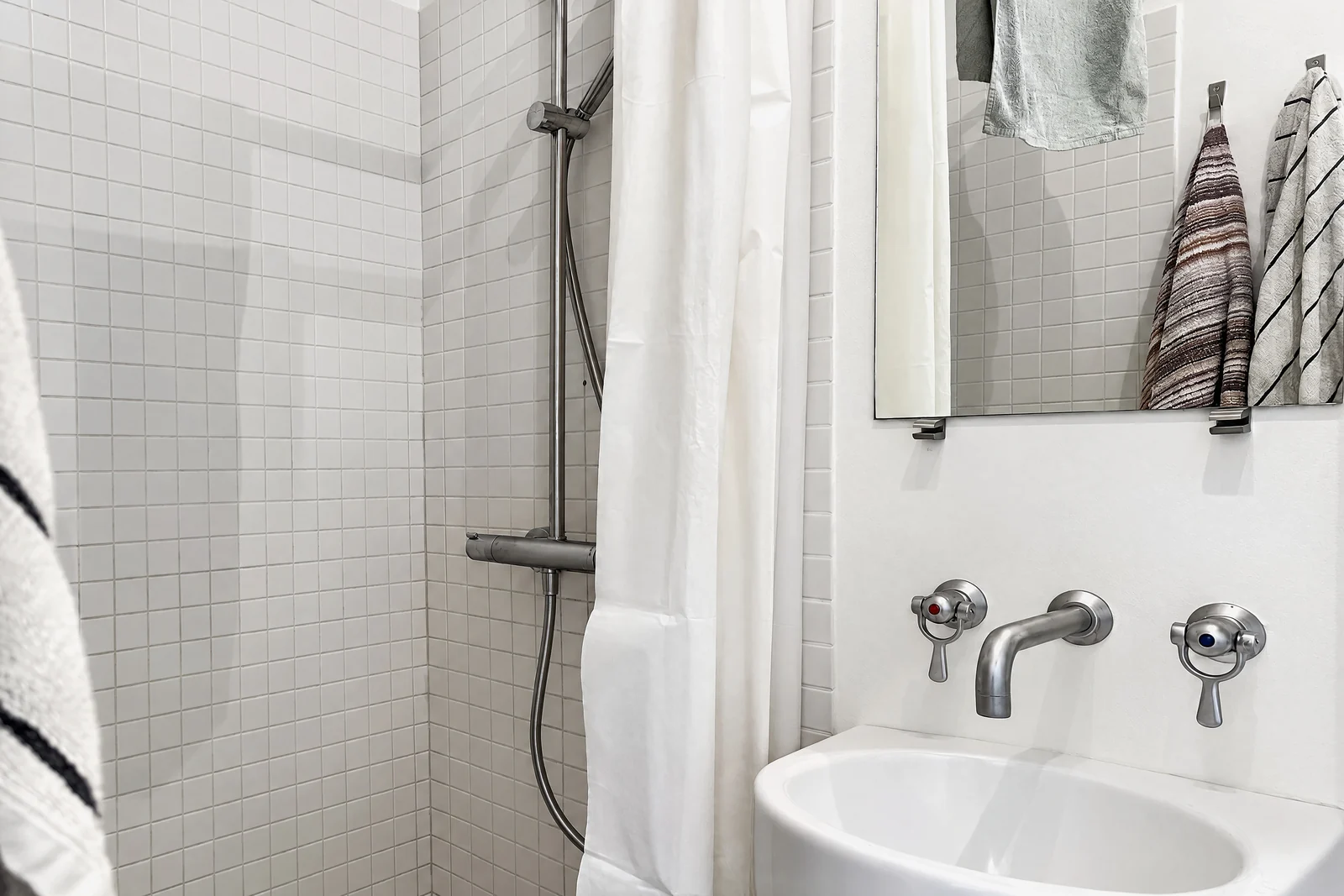
- Show the small bathroom honestly. A tight bathroom shot from the doorway, showing the shower, basin and the gap between them, tells a guest more than a clever angle that implies a bigger room. Our guide to photographing small bathrooms and hallways covers where to stand. The photo below is a bathroom of about two square meters, photographed as it is.
- Caption what the photo can't show. Airbnb's guide says to "Explain what the photo doesn't show that could be important to guests," with its own example of a drop-leaf table that seats ten when extended. Bed sizes, which floor, stairs, the view from the window and what's next door belong here.
- Edit light and color only. Airbnb's guide suggests adjusting brightness, contrast and highlights, and cropping or straightening. Removing flaws or adding anything is the edit its ground rules name.
- Update photos after any change. New sofa, new paint, a broken hot tub: re-shoot that room and swap the photo the same day. Old photos are the quiet cause of many "not as described" reports.
For the camera settings, a room-by-room shot list and Airbnb's size requirements, see how to take Airbnb photos with an iPhone. For which editing apps stay inside Airbnb's rules, see Airbnb photo editing. If you are weighing a professional shoot instead, what Airbnb photography costs compares local photographers, Airbnb's Pro Photo program and doing it yourself.
The line between tidying and misleading
Airbnb's rule is about what guests find, not about which tool you used. The useful question for any edit is: would a guest walking in feel the photo showed them this place?
| Edit | Under Airbnb's ground rules | Why |
|---|---|---|
| Brightness, color, straightening, cropping | Fine | Airbnb's own guide tells hosts to make these adjustments |
| Making a bed, plumping cushions, clearing counters you clear for every guest | Fine | The photo shows what guests receive |
| Tidying away your own clutter: cables, papers, bottles, a laptop | Fine, if it won't be there for guests | Loose items that leave with you aren't part of the listing |
| Removing a stain, a crack, mold or worn flooring | Not allowed | Editing flaws and hiding damage are named in the policy |
| Adding furniture, a hot tub, a view or a room you don't have | Not allowed | Adds amenities or attributes that are not part of the listing |
| Virtually staged or emptied rooms | Don't use them for a rental | Guests walk into the real room. A rendering of a different one misrepresents it |
October is built to stay on the right side of this line, and hosts should know how: its photos are AI-generated. The frames from one spot are stitched into a wide view, and an AI image model draws a new photo from it with a daylight look and loose items such as bottles, towels, papers and cables left out. The model is told to keep the fixed features, meaning walls, floors, windows, fittings, built-in furniture and the view, and each photo is checked against your capture and redrawn if the room changed. AI can still get a small detail wrong, so compare every photo with the room before you upload it; the room guests find has to be the room in the photo. Its Empty room and Staged options are delivered labeled as virtual and are meant for sale listings; for a rental, use the photos of the room as it is. A rental of up to 6 rooms is one place, $49 for photos or $99 with a walkthrough video, and the first place is free. Details on the short-term rental page.
Questions
What does Airbnb do about misleading photos?
Its ground rules say photos and the description must accurately represent the space, and that it will ask hosts to remove content where AI or other digital technology was used to edit flaws, hide damage or add amenities that aren't part of the listing. Repeated or severe violations can mean losing Superhost status, being blocked from publishing new listings, cancelled reservations or suspension.
Can I get a refund if an Airbnb doesn't match the photos?
Under the Rebooking and Refund Policy, a place that is significantly different from the listing (wrong space type, room count or location, or an advertised feature missing or broken) is a Reservation Issue. Report it within 72 hours of discovering it, with photos or video, and Airbnb may refund you in full or in part or help you rebook a similar place.
Are wide-angle Airbnb photos misleading?
They can be. A wide-angle lens from a corner makes a room look larger than it is, which is the single most common complaint. Shoot from the doorway at chest height on the normal 1× camera, keep the phone level, and put the room size or bed size in the caption.
Can I edit my Airbnb photos at all?
Yes, for brightness, contrast, highlights, cropping and straightening, which Airbnb's own photo guide recommends. What you can't do is edit out flaws or damage or add things guests won't find.
Does Airbnb check whether my photos are real?
It can. Its photo verification asks hosts to visit the listing in person and take new photos through the Airbnb app, matching the angles of the listed photos. Photos from a camera roll can't be submitted for that review.
How often should I update Airbnb photos?
Whenever anything in a room changes: furniture, paint, appliances, a broken amenity. Old photos are a quiet cause of "not as described" complaints, and Airbnb's photo tour lets you swap a single photo without redoing the set.
Does October change rooms in Airbnb photos?
It is not meant to, but its photos are AI-generated: an AI image model draws each photo from your capture, with a daylight look and loose items left out, and is told to keep walls, floors, windows, fittings, built-in furniture and the view. Each photo is checked against the capture, but check every one against the room yourself before you upload it. Its Empty room and Staged options are labeled as virtual and are for sale listings, not for a rental guests will walk into.
Sources
- Airbnb Help Center: Ground rules for home hosts
- Airbnb Help Center: Rebooking and refund policy for homes (effective Feb 6, 2025)
- Airbnb Help Center: How can I confirm photo accuracy for my listings?
- Airbnb Resource Center: How to take great photos for your listing (updated Nov 8, 2024)
- CTV News: Ontario family says AI was used in Airbnb listing photos (July 14, 2026)
- 1News / Fair Go: What happens if your holiday rental doesn't match the photos (July 6, 2023)
- Fox News: What the Airbnb experience is really like (July 2015)
- NWMLS: Real Estate Photography 101 (wide-angle distortion)