

Guides · Comparison
October vs SnapSnapSnap: which iPhone app for listing photos?
SnapSnapSnap is BoxBrownie's free iPhone camera app: you choose where to stand and shoot, the app brackets each shot, and BoxBrownie's human editors return each photo within 24 hours (48 for virtual staging), paid per photo, US$1.60 for an enhancement on its US pricing page in October 2026. October (october-ai.com) chooses the spot for you: its app shows where to stand in each room and takes the frames, an AI image model draws each finished photo from them, and the photos plus an AI walkthrough video usually come back within a few hours, for $49 a place of up to 6 rooms or $99 with the walkthrough, with any room available empty ($19) or staged ($29). SnapSnapSnap is cheaper for plain photo edits and has BoxBrownie's long menu of extras; October adds the guidance, the video and per-room staging.
By Emil Thomsen, Founder of October · Updated
Reading on Google? Add October to your Preferred Sources to see our guides more often.
The short answer
Both are iPhone apps you walk a property with, so they look alike at first. The difference is who does the photographer's job and who does the editing. With SnapSnapSnap you frame every shot yourself and a person at BoxBrownie edits it the next day. With October the app picks the spots and takes the frames, and an AI image model draws each finished photo from them, usually within a few hours.
- Choose SnapSnapSnap if you are comfortable framing a room, want a human editor on every photo, want twilight, floor plans or copywriting from the same account, or have an iPhone older than the 12.
- Choose October if the person holding the phone isn't a photographer, if the listing has to go live fast, or if you want a walkthrough video and staged rooms from the same visit.
- On photos alone, SnapSnapSnap is cheaper: 18 enhanced photos cost $28.80 against October's $49. With two staged rooms, October is cheaper; the cost section below has the numbers.
Side by side
| SnapSnapSnap (BoxBrownie) | October | |
|---|---|---|
| What it is | Free iPhone camera that sends your photos to BoxBrownie's editors | iPhone app that guides the capture, plus AI-generated photos drawn from it and an AI walkthrough video |
| Who decides where to stand | You; a grid shows a green box when the phone is level | The app: an arrow and the distance to the photographer's spot, an on-screen level, and it takes the photo when the shot is right |
| How a shot is taken | Brackets several exposures per shot (45 to 70 photos, says BoxBrownie's launch post); the app shows only the middle one | Several frames per spot, stitched into one wide view that an AI image model draws the finished photo from |
| Who edits | BoxBrownie's human editors | No one edits your frames: an AI image model (OpenAI's GPT Image) draws each photo new from your capture, keeping the room, with daylight light and loose items left out; checked against the capture and redrawn if the room changed |
| Photo price | Per photo: US$1.60 enhancement (US pricing page, Oct 2026) | $49 a place, up to 6 rooms |
| Turnaround | Within 24 hours; 48 hours for virtual staging | Usually within a few hours; photos arrive room by room |
| Video | None listed | Walkthrough video, HD at $99 a place or 4K at $199 (photos included) |
| Virtual staging | US$24 an image on the US pricing page, 48 hours, changes free within 2 months | $29 per room, every delivered photo of that room; Scandinavian, Modern or Classic |
| Removing items or furniture | US$4 (1 or 2 small items) to US$8 (standard) an image | Small loose items left out of the AI-drawn photos as standard; an Empty room is $19 per room |
| Twilight, floor plans, copy | Day to dusk US$4; floor plans, renders and copywriting on BoxBrownie.com | Not offered |
| Photos you already took | Yes: import from the camera roll | No: only captures made in the October app |
| Phones | iOS 15 or later; iPhone 7 minimum, iPhone 11 or later recommended | iPhone 12 or newer; no Android app yet |
| Free to try | Free app; a new BoxBrownie account gets 3 enhancements and 1 day to dusk free | First place free (up to 6 rooms, photos and walkthrough) |
| Billing | Pay per edited photo, no subscription | Pay per place, or Start $149/month (2 places) or Pro $399/month (6 places) |
SnapSnapSnap's own page lists virtual staging at US$48, which is what BoxBrownie's pricing page charges for 360° staging; its FAQ says app edits cost the same as on BoxBrownie.com, so we use the pricing page's US$24. The app is rated 4.2 from 64 ratings on the US App Store and was last updated on September 21, 2025. October's prices are on our pricing page.
What one listing costs with each
Take a six-room home photographed from three spots per room, 18 photos, as in our other comparisons, and stage two of the rooms. Here is the job priced both ways, with BoxBrownie's US prices on October 27, 2026.
| Job | SnapSnapSnap | October |
|---|---|---|
| 18 finished photos | 18 × $1.60 = $28.80, framed by you | $49 for the place, capture guided by the app |
| Stage 2 rooms, 3 photos each | 6 × $24 = $144 | 2 × $29 = $58 |
| Photos + 2 staged rooms | $172.80 | $107 |
| Add a walkthrough video | Not offered | $157 with the HD walkthrough, $257 in 4K |
| Empty 1 furnished room, 3 photos | 3 × $8 = $24 (standard item removal) | $19 |
| A twilight exterior | $4 | Not offered |
For photos only, SnapSnapSnap costs less, and less again if you shoot fewer than 18. Staging is where it turns: BoxBrownie charges per image and October per room, so the more angles of a staged room you list, the bigger October's lead. At the $2 and $30 list prices from August 2026, the SnapSnapSnap column rises to $36 for the photos and $180 for the staging. More in our virtual staging cost guide.
Where SnapSnapSnap is the better choice
- A person checks every photo. BoxBrownie says its editors are real people and that it corrects a standard edit for free if it isn't right. Reworks are requested on BoxBrownie.com.
- The long menu. Day to dusk, floor plan redraws, renders, virtual renovation, 360° editing, virtual tours from your photos and listing copy are all on the same account. October offers none of them.
- More staging styles and designer help. BoxBrownie lists styles 'from Modern to Traditional, Urban to Farmhouse, and more' and takes sample images of furniture you like. October has three looks.
- Older iPhones and existing photos. SnapSnapSnap runs on iOS 15 and down to an iPhone 7, and imports photos you already took. October needs an iPhone 12 and its own captures.
- Lower price per photo, and nothing to pay for photos you don't send for editing.
If you already shoot with SnapSnapSnap and want something faster or with video, our SnapSnapSnap alternatives guide compares seven other phone apps.
Where October is the better choice
- Nobody on the job is a photographer. SnapSnapSnap gives you a better camera; where to stand and what to point at are still up to you. October shows the spot with an arrow and the distance, keeps the phone level and takes the photo itself. If a shot is wrong, it says so on the spot.
- Usually hours, not next day. Photos usually come back room by room within a few hours while you carry on, instead of within 24 hours, or 48 for staging.
- Video from the same walk. The walkthrough video (1920×1080 HD, or 4K upscaled from the same film) is AI-generated motion (Kling) between each room's finished photos, not filmed footage. SnapSnapSnap lists no video.
- Staging priced per room, and labelled. $29 stages every photo of a room, and each one carries a "Virtually staged" label ("Virtually emptied" for an Empty room).
- Drawn from the actual room. October's photos are AI-generated from your own capture. The model is told to keep walls, floors, windows, fittings, built-in furniture and the view as captured, and each photo is checked against the capture and redrawn if the room changed. AI can still get a small detail wrong, so check every photo before you publish.
 As captured
 Delivered by October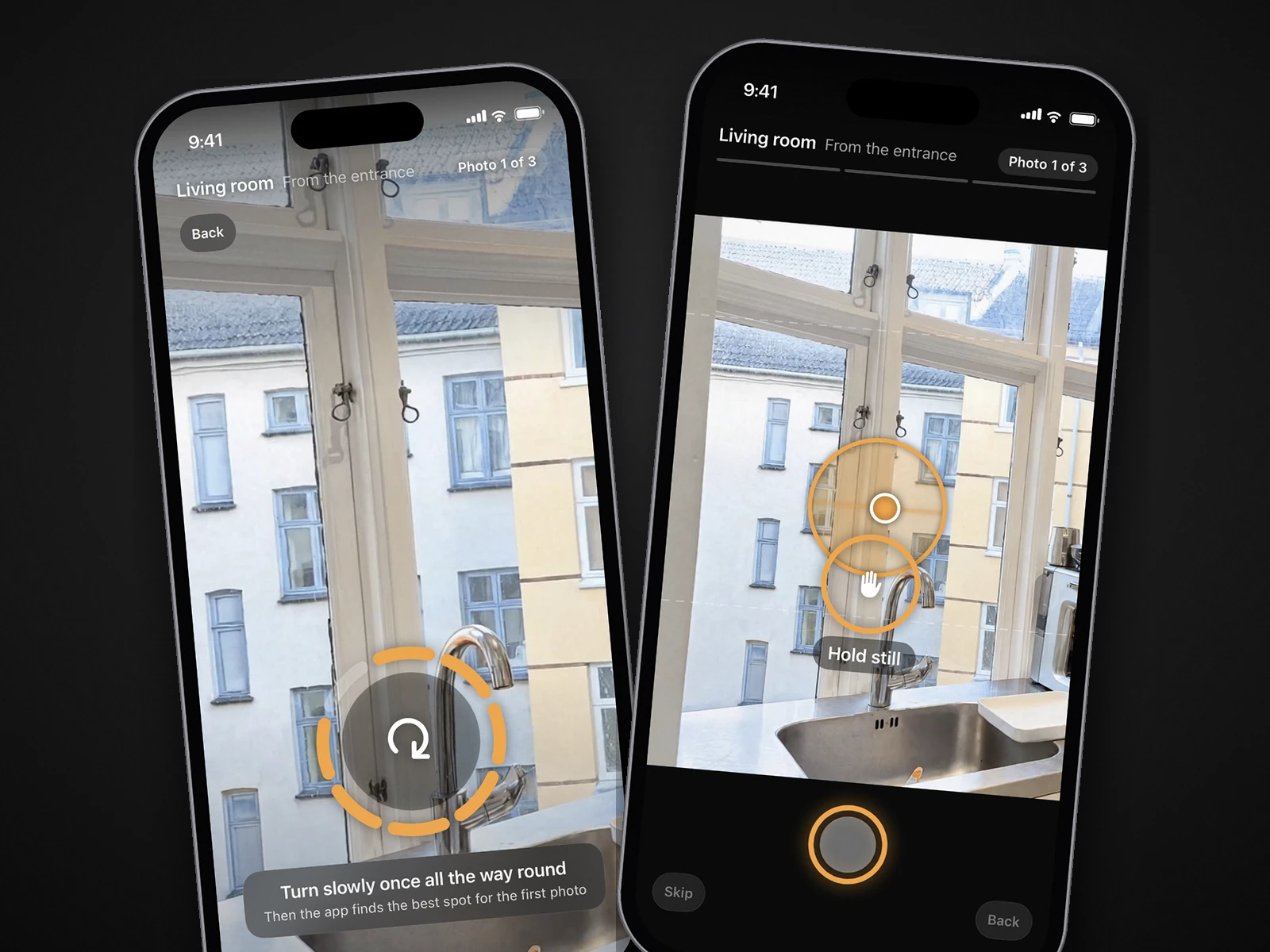
Edits, disclosure and MLS rules
Some edits need a disclosure and some don't, whichever app you use. California's AB 723, in force since January 1, 2026, requires agents to disclose a digitally altered image on or next to the image, and to include or link the unaltered version when they post online. Software or AI that adds, removes or changes elements of the property counts as altering; adjusting lighting, white balance, colour, exposure, angle, straightening and cropping doesn't (Senate Judiciary analysis).
- Usually no disclosure: light, colour, exposure and straightening, which covers BoxBrownie's image enhancement. It does not cover October's photos: each one is a new AI-generated image, so label it as AI-altered or digitally altered where your MLS or state requires (CRMLS Rule 11.5.2 accepts either).
- Disclosure needed: virtual staging and emptied rooms from either, and item removal. BoxBrownie's staging page advises 'clearly disclosing' staged images to buyers; October labels its Empty and Staged images on the image.
- Check your MLS: day to dusk changes what the exterior looks like. October's standard photos carry no label on the image, so add the disclosure your MLS asks for.
With SnapSnapSnap you can download the unedited middle exposure of each shot as your original. October's download includes the unaltered original of every photo, so you can link or provide it where your MLS or state requires. More in our guides to California AB 723 and AI photo editing and MLS rules.
Questions
What is SnapSnapSnap?
SnapSnapSnap is a free iPhone camera app from BoxBrownie.com. It brackets each shot and sends the photos you choose to BoxBrownie's human editors, who return them within 24 hours (48 hours for virtual staging). You pay per edited photo, with no subscription.
Is October cheaper than SnapSnapSnap?
For edited photos alone, no: at BoxBrownie's US price of $1.60 an enhancement in October 2026, 18 photos cost $28.80 against October's $49 a place. With staging or video, October usually costs less: two staged rooms with three photos each are $58 with October and $144 through SnapSnapSnap, and SnapSnapSnap has no walkthrough video. Your first place with October is free.
Does SnapSnapSnap make video?
Its App Store listing and BoxBrownie's SnapSnapSnap page list no video. BoxBrownie sells virtual tours made from your photos on its website. October makes an AI-generated walkthrough video that moves between the room's finished photos, in HD or 4K.
Does October do virtual staging?
Yes. Any room captured with the October app can be ordered as a Staged room for $29 (Scandinavian, Modern or Classic) or an Empty room for $19, done on every delivered photo of that room and labelled "Virtually staged" or "Virtually emptied". Pro plans include 3 a month.
Which iPhones do they need?
SnapSnapSnap needs iOS 15 and works from an iPhone 7, with an iPhone 11 or later recommended. October needs an iPhone 12 or newer. BoxBrownie's SnapSnapSnap page mentions only the iPhone, and October has no Android app yet.
Can I send October photos to BoxBrownie?
Yes. You own the photos October delivers, so you can send any of them to BoxBrownie for an edit October doesn't offer, such as a twilight sky or a floor plan.
Sources
- App Store: SnapSnapSnap by BoxBrownie.com (free, no subscriptions, 24 h / 48 h, 4.2 from 64 ratings, iOS 15, updated Sep 21, 2025)
- BoxBrownie: SnapSnapSnap page and FAQ (iPhone 7 minimum, 11 recommended, middle bracket, gallery import, reworks, edits priced as on BoxBrownie.com)
- BoxBrownie: pricing, United States (enhancement US$1.60, day to dusk US$4, staging US$24, item removal US$4–US$8, 360° staging US$48)
- BoxBrownie: virtual staging, United States (US$24 an image, 48 hours, changes within 2 months, styles, disclosure advice)
- BoxBrownie: homepage (human editors, satisfaction guarantee, 250,000+ customers, 138 countries, ownership of photos, free account offer)
- BoxBrownie: SnapSnapSnap launch post, February 2023 (45 to 70 photos per shot)
- California Senate Judiciary Committee: AB 723 analysis (definition and exemptions)