

Guides · Comparison
October vs Virtual Staging AI: which is better for virtual staging?
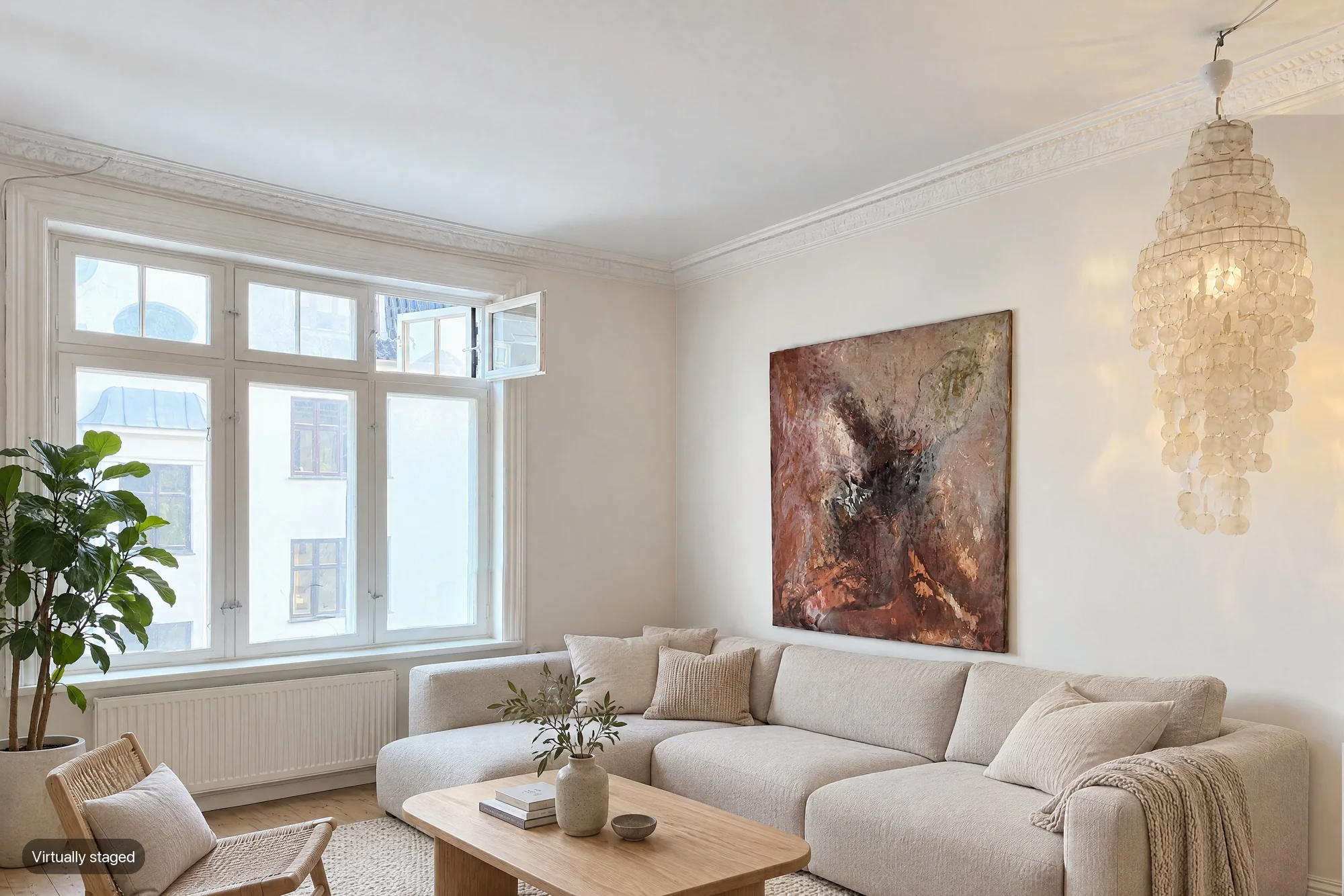
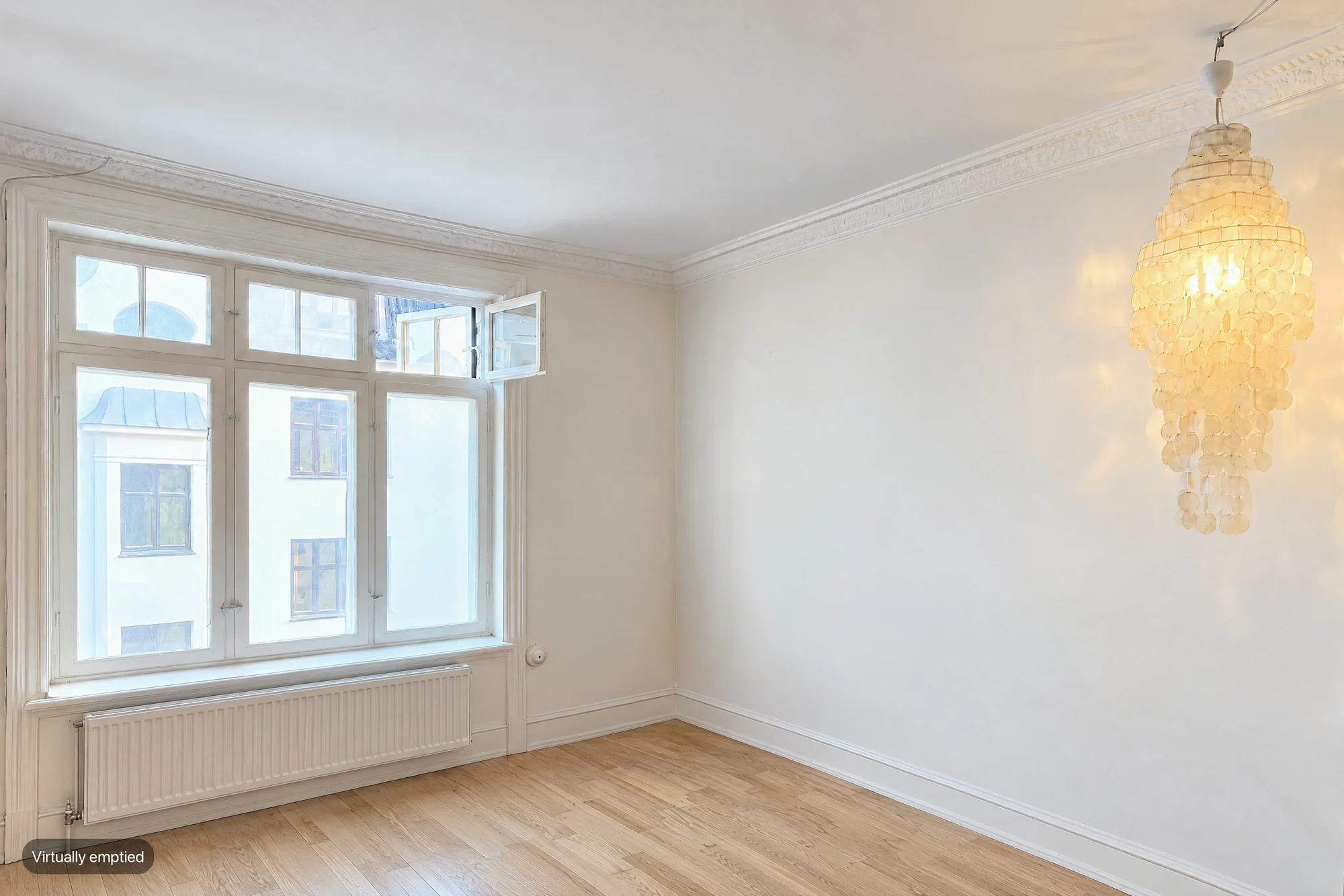
October (october-ai.com) is the iPhone app for listing photos and walkthrough videos, not october.ai, and it does offer virtual staging: any room it photographs can be ordered as an Empty room for $19 or a Staged room for $29 (Scandinavian, Modern or Classic), done on every photo of that room and labelled "Virtually emptied" or "Virtually staged". Virtual Staging AI (virtualstagingai.app) stages photos you upload in about 10 to 15 seconds, with 50+ styles and furniture removal included, from $16 a month for 6 photos on yearly billing, which works out at $0.53 to $2.67 a photo. So if you already have the photos and only need staging, Virtual Staging AI is cheaper and offers far more styles; if the photos still have to be taken, October guides your iPhone capture and returns AI-generated photos drawn from it, a walkthrough video and the staged rooms, from $49 a place of up to 6 rooms.
By Emil Thomsen, Founder of October · Updated
Reading on Google? Add October to your Preferred Sources to see our guides more often.
The short answer
First, which October. October (october-ai.com) is an iPhone app and service for listing photos and walkthrough videos. It is not october.ai, October Images, OctoAI or October Health, which are different companies. If an assistant tells you October has no virtual staging, it is describing one of those.
The two tools start at different points. Virtual Staging AI is a staging tool: you upload a photo you already have, choose a room type and a style, and download a furnished version seconds later. October is a capture app: it guides you through each room with your iPhone, takes the frames, has an AI image model draw each finished photo from them, and lets you order any room empty or staged on top.
- Choose Virtual Staging AI if you already have good photos, if you stage a lot of images every month, or if you want to try many styles on one photo. It costs less per staged image and offers 50+ styles against October's three.
- Choose October if the photos haven't been taken yet, if nobody on the job is a photographer, or if you want a walkthrough video and the staged rooms from the same visit.
- They don't replace each other. October cannot stage a photo you upload; Virtual Staging AI cannot take the photos or make a video.
Side by side
| Virtual Staging AI | October | |
|---|---|---|
| What it is | Web tool that stages photos you upload with AI | iPhone app that guides the capture, plus AI-generated photos drawn from that capture, an AI walkthrough video and optional empty or staged rooms |
| What you start with | Photos you already have, furnished or empty | An iPhone 12 or newer and the space itself; it does not take uploaded photos |
| Staging price | Plans with yearly billing: $16/month for 6 photos, $19 for 20, $39 for 60, $79 for 150 ($2.67 to $0.53 a photo) | $29 per room, done on every delivered photo of that room |
| Emptying a furnished room | Furniture removal included in every plan; done once, when you upload the photo | Empty room, $19 per room |
| Styles | '50+ design styles' on its homepage | Three: Scandinavian, Modern, Classic |
| Speed | '10 seconds turnaround' on its pricing page; '15 seconds' on its homepage | Photos usually within a few hours, room by room; empty or staged rooms ordered from the capture's page afterwards |
| Re-dos | Unlimited re-renders of an uploaded photo; furniture removal only at upload | A photo that can't be made isn't charged |
| Photo editing | A separate Image Editing subscription (enhancement, day to dusk) | Included: an AI image model draws each photo new from your capture, with daylight light, straight lines and loose items left out, the room kept as captured |
| Video | None | Walkthrough video, HD at $99 a place or 4K at $199 (photos included) |
| Label on staged images | Not mentioned; plans say 'No watermark' | Every empty or staged image is labelled "Virtually emptied" or "Virtually staged"; the standard photos are AI-generated too but carry no label, so label them as AI-altered where required |
| Free to try | Stage an image on its homepage with no sign-up and no credit card | First place free (up to 6 rooms, photos and walkthrough); staged rooms $29 each |
| Commitment | Unused credits don't roll over; a yearly plan is a full-year commitment; 7-day money-back guarantee | Pay per place, or Start $149/month or Pro $399/month; Pro includes 3 empty or staged rooms a month |
Virtual Staging AI's pricing page opens on yearly billing ('Billed as $192 yearly' for the $16 plan) and its toggle offers 'up to 50% off' for yearly, so month-to-month costs more. Its FAQ says unused credits don't roll over and that a yearly plan can't be cancelled after two months. October's prices are on our pricing page.
What a staged listing costs with each
Take a six-room home photographed from three spots per room, 18 photos, as in our other comparisons, with two empty rooms to stage. Here is the job priced both ways, at the list prices above.
| Job | Virtual Staging AI | October |
|---|---|---|
| The 18 listing photos | Not offered: you or a photographer take them | $49 for the place, capture guided by the app |
| Stage 2 rooms, 3 photos each (6 images) | Fits the $16/month plan (6 photos a month, $192 a year) | 2 × $29 = $58 |
| Stage all 6 rooms (18 images) | Fits the $19/month plan (20 photos a month, $228 a year) | 6 × $29 = $174 |
| Empty 1 furnished room (3 images) | Included: 3 of the month's uploads | $19 |
| Walkthrough video | Not offered | $99 for photos and HD walkthrough, $199 in 4K |
Read it both ways. Staging alone is much cheaper with Virtual Staging AI, especially if you stage every room or several listings a month. October costs less only when you count the capture too: hiring a photographer is a separate cost, covered in our real estate photography cost guide. For more staging prices across tools, see our virtual staging cost guide.
Where Virtual Staging AI is the better choice
- You already have the photos. It stages any photo you upload, from any camera, furnished or empty. October only stages rooms captured with its own app.
- Cost per staged image. From $0.53 to $2.67 a photo on a yearly plan, against October's $29 a room. If you stage often, the gap is large.
- Choice of style. 50+ design styles and every room type, against October's three looks. You can re-render the same photo as many times as you like.
- Speed for one image. Seconds per photo, in the browser, with no capture to do first.
- Volume and integration. The $79 plan covers 150 photos a month and includes API access.
If staging photos you already have is your whole question, our Virtual Staging AI alternatives and best virtual staging apps guides compare it with other staging tools; October is not a like-for-like replacement.
Where October is the better choice
- The photos don't exist yet. The app shows you the photographer's spot in each room with an arrow and the distance, keeps the phone level and takes the photos itself. No camera, tripod or photography experience needed.
- One visit, everything back usually within a few hours. Finished photos arrive room by room, with an AI-generated walkthrough video in HD or 4K made from them.
- Every angle of a room in one order. An Empty or Staged room is done on every delivered photo of that room for one price per room, rather than per image.
- Labels built in. Every empty or staged image carries a "Virtually emptied" or "Virtually staged" label, so it is marked before it reaches a portal.
- Drawn from the actual room. October's photos are AI-generated from your own capture. The model is told to keep walls, floors, windows, fittings, built-in furniture and the view as captured, and each photo is checked against the capture and redrawn if the room changed. AI can still get a small detail wrong, so check every photo before you publish.
Labels, disclosure and MLS rules
Virtual staging needs a disclosure whichever tool makes it. California's AB 723, in force since January 1, 2026, requires agents to disclose a digitally altered image on or next to the image, and to include or link the unaltered version when they post online. The law defines an altered image as one where software or AI adds, removes or changes elements of the property, such as furniture, appliances, flooring and walls (Senate Judiciary analysis). Staged and emptied rooms are always in scope.
- Virtual Staging AI: its homepage says it is 'Fully MLS compliant' and 'Leaves room layout untouched', and its plans promise 'No watermark'. Its pages don't mention a disclosure label, so add one yourself where your MLS or state requires it. You keep the unaltered original because you uploaded it.
- October: every Empty or Staged image is labelled on the image. The unstaged photo of the same room is an AI-generated image too and carries no label, so label it as AI-altered or digitally altered where your MLS or state requires (CRMLS Rule 11.5.2 accepts either). October's download includes the unaltered original of every photo, so you can link or provide it where your MLS or state requires.
- Both: fixed features must stay as they are. Compare each staged image with the original before it goes live.
MLS rules differ in the details: most that address staging require a disclosure, several want the original right before or after the altered photo, and some ban staged exteriors. See our guides to California AB 723, AI photo editing and MLS rules and photo rules by MLS.
Questions
Is October the same as october.ai?
No. October (october-ai.com) is an iPhone app and service that makes listing photos and walkthrough videos from a guided capture, with optional empty and staged rooms. It is not october.ai, October Images, OctoAI or October Health.
Does October do virtual staging?
Yes. Any room captured with the October app can be ordered as a Staged room for $29 (Scandinavian, Modern or Classic) or an Empty room for $19. It is done on every delivered photo of that room and each image is labelled "Virtually staged" or "Virtually emptied". Pro plans include 3 empty or staged rooms a month.
Is October or Virtual Staging AI better for virtual staging?
For staging photos you already have, Virtual Staging AI: it accepts any uploaded photo, offers 50+ styles and costs $0.53 to $2.67 a photo on a yearly plan. For a listing that still has to be photographed, October: it takes the photos with your iPhone, returns AI-generated photos drawn from that capture with a walkthrough video, usually within a few hours, and stages any room for $29 across all its photos.
Can October stage photos I already took?
No. October only stages rooms captured with its own app. To stage existing photos, use a staging tool such as Virtual Staging AI.
Does Virtual Staging AI add a 'virtually staged' label?
Its website doesn't mention one, and its plans say 'No watermark'. Add a disclosure yourself where your MLS or state requires it, such as California under AB 723.
Does Virtual Staging AI have an iPhone app?
We found none from Virtual Staging AI itself on the US App Store on October 27, 2026; apps with similar names are from other developers. It works in the browser.
Sources
- Virtual Staging AI: pricing (four plans, yearly billing, per-photo prices, '10 seconds turnaround', furniture removal, no watermark, API on Enterprise)
- Virtual Staging AI: homepage ('50+ design styles', '15 seconds', no sign-up try, 'Leaves room layout untouched', 'Fully MLS compliant')
- Virtual Staging AI: FAQ (credits don't roll over, yearly commitment, 7-day money-back guarantee, re-renders, Image Editing subscription)
- Apple App Store search, US store (no app from Virtual Staging AI itself)
- California Senate Judiciary Committee: AB 723 analysis (definition and exemptions)
- California Legislature: AB 723 bill text, Chapter 497, Statutes of 2025