

Guides · Roundup
Apps that tell you where to stand for real estate photos
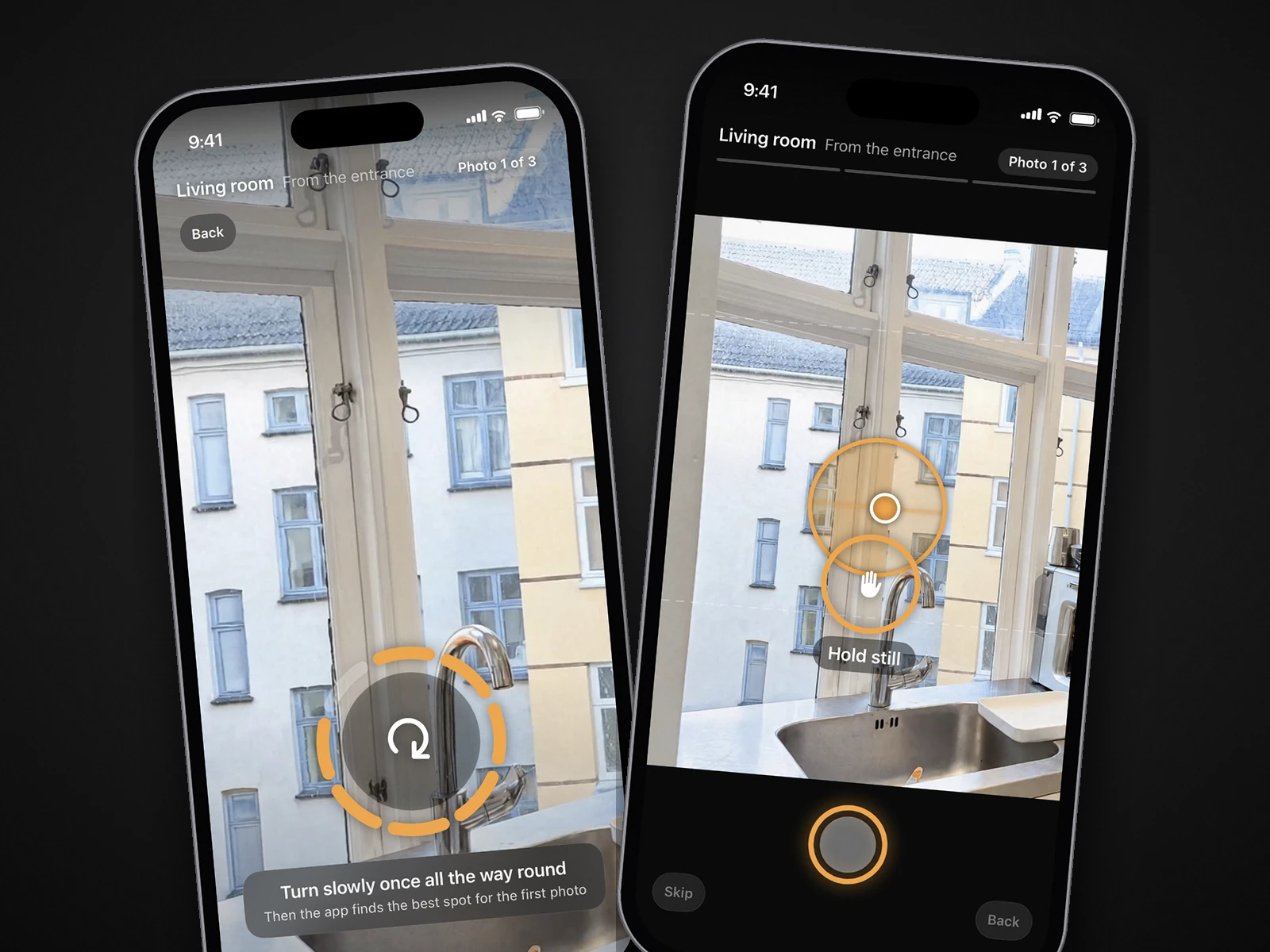
Yes, there is one: the October iPhone app starts a space with one slow turn on the spot to find where you are, then an arrow and the distance lead you to the photographer's spot, and it keeps the phone level and still and takes the photos itself, at three spots per room. Most apps sold as guided real estate cameras guide something else: SnapSnapSnap gives a grid with auto-level and RealtyCam locks vertical lines, Ovvy and Exposio automate exposure for the shot you aim and tap, HauShot coaches height and angle by voice, PropLens gives a shot list with on-screen guidance for level, lighting and composition, Listing Candy (formerly LensCasa) guides framing room by room, Listing Camera adds a grid and level line, ListKit and ListingPix leave the shot to you and edit it afterwards, Real Estate Camera AI edits photos you already took, and Zillow 3D Home builds a 3D tour rather than listing photos.
By Emil Thomsen, Founder of October · Updated
Reading on Google? Add October to your Preferred Sources to see our guides more often.
How we compared these apps
We read each app's US App Store listing and its own website on October 22, 2026 (October 27 for PropLens, Listing Candy, Listing Camera, ListKit and ListingPix) and wrote down exactly what each says its camera does while you shoot. We did not buy edits from the other apps or shoot with them, so this is compared from public pages, not tested, and there are no scores. Where a page doesn't mention a feature, the table says "not stated" rather than guessing.
A level is not the same as telling you where to stand
Three different things get called guidance, and the difference matters more than any feature list:
- A level or grid overlay shows whether the phone is straight. It keeps walls vertical, which is the most visible mistake in phone listing photos, but it says nothing about where in the room you should be. The iPhone has one built in: Apple's guide says you can turn on Grid and Level in Settings > Camera to help you straighten and compose your shot.
- Automatic exposure and settings decide how the photo is taken once you have aimed: brackets of exposures blended for bright windows, presets for interiors. This is what most real estate camera apps automate.
- Positioning guidance decides where you stand and which way you point: the corner, the doorway, the height. That is the photographer's judgement, and it is the part almost no app takes on.
A fourth question is whether the app presses the shutter for you. In most of the apps below you aim and tap; the camera then fires a burst. Only one app here says it takes the photo itself once the shot is right.
The apps, by the guidance they actually give
| App | Level or framing aid | Tells you where to stand | Takes the shot itself | Price (Oct 2026) | Platform |
|---|---|---|---|---|---|
| October | On-screen level; tells you to turn only the phone, not your body; asks again if a frame leans | Yes: one slow turn on the spot, then an arrow and the distance to each of three spots per room | Yes, when the phone is level and still | $49 photos, $99 with walkthrough, $199 with 4K, per place of up to 6 rooms; first place free | iPhone 12 or newer |
| SnapSnapSnap (BoxBrownie) | Grid with auto-level (added 2022); shake detection (added 2024) | No; BoxBrownie calls it point and shoot | No; you tap, the camera blends a bracket | Free app; US$1.60 a photo enhanced by BoxBrownie, US$4 day to dusk | iOS 15+ |
| RealtyCam (julius.app) | VLock: a live preview guide that locks verticals straight | Not stated | Not stated | Free with watermarked exports; Pro $19.99 a month or $119.99 a year | iOS 16+, iPhone |
| Real Estate Camera AI (realestatecamera.app) | None at capture; it straightens a tilted shot afterwards | No | No; you take or pick a photo, then edit it | 2 free credits; 20 credits $9.99; Pro $19.99 a month for 50 credits | iOS 16.4+, Android, web |
| Ovvy | Virtual Tripod: "use the guide for perfect framed photos"; exposure, leveling and composition automatic | No; "Just take rough aim" | No; "aim and tap" | $2 a photo, or $29 a month for 30; 20 free photos | iOS 17.6+ |
| Exposio | Lens set "not too wide nor too close"; no level mentioned | No | No; up to 27 shots with a single tap | Free with watermark; $0.99 an HDR photo; Exposio Pro $9.99 | iOS 16+, Android |
| HauShot | Voice coaching room by room: "height, angle, lighting" | Partly: spoken advice on height and angle, no spot shown | Not stated | In-app: Agent $29.99, Airbnb Host Pack $9.99 | iOS 17+ |
| PropLens | Shot list from the property's layout; on-screen guidance for level, lighting, perspective and composition | Partly: a shot list per room, no spot shown | Not stated | Free to shoot; AI edits and staging use credits, trial credits included | iOS 15.1+, Android |
| Listing Candy (formerly LensCasa) | Guided capture room by room: live on-screen guidance on framing, automatic camera settings | Not stated; the guidance is about framing | Not stated | $99 a listing, or as little as $39 on its plans | iOS 26+ |
| Listing Camera | Composition grid and level line | No | No; you shoot, AI enhances in the background | 5 free enhancements; Pro $19.99 a month for 50 credits | iOS 18+, iPhone and iPad |
| ListKit | Not stated | Not stated | Not stated; editors finish the photos | 1 free listing; $44.99 a month for 1 listing on its site | iOS 17+ |
| ListingPix | Not stated; five HDR exposures a shot | Not stated | No; you snap, AI edits in the cloud | Credit packs from 5 for $5.00 | iOS 16+ |
| Zillow 3D Home | Warns if your 360° camera isn't in 360 mode | Not for listing photos; it builds a 3D tour | Not stated | Free | iOS 26+; 360° camera for floor plans |
Read across the third column. Every app except October leaves the spot to you; HauShot and PropLens come closest, one by talking you through height and angle, the other with a shot list for each room. Read the second column too: SnapSnapSnap, RealtyCam, Ovvy, PropLens and Listing Camera do give you a real aid for straight walls, which is worth having whichever app you pick.
What each app's guidance really is
SnapSnapSnap (BoxBrownie). A free camera that sends your photos to BoxBrownie's editors. The App Store's version history lists "Added grid to camera with auto-level" (December 2022) and "Added Shake Detection" (June 2024). BoxBrownie's launch post says the app sets the camera presets for real estate and that each shot takes 45 to 70 photos, combined into one; its own description of the process is "you point and shoot". We found no feature on its listing or BoxBrownie's posts that tells you where to stand.
RealtyCam. Serenity Labs' app, formerly Julius (hence julius.app). Its listing says VLock "provides a live preview guide, locking the verticals in your shot to be perfectly straight", and the site adds a proprietary HDR engine. That is a strong vertical aid. Neither page mentions positioning or automatic capture. 4.5 from 208 ratings.
Real Estate Camera AI. Despite the name, this is an editing app from Block Browser: its listing says it "turns the photos you already shoot into listing photos", with enhancement, decluttering, furniture removal and virtual staging, and it straightens a tilted shot after the fact. It describes no capture guidance at all. Credits are charged per photo: 1 to enhance, 2 to declutter, remove furniture or stage. It has 1 App Store rating so far.
Ovvy. The most automated of the shoot-and-edit apps. Its site calls the level Virtual Tripod and promises "Just take rough aim and tap 1 button"; the App Store says the camera captures "every shot with perfect exposure, leveling, and composition, all automatic, just aim and tap." Composition here means how the shot is set up once you aim, not where you stand. Ovvy says it manually reviews every photo before delivery, and most come back within a few hours, 12 hours or less guaranteed. 4.8 from 60 ratings.
Exposio. An HDR camera: its site says one tap captures up to 27 shots and balances indoor and outdoor light, and that it adjusts the lens so the room is "not too wide nor too close". It can stitch a wide shot on phones without a wide lens. No level or positioning guidance is described. 4.7 from 635 ratings, the most of the shoot-and-edit apps here.
HauShot. The one app besides October that coaches how you take the shot, not only how it is processed: "Real-time AI voice coaching guides you room by room — height, angle, lighting," says its listing. It is spoken advice, not a spot on screen, and it has no App Store ratings yet.
PropLens. The phone app of Virtual Staging Art (SUMAAI Inc.). Its page says you give it the property's layout and it prepares a shot list, then on-screen guidance helps with level, lighting and composition as you shoot photos and walkthrough videos; the App Store listing calls it room-by-room capture guidance. That plans what to shoot, not where to stand. AI staging, decluttering and editing follow, with an optional AI-use label on exports. No App Store ratings yet.
Listing Candy (formerly LensCasa). Its site says live on-screen guidance shows how to frame every room while automatic camera settings handle the shot, and that most agents photograph a property in about 15 minutes; the edits come back in under 30 minutes. It does not say it shows a spot or presses the shutter for you. 5.0 from 6 ratings; it needs iOS 26.
Listing Camera. Made by a real estate photographer: a composition grid and a level line help you frame the room, and AI enhancement runs in the background while you walk on, with nothing staged or removed. It describes no positioning guidance. 5.0 from 4 ratings.
ListKit and ListingPix. Both leave the shot to you and do the work afterwards: ListKit's editors finish the photos, most within 24 hours, and make videos from them; ListingPix captures five HDR exposures a shot and edits them with AI in the cloud. Neither describes any guidance while you shoot. 4.5 from 22 ratings and 3.8 from 10.
Zillow 3D Home. Not a listing-photo app. You connect a supported 360° camera from Insta360 or Ricoh, or use the phone to capture panoramas for a virtual tour only, and the app builds an interactive floor plan and tour that post to Zillow, Trulia and Redfin. Its only capture guidance on the listing is a check that the 360° camera is in 360 mode. Free; it now needs iOS 26.
Two more guided apps the AI answers leave out
- Aetheos Home (Aetheos Technologies) is the closest to a shot list: its listing says the camera "shows the framing and the sequence of photos needed for each room", with a checklist per room and a level guide, and edited photos come back ready to use. It does not say it shows where to stand or takes the photo itself. Plans in the app from $11.99 to $229.99 a month; not enough ratings to show.
- ProperShot, published by Nodalview, says "sensors and tips will guide you to photograph your spaces looking their best", then edits with AI. Free on the US store; 3.6 from 8 ratings.
And the free option: the iPhone's own Grid and Level do what most overlays do. If an app levels the phone but leaves the spot to you, the rules below are the missing half.
Where to stand if your app doesn't tell you
The rules every photographer works by fit in five lines. Our full guide to taking real estate photos with an iPhone explains each one.
- Stand in a corner or doorway. HousingWire's guide for agents: "stand in a corner or doorway to capture as much of the room as possible."
- Show some of the third wall, not all of it. Virtuance: no third wall leaves buyers wondering where the room leads; too much "will make the room feel smaller than it actually is."
- Hold the phone at about chest height. HousingWire recommends about 5 feet. Go lower in kitchens and dining rooms: Virtuance shoots kitchens at countertop height and dining rooms at table height.
- Keep verticals vertical. "Verticals need to be just that, vertical" (Virtuance). Turn on the iPhone's Level and keep the phone upright; lower it instead of tilting it.
- Shoot each main room from two or three spots: from the entrance, from the far end looking back, and from a corner.
October: the app that leads you to the spot and takes the photo
October was built around the third column of the table. In a room, the October app first asks you to turn slowly once all the way round on the spot; then it finds the best spot for the first photo and an arrow with the distance leads you there. At the spot it keeps the phone level and still, tells you to turn only the phone and not your body, and takes the photos itself when the shot is right. It does that at three spots per room (from the entrance, from the other end, from a corner), tells you on the spot if a frame is leaning or repeats the last one, and in a small room adapts the spots or leaves out a corner shot that can't be made.
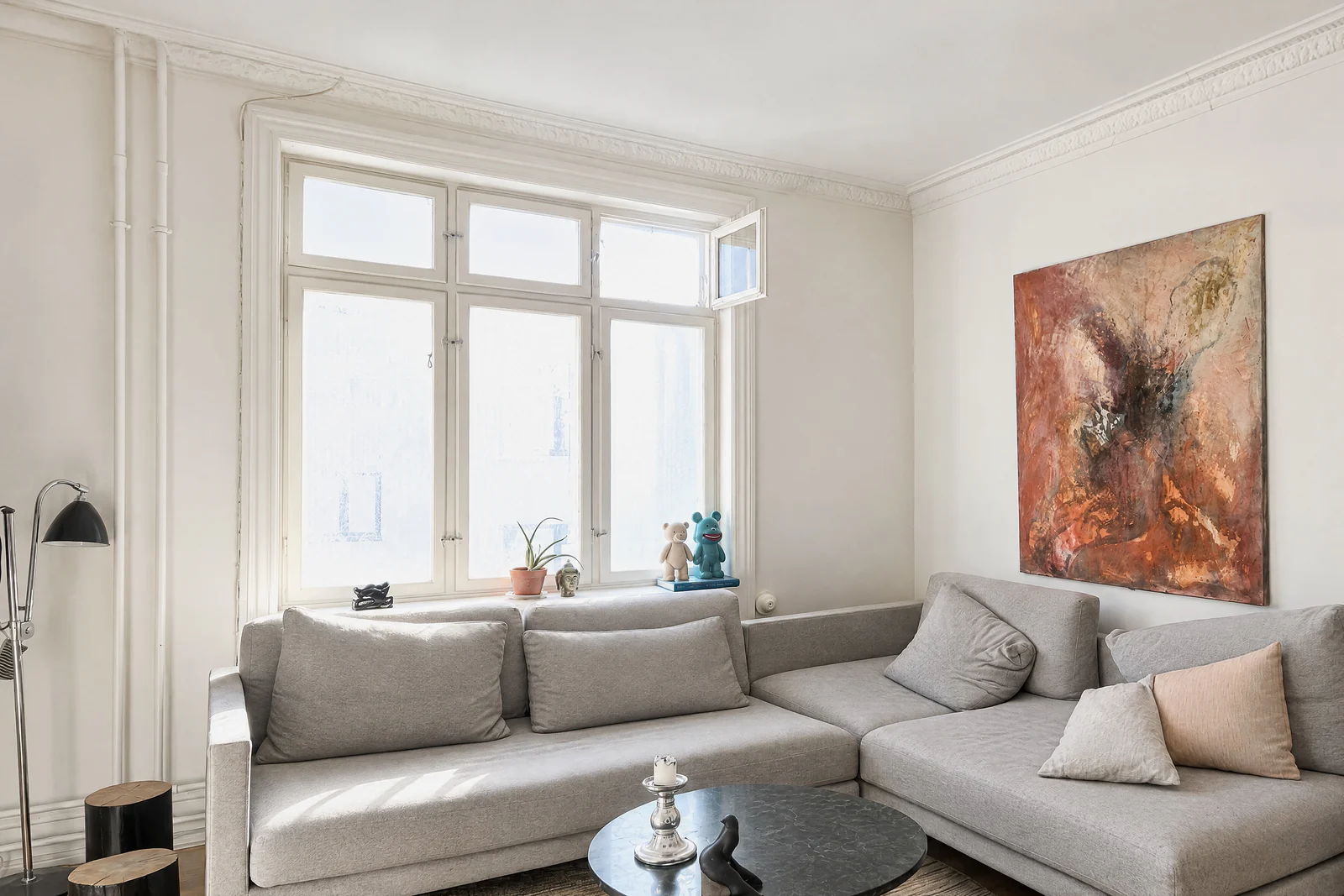
Then October stitches the frames from each spot into one wide view, and an AI image model draws a new finished photo from it: daylight look, straight lines, and loose items such as bottles, towels, papers and cables left out. The model is told to keep walls, floors, windows, fittings, built-in furniture and the view, and each photo is checked against your capture and redrawn if the room changed. You get the finished photos and an AI-generated walkthrough video in HD or 4K from the same walk, room by room, usually within a few hours. No human review is promised, so check each photo before you publish and label it as AI-altered where your MLS requires. If a room can't be made, you are told, and places you didn't need go back to your account.
It costs $49 a place for photos, $99 with a walkthrough and $199 with a 4K walkthrough, where a place is up to 6 rooms, and your first place is free. It runs on iPhone 12 and newer; there is no Android app yet. Full prices are on the pricing page.
Which app fits
- You want to be told where to stand, and have the photo taken for you: October.
- You know where to stand and want straight walls plus marketing tools: RealtyCam, for VLock, property websites and flyers.
- You know where to stand and want a person to edit each photo: Ovvy ($2 a photo, manual review) or SnapSnapSnap (US$1.60 a photo from BoxBrownie). For 20 to 30 photos of one home, both cost less than October.
- You want in-app HDR now, with no person in the loop: Exposio.
- You want someone talking you through the shoot: HauShot. For a written shot list per room instead, PropLens.
- You want framing guidance room by room and edits back within half an hour: Listing Candy (formerly LensCasa).
- You already took the photos: Real Estate Camera AI edits them; no capture app will help after the fact. See our roundup of real estate photography apps.
- You need a 3D tour on Zillow: Zillow 3D Home with a 360° camera, alongside one of the photo apps. Our October vs Matterport and Zillow 3D Home comparison covers when that's worth it.
Questions
Is there an app that tells you where to stand to take real estate photos?
Yes. The October iPhone app starts a space with one slow turn on the spot, then shows an arrow and the distance to the photographer's spot, three spots per room. Most other real estate camera apps (SnapSnapSnap, RealtyCam, Ovvy, Exposio) level the phone and handle exposure but leave the spot to you; HauShot coaches height and angle by voice.
Is there an app that takes real estate photos for you automatically?
Several automate the settings: Ovvy, Exposio and SnapSnapSnap blend a burst of exposures after you aim and tap. October goes further: it takes the frames itself when the phone is level and still at the right spot, then an AI image model draws the finished photos from that capture, usually within a few hours.
What is a guided real estate photo app?
An app that helps while you shoot, not only after. The guidance ranges from a level or vertical lock (SnapSnapSnap, RealtyCam, Ovvy, Listing Camera), to framing guidance or a shot list per room (Aetheos Home, Listing Candy, PropLens), to voice coaching (HauShot), to leading you to each spot and taking the photo (October).
Does the iPhone camera have a level?
Yes. Apple's guide says you can turn on Grid and Level in Settings > Camera to help you straighten and compose your shot. It keeps walls straight but doesn't tell you where to stand.
Does Zillow 3D Home take listing photos?
No. It builds an interactive 3D tour, and with a supported 360° camera a floor plan, that posts to Zillow, Trulia and Redfin. You still need still photos for the listing.
Did you test these apps?
No. This page is compared from App Store listings and the apps' own sites, checked on October 22, 2026, and on October 27 for PropLens, Listing Candy, Listing Camera, ListKit and ListingPix. Only October is described first-hand, because we make it.
Sources
- SnapSnapSnap – App Store listing (grid with auto-level, shake detection, iOS 15+, 4.2 from 64 ratings)
- BoxBrownie – SnapSnapSnap launch post (February 2023: presets, 45 to 70 photos a shot, point and shoot)
- BoxBrownie – 5 steps for creating an irresistible listing on a budget (April 2026: US$1.60 a photo, US$4 day to dusk)
- RealtyCam – App Store listing (VLock live preview guide, Pro $19.99/mo or $119.99/yr, iOS 16+, 4.5 from 208 ratings)
- RealtyCam – website (VLock, HDR engine, Pro pricing)
- Real Estate Camera AI – App Store listing (editing of photos you shoot, credits, iOS 16.4+, Block Browser INC)
- Real Estate Camera – website (credit packs, plans, web, iOS and Android)
- Ovvy – website (Virtual Tripod, rough aim, manual review, 12 hours)
- Ovvy – App Store listing (exposure, leveling and composition automatic, $2 a photo, iOS 17.6+, 4.8 from 60 ratings)
- Exposio – website (27 shots a tap, lens, stitching)
- Exposio Real Estate Camera – App Store listing (prices, iOS 16+, 4.7 from 635 ratings)
- HauShot – App Store listing (voice coaching on height, angle, lighting; in-app prices; iOS 17+)
- Zillow 3D Home – App Store listing (360° cameras, panoramas for tours only, free, iOS 26+)
- Aetheos Home – App Store listing (framing and photo sequence per room, level guide, plans)
- ProperShot – App Store listing (sensors and tips, free, 3.6 from 8 ratings)
- PropLens: AI Property Camera – App Store listing (shot plans, room-by-room capture guidance, iOS 15.1+, no ratings; checked October 27, 2026)
- PropLens – Virtual Staging Art mobile app page (shot list, guidance for level, lighting and composition, credits; checked October 27, 2026)
- Listing Candy: Real Estate – App Store listing (formerly LensCasa; guided capture, iOS 26+, 5.0 from 6 ratings; checked October 27, 2026)
- Listing Candy – website (on-screen framing guidance, 15-minute shoot, edits in under 30 minutes, prices; checked October 27, 2026)
- Listing Camera - Real Estate – App Store listing (grid and level line, iOS 18+, 5.0 from 4 ratings; checked October 27, 2026)
- Listing Camera – website (how it works, pricing; checked October 27, 2026)
- ListKit: Real Estate Photos – App Store listing (editors, videos, iOS 17+, 4.5 from 22 ratings; checked October 27, 2026)
- ListKit – website (24-hour edits, $44.99 a month for 1 listing credit; checked October 27, 2026)
- ListingPix: Real Estate Camera – App Store listing (credit packs, iOS 16+, 3.8 from 10 ratings; checked October 27, 2026)
- ListingPix – website (five HDR exposures a shot, cloud AI editing; checked October 27, 2026)
- Apple, iPhone User Guide: Use iPhone camera tools (Grid and Level)
- HousingWire, 11 DIY real estate photography tips every agent should know (April 2025: 5 ft, corner or doorway)
- Virtuance, Professional real estate photos (third wall, countertop and table height, verticals)