

Guides · Roundup
The best real estate photography apps for iPhone in 2026, compared
The best real estate photography app for your iPhone depends on what you want back: Ovvy, Realty Pro Shots, SnapSnapSnap and ListKit send the photos you take to editors, Roomify, ProntoPic, Lumo, CurbShot, Real Estate Camera AI, Home List AI and Homy enhance photos you already have, Stageflow stages them with a disclosure record, HauShot coaches you by voice while you shoot, PropLens gives you a shot list and on-screen guidance, Listing Candy (formerly LensCasa) guides you room by room and edits within half an hour, Listing Camera and ListingPix enhance each shot with AI as you go, Exposio, Cimm and RealtyCam do HDR in the app, ImmoPhoto adds AI retouching and LiDAR floor plans, Nodalview adds tours and floor plans, October guides the whole capture and returns AI-generated photos drawn from it plus an AI walkthrough video, usually within a few hours, and Lightroom or Snapseed are for doing the editing yourself. This is a roundup of 27 apps compared from their public pricing pages and App Store listings, checked on October 20 to 27, 2026, not a hands-on test.
By Emil Thomsen, Founder of October · Updated
Reading on Google? Add October to your Preferred Sources to see our guides more often.
How we compared these apps
We read each app's App Store listing (US store) and, where one exists, its own pricing page, and wrote down what it does, what it costs, which devices it needs and what it leaves out. We did not buy edits from the other apps or run our own photos through them, so there are no scores and no ranking here. Prices and features are as of October 2026 and change often; check the listing before you pay.
The apps fall into four groups:
- Capture + editing services: you shoot in their camera app and they send back edited photos (Ovvy, SnapSnapSnap, Realty Pro Shots, ListKit, Nodalview, ProperShot, HauShot, PropLens, Listing Candy, Listing Camera, ListingPix, Exposio, Cimm, RealtyCam, ImmoPhoto).
- AI enhancement and staging of photos you already have: shoot with the normal camera or import, get enhanced or staged photos back (Roomify, ProntoPic, Lumo, CurbShot, Real Estate Camera AI, Stageflow, Home List AI, Homy).
- Guided capture to AI-generated photos and video: the app walks you to each spot and takes the shots, and an AI image model draws the finished photos from that capture, with an AI walkthrough video (October).
- Do-it-yourself editors and 3D tours: Lightroom and Snapseed for editing by hand, Zillow 3D Home for a free 3D tour.
The 27 apps at a glance
| App | What you get | Price (as of Oct 2026) | Needs | Best for |
|---|---|---|---|---|
| October | Guided capture; wide photos drawn by AI from that capture + AI walkthrough video, usually within hours | $49 photos / $99 with walkthrough per place (up to 6 rooms); first place free | iPhone 12 or newer | Photos and video from one walk |
| Ovvy | Camera app + edited photos, staging, twilight, property site | $2 a photo, or $29/mo for 30 photos; 20 free photos | iOS 17.6+ | Edited photos with a manual quality check |
| Roomify | AI enhancement of your iPhone photos, about 3 minutes a listing | $49 a listing, $199 for 5, $499 for 20; first listing free | iOS 15.1+ | Fast results on photos you already took |
| ProntoPic | Web tool: AI enhancement and virtual staging of photos you upload, seconds per photo | $1.50 a photo in credit packs (10 for $15); 2 free credits | Any phone browser; no App Store app | Furnishing an empty room for $1.50 |
| Lumo: AI Real Estate Camera | Shoot or import up to 20 photos, sorted by room; AI enhancement, twilight, sky, staging, branded exports | 5 free enhancements with a badge; Lumo Pro $29.99/mo or $239.99/yr for 500 photos a month | iOS 26+ | Batch-enhancing a whole camera roll in one subscription |
| Real Estate Camera AI | Enhance, declutter, stage in 8 styles, and a listing video made from your photos; staged files labelled | Credits from $9.99 for 20 (1 or 2 an edit); Pro $19.99/mo for 50; 2 free credits | iOS 16.4+; also Android and web | Pay-per-edit staging plus a short listing video |
| Stageflow | Web tool: virtual staging in 30+ styles, marketing templates, and a disclosure record per image | Pro $79/mo billed yearly or $99 monthly, 150 credits; 1 credit a room | Web browser; no mobile app mentioned | Staging with a disclosure link and QR code built in |
| HauShot | Camera with AI voice coaching, automatic editing, staging, twilight, item removal | Free trial: 3 edits + 1 staging; Agent $29.99/mo for 4 properties; Airbnb pack $9.99 a listing | iOS 17+; also Android | Spoken guidance while you shoot |
| CurbShot: Real Estate Photos | Shoot or import; brighten, straighten, declutter, stage; originals kept and an edit note per photo | 5 free photos + 1 staging; packs from $9.99; Pro $19.99/mo or $149.99/yr | iOS 18.2+; also Android | Disclosure wording written for you at export |
| Home List AI Real Estate Photo | AI lighting fix, staging in 4 styles, sky and lawn edits on photos you take or upload | 1 free photo; then $6.99/week, $14.99/mo or $49.99/yr, unlimited edits | iOS 15.1+ | Unlimited AI edits for a low yearly price |
| Homy: AI Home Photo Enhancer | Chat with an AI to declutter, relight, stage or restyle a room photo | Free basic edits with a watermark; Premium $6.99/week, $19.99/mo or $39.99/yr | iOS 15.1+ | Describing the edit in plain words |
| SnapSnapSnap (BoxBrownie) | Camera app, photos edited by BoxBrownie | US$1.60 a photo enhancement, US$4 day to dusk | iOS 15+ | BoxBrownie users who want its full edit menu |
| Realty Pro Shots | Camera app with bracketing, photos blended by human editors, under 24 hours | $2 a photo; 10 free | iOS 15.1+; also Android | Human-edited HDR at a low per-photo price |
| ListKit: Real Estate Photos | Camera app, photos edited by its editors ('Most edited photos are returned within 24 hours'), then a landscape and a portrait video from the edited photos | 1 free listing credit; $44.99/month for 1 listing credit or $499.99/year for 12 ($41.67 each) on its site; $49.99/month or $569.99/year in the US App Store | iOS 17+ | Human-edited photos plus a listing video at one price per listing |
| Listing Candy (formerly LensCasa) | Guided capture room by room; enhancement, staging, twilight, object removal; videos and reels from the photos ('Full photo edits are delivered in under 30 minutes') | $99 a listing with no subscription; plans bring it down to as little as $39 a listing, its site says | iOS 26+ | Photos, staging and a video from one app within the hour |
| Listing Camera - Real Estate | Camera with grid and level line; AI enhancement runs in the background, 30-40 seconds a photo, its site says; no staging by design | 5 free enhancements; Pro $19.99/month or $179.99/year for 50 credits a month that roll over; 25 more for $7.99 | iOS 18+; iPhone and iPad | Enhancement only, with nothing added to the home |
| ListingPix: Real Estate Camera | HDR camera; AI editing in the cloud (window pull, sky, colour, perspective) and virtual staging, delivered instantly, its site says; pay only for the photos you keep | Credit packs in the US App Store: 5 for $5.00, 25 for $20.00, 100 for $60.00, 500 for $200.00; staging from $3 an image, its site says | iOS 16+ | Paying only for the shots you download |
| PropLens: AI Property Camera | Shot list per property, on-screen guidance for level, lighting and composition; AI staging, declutter and edits; walkthrough video; optional AI-use label | Free to shoot; AI edits and staging use credits, trial credits included; no in-app prices in the US App Store | iOS 15.1+; also Android | A shot list and an AI-use label on every export |
| Nodalview | HDR photos, video, 360° tours, floor plans, AI staging | Credits: 20 for $28.99, 40 for $55; plans on request | iOS 17+; also Android | Agencies that want one platform with tours |
| ProperShot | Guided capture with AI editing and mood settings | Free download; no prices listed | iOS 15+ | Trying guided capture at no upfront cost |
| Exposio Real Estate Camera | HDR + wide-angle camera, AI staging, sky and twilight, Motion videos | Free with watermark; $0.99 an HDR photo, credit packs, or Exposio Pro $9.99/mo | iOS 16+; also Android | In-app HDR with staging and video add-ons |
| Cimm Real Estate Camera | HDR exposure blending + blue-sky replacement | $0.99 an HDR photo; credit packs | iOS 12+ | Cheapest per-photo HDR |
| RealtyCam | HDR camera with VLock vertical lines, AI eraser, twilight, staging, property websites and flyers | Free with watermarked exports; Pro $19.99/mo or $119.99/yr | iOS 16+; iPhone only | Straight verticals plus listing marketing in one app |
| ImmoPhoto: Real Estate Camera | Camera with framing guides by room type; 8 AI retouches incl. declutter, sky, empty room, staging; LiDAR floor plans | Free for 1 property and 9 photos; Pro $25.99/mo or $259.99/yr in the US App Store; €19.99/mo on its site | iOS 17+; iPhone Pro for floor plans; web app on Android | AI retouching plus a floor plan from one app |
| Adobe Lightroom | Manual and AI editing, presets, Generative Remove | Free; Lightroom plan $9.99/mo in the app | iOS 18+ | Agents who edit themselves |
| Snapseed | Free editor with perspective, healing, curves | Free, no ads or watermarks | iOS 17+ | Free straightening and touch-ups |
| Zillow 3D Home | 3D tours and interactive floor plans | Free | iOS 26+; 360° camera for floor plans | A free 3D tour on Zillow |
For these apps next to AI editors, editing services, staging, tour and video tools in one table, see all real estate photo apps and services compared.
October: guided capture, AI-generated photos and a walkthrough video
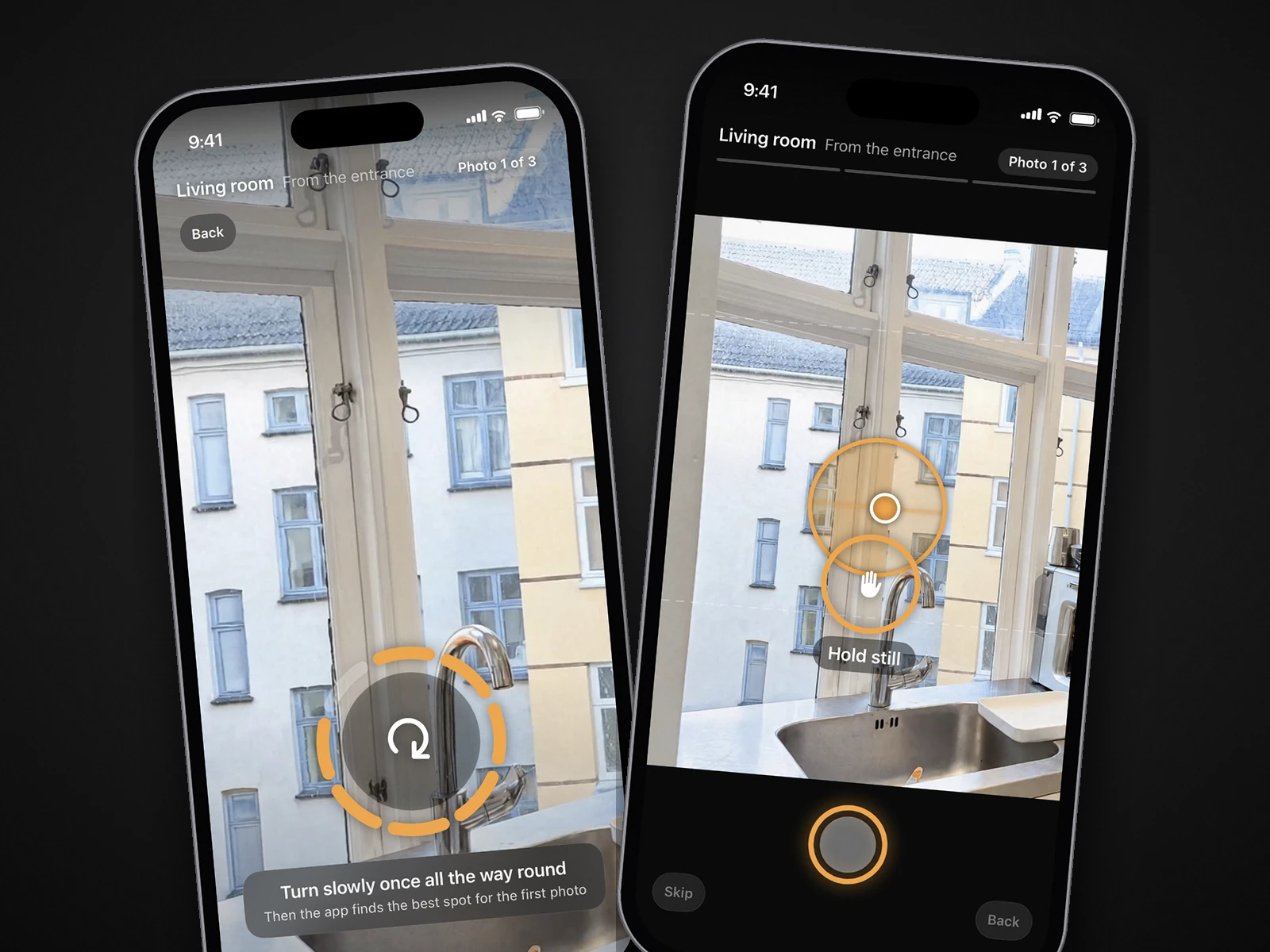
October is an iPhone app plus an AI photo service. The app shows you the photographer's spot with an arrow and the distance, takes you to three spots in each room (from the entrance, from the far end, from a corner), keeps the phone level and takes the photos itself. October stitches the frames into one wide view, and an AI image model (OpenAI's GPT Image) draws each finished photo new from it: daylight light, straight lines, beds made, and loose items such as bottles, towels and cables left out. Nothing of the phone photo is pasted back. The model is told to keep walls, floors, windows, fittings, built-in furniture and the view as captured, and each photo is checked against the capture and redrawn if the room changed. The walkthrough is AI-generated motion (Kling) between each room's finished photos. Results usually arrive within a few hours.
- Price: $49 per place for photos, $99 with a walkthrough video, $199 with a 4K walkthrough. A place is up to 6 rooms. Plans: Start $149/month (2 places), Pro $399/month (6 places). Your first place is free. See pricing.
- Platform: iPhone 12 or newer. No Android app yet.
- Best for: anyone who wants listing photos and a walkthrough video from the same walk, without knowing where to stand: agents, hosts, hotels, venues.
- Limits: works from captures made in the October app, so you cannot send it photos you already took. Every photo is AI-generated, so label it as AI-altered where your MLS or state requires (see the note at the end), and check each photo before you publish, since AI can get a small detail wrong. The download includes the unaltered original of every photo, to link or provide where your MLS or state requires. No human editor review is promised.
 As captured
 Delivered by October
Ovvy
Ovvy is a camera app plus an editing service. Its camera handles exposure and leveling and captures several exposures per shot; you submit the photos and get edited versions back. It also offers virtual staging, virtual twilight, a shareable property website and a generated listing description. Ovvy's website says it manually reviews all photos before delivery and guarantees 12 hours or less for most photos.
- Price: $2 a photo pay-as-you-go, or Pro at $29/month for 30 photos. 20 free photos when you sign up.
- Platform: iPhone (iOS 17.6 or later), plus a web dashboard.
- Best for: agents who want each photo edited with a person checking it, and like having staging and twilight in the same app. For a photos-only shoot of 20 to 30 photos it is cheaper than October.
- Limits: photos must be taken in the Ovvy app. Results take hours, not minutes. No video.
Roomify
Roomify enhances photos you take with your iPhone, or import, with AI: lighting, colour and clarity. Its listing says it returns MLS-ready photos in about three minutes per listing, allows up to 150 photos per listing with five free re-runs per photo, and can publish a single-property website. It states that it improves real photos and does not fabricate rooms.
- Price: $49 a listing, $199 for 5 listings, $499 for 20. No subscription. First listing free.
- Platform: iPhone (iOS 15.1 or later), so it runs on older iPhones than Ovvy or October.
- Best for: the fastest turnaround, big listings with many photos, and photos you have already taken. Our Ovvy vs Roomify vs October comparison goes deeper.
- Limits: no guided capture, so composition is up to you. No video. Very few App Store ratings so far.
ProntoPic
ProntoPic is not an App Store app but a website you use from the phone's browser: upload a photo, wait a few seconds, download the enhanced version. Its site says enhancement stays within lighting, colour, exposure and decluttering and never removes permanent features, that most photos finish in 6 to 12 seconds, and that it can virtually stage an empty or lightly furnished room in a chosen style in under a minute, with a "Virtually Staged" disclosure on every staged image. It is aimed at listing agents and short-term rental hosts and, as of October 2026, reports 650+ users and 1,800+ photos enhanced.
- Price: $1.50 a photo, bought as credits: 10 for $15, 25 for $37.50, 50 for $75. No subscription, credits do not expire, and staging costs the same 1 credit per room. 2 free credits when you sign up, no card needed.
- Platform: web only. We found no iPhone or Android app in the App Store or on its site; it accepts JPG, PNG and WebP up to 10 MB.
- Best for: the cheapest way to furnish an empty room, and quick enhancement of a few photos without a subscription.
- Limits: no camera or guided capture, no video, and it is a small, new service with few public reviews. Staged photos must carry its disclosure, and staging counts as an alteration under the rules at the end.
Lumo: AI Real Estate Camera
Lumo is an iPhone camera and AI editor from a single developer in New York. You shoot in its camera or import up to 20 photos at once from the camera roll; the app sorts them into rooms (kitchen, living room, bedrooms, exterior and so on), and one tap enhances each photo in under 30 seconds, according to its listing. For exteriors you choose Bright Day, Golden Hour or Twilight and can replace a grey sky; for empty rooms it offers virtual staging in Modern, Traditional or Minimalist style and spots the empty rooms in a batch by itself. Staged photos and new skies export with a "Virtually Staged" label by default. It also exports in MLS, listing-site and social sizes, builds a PDF listing report by room and drafts an MLS description. The listing says it is designed to keep the room as shot, with no moved walls or swapped fixtures, and that photos are processed by Lumo's server and OpenAI.
- Price: free with 5 photo enhancements and 1 listing; free exports carry a small Lumo badge. Lumo Pro is $29.99 a month or $239.99 a year in the App Store, for up to 500 enhancements and 50 listings a month, your branding on exports and no badge. No per-photo price.
- Platform: iPhone only, and it requires iOS 26 or later (the App Store listing and Lumo's site agree), so an iPhone that cannot take the current iOS is out. No Android app.
- Best for: enhancing a whole camera roll at once, sorted by room, with twilight and staging in the same subscription.
- Limits: new and little reviewed: 4.3 from 6 App Store ratings as of October 2026, first released in April 2026. No guidance on where to stand, no video. Staging, sky and twilight edits are alterations under the rules at the end, and your photos go through a third-party AI service. If your iPhone cannot run iOS 26, see Lumo alternatives.
Real Estate Camera AI
Real Estate Camera AI ("Real Estate Camera AI: Staging" in the App Store, from Block Browser Inc.) turns phone photos into listing photos in 20 to 60 seconds, its site says. Enhance (1 credit) fixes the light and straightens verticals; Declutter (2 credits) takes the furniture out and rebuilds the floor and walls behind it; Virtual staging (2 credits) furnishes an empty room in one of eight styles, from Modern and Scandinavian to Japandi. Every staged file comes back labelled virtually staged, with the original kept beside it in the project. It can also turn the finished photos into a listing video with music, a title card and an end card, as a 9:16 Reel or 16:9, where each photo becomes an AI-generated walkthrough clip (2 credits a clip). The site says walls, windows and doors stay where they are, visible damage stays visible and a grey sky stays grey, and that failed edits refund their credits.
- Price: first 2 credits free, enough to stage one room. Packs that never expire: 20 credits for $9.99, 60 for $24.99, 150 for $49.99, 400 for $149.99. Monthly: Pro $19.99 for 50 credits, Business $49.99 for 150.
- Platform: iPhone and iPad (iOS 16.4 or later), Android, and a web app on the same account and balance.
- Best for: paying per edit for staging and decluttering, with a short social video from the same photos.
- Limits: very new, with 1 App Store rating as of October 2026. No guidance on where to stand. The video clips are AI-generated from stills, not filmed, so check them against the rooms. Declutter and staging are alterations under the rules at the end.
Stageflow
Stageflow is a web platform for virtual staging, not a camera: you upload room photos, pick one of more than 30 designer styles and get a staged room in about 60 seconds, by its own account. Around the staging it has Studio (logos, listing data and headlines on the images), Kit (social tiles, flyers, postcards and a property video for each stage of a listing, through to Just Sold) and Verify, which attaches a verification URL, QR code, audit trail and MLS-ready disclosure language to each published image and stores them for 3 years. It says Verify supports California's AB 723 and also works with photos staged elsewhere.
- Price: Pro is $79 a month billed yearly or $99 monthly, with 150 credits a month, 4K exports, batch staging and a team workspace, according to its FAQ; one staged room, style variation or new angle is 1 credit. The pricing page also offers other credit tiers, from 50 to 10,000 a month, so check the amount before you pay. Enterprise is quoted.
- Platform: web app in the browser; the site mentions no iPhone or Android app.
- Best for: agents who stage on the web and want the disclosure link and QR code made for them.
- Limits: no camera, guided capture or photo enhancement listed, and no public ratings we could find. The disclosure record is the vendor's tool, not a ruling that an image complies; staging is still an alteration under the rules at the end.
HauShot
HauShot is a camera app with a voice in it: while you shoot, an AI coach talks you through each room, telling you about height, angle and lighting. The photos are then edited automatically (white balance, brightness, perspective correction, "done in minutes" according to the listing), and the app adds virtual staging, twilight conversion, item removal and AI listing copy. If an edit goes wrong you can re-run it or touch up areas by hand. It is made by CNK Marketing in Sydney, which says it draws on 15 years of real estate photography, and its site promises "10 minutes to shoot, 10 minutes to deliver". Photos are deleted from its servers within 24 hours, the site says.
- Price: a one-time free trial of 3 AI edits and 1 virtual staging, no card needed. Plans on the site: Agent $29.99 a month for 4 properties with 8 photos each (2 stagings and 2 twilight conversions per property), Agency $79.99 for 12 properties with a team account, Studio $149.99 for 25. Airbnb hosts can buy a $9.99 one-time pack per listing (15 edits, 2 twilights) instead of subscribing, and extra credits (10 for $9.99 in the App Store) never expire.
- Platform: iPhone (the App Store says iOS 17 or later; the site's FAQ says iOS 15) and Android.
- Best for: someone who wants spoken coaching on where to stand and how to hold the phone, with the editing done afterwards without a photographer.
- Limits: brand new, released July 2026, with no App Store ratings yet as of October 2026. Photos are counted per property (8 on the Agent plan), the coaching needs the microphone, and staging, twilight and item removal are alterations under the rules at the end. No video.
CurbShot: Real Estate Photos
CurbShot (the App Store entry called "CurbShot: Real Estate Photos", not the unrelated contractor-invoicing app named Curbshot) edits photos on the phone: shoot in its camera, which has a live tilt readout, or import, and it brightens dim rooms, balances blown-out windows, fixes flat colour and straightens leaning verticals in seconds. It can furnish an empty room with two staging options to choose between, and declutter three ways: tidy up, tap the items you want gone, or empty the room while keeping curtains, windows, outlets and built-ins. Two things set it apart: every original is archived untouched and can go into the export beside the edited photo, and every export folder carries a note with one line per photo, such as "Light and colour corrected" or "Digitally altered: virtually staged with furniture that is not in the property", written to paste into a caption or MLS remarks. The listing says it will not add, remove or move walls, windows or doors, conceal damage or invent a view, and that it needs no account and keeps no photos on its servers.
- Price: free to start with 5 photos and 1 staging session, no account. Credit packs that never expire: Listing Pack $9.99, Host Pack $14.99 (the listing does not say how many credits each holds). CurbShot Pro is $19.99 a month or $149.99 a year for 100 photo credits a month (about 33 enhanced photos or 3 emptied rooms, by its own count) plus 8 staging sessions.
- Platform: iPhone and iPad (iOS 18.2 or later) and Android.
- Best for: agents who want the disclosure wording handed to them with each photo, and the originals kept alongside.
- Limits: brand new (released August 2026) from a single developer with no website beyond a privacy-policy page, and no App Store ratings yet as of October 2026. No guidance on where to stand, no video. Declutter and staging are alterations; the app's notes help you disclose them but do not decide for you.
Home List AI Real Estate Photo
Home List AI ("Home List AI Real Estate Photo" in the App Store, from developer Dogan Turan; its website, homelistai.com, links to the same app) is an AI editor for photos you take or upload. You pick Lighting, Staging, Sky or Garden, preview the before and after, and download. Lighting fixes dark interiors and balances colour; staging furnishes an empty room in Modern, Traditional, Minimalist or Luxury style; Sky and Garden swap in a blue sky and greener lawns for exteriors. The listing promises batch processing of 20 to 30 photos at once, 4K exports and unlimited enhancements on every plan.
- Price: 1 free photo, then $6.99 a week, $14.99 a month or $49.99 a year in the US App Store, all with unlimited enhancements.
- Platform: iPhone (iOS 15.1 or later). We found no Android app.
- Best for: the lowest yearly price on this list for unlimited AI lighting fixes and staging, if the results hold up on your photos.
- Limits: 1 App Store rating (1 star) as of October 2026; released November 2025 and last updated in April 2026. No guidance while you shoot, no video, and the listing says nothing about labelling staged photos or keeping the originals. Staging, sky and lawn edits are alterations under the rules at the end.
Homy: AI Home Photo Enhancer
Homy ("Homy: AI Home Photo Enhancer" in the App Store, from developer Engin Can Kurt) edits a room photo by chat: you take or upload the photo, pick the space type and tell the AI what to change, for example "Remove the vacuum". Its listing says it can declutter and remove furniture, improve exposure and colour balance, stage an empty room, and redesign or restyle a room. It is pitched at agents, Airbnb hosts, interior designers and homeowners alike.
- Price: free to download with basic edits; Homy Premium (unlimited enhancements, high-resolution downloads, no watermark) is $6.99 a week, $19.99 a month or $39.99 a year in the US App Store.
- Platform: iPhone (iOS 15.1 or later). No website beyond its terms and privacy pages, and we found no Android app.
- Best for: trying chat-style edits on a few photos before paying.
- Limits: 1 App Store rating as of October 2026, a 1-star review saying the app did not work, and no update since October 2025. Redesigning or restyling can change the room itself, which a listing photo must not do; removing objects and staging are alterations under the rules at the end, and the listing says nothing about labels or originals. No camera guidance, no video.
SnapSnapSnap by BoxBrownie
SnapSnapSnap is BoxBrownie's free iPhone camera. You point and shoot with automatic HDR, then send the photos you want edited to BoxBrownie through the app. Standard edits come back in 24 hours and virtual staging in 48 hours, according to the listing. BoxBrownie's launch post said the camera takes 45 to 70 photos per shot and combines them into one image.
- Price: free download, no subscription. US$1.60 per photo for image enhancement and US$4 for a day-to-dusk edit (BoxBrownie, April 2026). Staging and item removal are priced separately.
- Platform: iPhone and iPad (iOS 15 or later).
- Best for: agents already using BoxBrownie who want its full menu (enhancement, item removal, day to dusk, staging) from the phone. See October vs BoxBrownie.
- Limits: a day's wait. No video. You choose where to stand.
Realty Pro Shots
Realty Pro Shots, from Imagery Intelligence, is a camera app with a human editing service behind it. The app guides each shot and captures several bracketed exposures with one tap; the photos upload to the company's editors, who blend the exposures, clean up the room and enhance details, and the finished images come back by email. Its site lists blacking out TV screens, adding a fireplace flame, replacing skies and general cleanup as included. The App Store listing offers rush delivery in 2 hours for photos submitted between 8am and 8pm CST; the site says under 24 hours, or same day if submitted by 6pm CST.
- Price: free app, $2 per edited photo, and you pay only for the photos you submit. 10 free images for new users.
- Platform: iPhone (iOS 15.1 or later) and Android (Google Play).
- Best for: human-edited HDR photos, with sky replacement included, at the lowest per-photo price on this list for a service with editors.
- Limits: only 7 App Store ratings as of October 2026 (5.0 average), so little public track record. Sky replacement and cleanup are alterations that may need disclosure. No video, no staging listed.
ListKit: Real Estate Photos
ListKit ("ListKit: Real Estate Photos" in the App Store, from 615 Media Group in Nashville, which renamed its Go 615 app ListKit in 2024) is a camera app with editors behind it. You photograph the property on your iPhone, choose the photos and any add-ons, and send them in; its site says its editors polish every image with cleaner colour, balanced lighting and straightened lines, and the App Store listing adds colour-cast removal, window adjustments and removing you from a mirror. Its site says most edited photos come back within 24 hours. From up to 20 of the finished photos it then makes two videos, a landscape one for the MLS and a portrait one for social media.
- Price: 1 free listing credit, no card needed. On its site, $44.99 a month for one listing credit or $499.99 a year for 12 ($41.67 each), with extra credits at $44.99 or $39.99. In the US App Store the same plans are dearer: $49.99 a month, $49.99 an additional property, $569.99 a year. A credit is one listing of up to 30 photos, with blue skies, colour correction and reflection removal, plus the two videos, and unused credits roll over. Add-ons per photo: declutter $29.99, virtual staging $25.99, digital twilight $20.99.
- Platform: iPhone (iOS 17 or later). We found no Android app.
- Best for: a person editing every photo, and a listing video, at one price per listing.
- Limits: 4.5 from 22 App Store ratings as of October 2026. Most photos take up to a day. Neither its site nor its listing describes guidance on where to stand. The videos are built from your stills, not filmed. Declutter, twilight and staging are alterations under the rules at the end.
Listing Candy (formerly LensCasa)
Listing Candy is the new name of LensCasa: its App Store listing says LensCasa is now Listing Candy, the same app with a new name and look, and lens.casa now forwards to listingcandy.com. It is published by Tennessee Real Estate Media LLC. Its guided camera takes you through the property room by room, with live on-screen guidance on how to frame each room and automatic camera settings, and its site says most agents photograph a whole property in about 15 minutes. The edits (exposure balancing, colour, perspective and lens correction, window pulls) come back in under 30 minutes, it says, and it describes them as corrections to your own photos, not AI-generated replacements. On top of that it offers virtual staging you describe to an AI, virtual twilight, object and glare removal, plain-English edits, and videos and vertical reels made from the photos. You can also import photos you already have.
- Price: $99 a listing with no subscription, or as little as $39 a listing on its plans, its site says; individual enhancements such as object removal, decluttering and staging typically cost $0.50 to $3. In the US App Store: One Listing $99, Full-Time Agent $99 a month or $999 a year, Pro Agent $189 a month or $1,899.99 a year, and credit packs from 20 for $19 to 1,000 for $999.
- Platform: iPhone and iPad (iOS 26 or later). We found no Android app.
- Best for: shooting a listing yourself and getting edited photos, staging and a video from one app the same hour.
- Limits: 5.0 from 6 App Store ratings as of October 2026, and it needs iOS 26. The guidance is about framing each room, not a spot to stand on. Its pages do not say whether the full edit is done by software or by people. Staging, twilight and object removal are alterations under the rules at the end.
Listing Camera - Real Estate
Listing Camera ("Listing Camera - Real Estate" in the App Store, developer Michael Yamin) was made by a Connecticut real estate photographer who, its site says, has shot more than 2,500 homes over almost 20 years. It is a simple camera with a composition grid and a level line: you shoot each room and AI enhancement runs in the background while you move on, tuned separately for interiors, exteriors and scenery, so the set is finished before you leave. It fixes dim and uneven light, harsh shadows, blown windows, colour casts and leaning verticals, and every exterior comes back with a sunny blue sky. It does no virtual staging and, it says, adds or removes nothing in the home; wear and flaws stay visible. You can also import photos you already took, and there is a before and after for every shot.
- Price: 5 free enhancements. Pro is $19.99 a month or $179.99 a year for 50 credits a month that roll over, one credit per enhanced photo; Pro members can add 25 credits for $7.99.
- Platform: iPhone and iPad (iOS 18 or later). Android is coming soon, its site says.
- Best for: agents who want enhancement only, with nothing staged or removed, ready before they walk out the door.
- Limits: new (released July 2026), with 5.0 from 4 App Store ratings as of October 2026. No guidance on where to stand and no video listed. The sunny sky on every exterior is a sky replacement, which can count as an alteration under the rules at the end.
ListingPix: Real Estate Camera
ListingPix Camera ("ListingPix: Real Estate Camera" in the App Store, developer James Plessinger) is the do-it-yourself app of ListingPix, which also runs a marketplace for booking local real estate photographers through two separate apps. Its site says the camera captures five HDR exposures per shot and sends them to the cloud, where AI merges and edits them: window pull, relighting, colour and perspective correction, and a blue sky swapped in for a grey one, with a choice of cloud cover. Virtual staging is offered too. You shoot as many photos as you like and pay credits only for the ones you download.
- Price: in the US App Store, credit packs of 5 for $5.00, 25 for $20.00, 100 for $60.00 and 500 for $200.00. Its site lists different packs ($0.60 to $1 a credit) and virtual staging from $3 an image, so check the price in the app. Booking a photographer through its marketplace starts at $89 a package, the site says.
- Platform: iPhone (iOS 16 or later). Its site links an Android app for booking photographers; we found none for the camera.
- Best for: paying only for the shots you keep, with sky replacement and staging in the same app.
- Limits: 3.8 from 10 App Store ratings as of October 2026. The editing is automatic, with no person reviewing it and no guidance on where to stand; video is not mentioned. Sky replacement and staging are alterations under the rules at the end.
PropLens: AI Property Camera
PropLens ("PropLens: AI Property Camera" in the App Store) is the phone app of Virtual Staging Art, published by SUMAAI Inc. of Tokyo. You give it the property's layout and it prepares a shot list; while you shoot photos and walkthrough videos, on-screen guidance helps with level, lighting, perspective and composition. Then its AI tools stage rooms in several styles (from a reference photo if you like), remove clutter and furniture, add HDR, replace overcast skies and clean up floor plans. Exports carry your logo watermark and, if you choose, a customisable AI-use disclosure label, and projects sync to the Virtual Staging Art web app.
- Price: free to download and to shoot; AI edits and staging use credits, and trial credits are included. The US App Store listing shows no in-app purchases and the app's page lists no prices. Virtual Staging Art's own plans, on the account the app syncs to, start at $22 a month, its pricing page says; Starter is $29 a month for 40 photo credits, one credit a render.
- Platform: iPhone and iPad (iOS 15.1 or later) and Android, with tablets supported.
- Best for: a shot list for each property, and an AI-use label on every export.
- Limits: no App Store ratings yet as of October 2026; released July 2026, last updated September 2026. The shot list says what to shoot, not where to stand. Staging, decluttering and sky replacement are alterations under the rules at the end.
Nodalview
Nodalview is a mobile app for iPhone and Android, with a desktop platform, for agencies. It takes HDR photos and video, builds 360° virtual tours and 2D floor plans, and has AI tools for decluttering and restyling rooms. Everything runs on credits: on Nodalview's site a photo is 1 credit and a video, virtual visit or floor plan is 15 credits.
- Price: in-app credit packs of 20 for $28.99 and 40 for $55. Subscription plans are by quote. 14-day free trial, no card needed.
- Platform: iPhone (iOS 17 or later) and Android smartphones, per its mobile app page, plus a web platform.
- Best for: agencies that want photos, tours, floor plans, teams and branding in one subscription.
- Limits: plan prices are not published, and credit costs add up quickly for video and tours. Compared with Matterport, Zillow 3D Home, Exposio and others in Nodalview alternatives.
ProperShot
ProperShot, now published by Nodalview, guides you to the shot with the phone's sensors and on-screen tips, then uses AI editing to turn the pictures into a professional-looking set. You can pick a time-of-day and mood setting for the edit. The developer says it has processed more than ten million real estate photos.
- Price: free download; the US App Store listing shows no in-app prices.
- Platform: iPhone and iPad (iOS 15 or later).
- Best for: trying guided capture with AI editing without paying upfront.
- Limits: pricing is unclear from public pages, and the App Store rating is 3.6 from only 8 ratings.
Exposio Real Estate Camera
Exposio is the main app from Exposio Technologies, the Canadian company behind Cimm below. It is an HDR and wide-angle camera: its site says one tap captures up to 27 shots, which it blends to balance indoor and outdoor light, and stitches into one wide shot when the phone has no wide lens. On top of the camera it sells AI Studio (virtual staging of empty rooms, season and twilight changes, sky replacement) and Motion, a video generated from your photos after each shoot. It can also pair with selected Canon cameras over Wi-Fi. The company says its processing has handled 38 million photos since 2010.
- Price: free to download; you shoot for free with a watermark and pay 1 credit per photo to remove it. In the US App Store an HDR photo is $0.99, credit packs are listed from $6.99 to $9.99 for 11 up to $69.99 to $99.99 for 120, and Exposio Pro is $9.99. On its own site Pro is €8.99 excl. VAT per month with 15 credits a month, and packs run from €9.99 for 11 credits (about €0.91 each) to €600 for 1,000 (€0.60 each). The site offers the first listing free; the App Store listing says the first month is free.
- Platform: iPhone and iPad (iOS 16 or later), plus Android.
- Best for: in-app HDR with staging, sky and video add-ons from the same account, and the most rated of the capture apps here (4.7 from 635 App Store ratings as of October 2026).
- Limits: no guided positioning; the editing is automatic in the app, not reviewed by a person. Staging, sky and twilight edits count as alterations under the rules at the end. US pricing in the app and euro pricing on the site do not match exactly, so check the in-app price.
Cimm Real Estate Camera
Cimm, from Exposio, is an HDR camera: it blends several exposures into one brighter photo and can swap a grey sky for a blue one. You can shoot for free, but photos are watermarked until you buy them.
- Price: $0.99 per HDR photo, or credit packs (11 for $9.99, 45 for $29.99 to $39.99, 120 for $69.99 to $99.99).
- Platform: iPhone and iPad (iOS 12 or later).
- Best for: the lowest price per HDR photo if you only need exposure blending.
- Limits: the listing's last update is from October 2022. Sky replacement can count as an alteration under California's disclosure law. No staging, tidying or video.
RealtyCam
RealtyCam (from Serenity Labs, called Julius until version 6.5) is an HDR camera with marketing tools built around it. Its site says a proprietary HDR engine gives well-exposed photos in all lighting conditions and that its VLock feature locks vertical lines for straight photos, with a live guide in the viewfinder; photos are sorted by property address automatically. On top of the camera it has AI editing (sky replacement, lawn greening, a fireplace and TV editor, an AI eraser that removes clutter, virtual staging and virtual twilight) and marketing: one-click property websites in branded and unbranded, MLS-compliant versions, social media templates, print-ready flyers and an AI-written property description.
- Price: free to download, with all editing tools, but free exports are watermarked. RealtyCam Pro is $19.99 a month or $119.99 a year (shown on its site as $9.99 a month billed yearly) and removes the watermark and adds galleries, the description writer and video export.
- Platform: iPhone only (iOS 16 or later); its site links only to the App Store, and we found no Android app.
- Best for: agents who want straight verticals while they shoot, and a property website, flyers and social posts from the same app.
- Limits: the editing is automatic in the app, with no person reviewing it and no guidance on where to stand. The listing rates it 4.5 from 208 App Store ratings as of October 2026, but some reviews on the listing report clipped highlights on older and non-Pro iPhones and crashes, which the developer answers. Eraser, sky, staging and twilight edits are alterations under the rules at the end.
ImmoPhoto: Real Estate Camera
ImmoPhoto ("ImmoPhoto: Real Estate Camera" in the App Store, from NUGGETS CONSULTING FZCO) is a camera and AI editor built first for French estate agents: its site is in French and English, and the App Store listing names MLS, Zillow, Rightmove and Realtor.com as export targets. The camera shows framing guides and composition tips for each room type. Its site lists eight AI retouches in the app: automatic enhancement, decluttering, empty room, sky, virtual staging, garden, an eraser and upscaling. With an iPhone Pro (LiDAR sensor) it scans the home as you walk through it and draws a dimensioned 2D floor plan, floor by floor, exported as a PDF or in 3D; from the plan you open each room's photos, and 360° panoramas are in beta. Photos are kept by property and room, and your logo can be added to exports.
- Price: free for 1 property, 9 photos and one floor plan; the AI retouches need the subscription, which has a free trial. Its site says €19.99 a month on the web or €25.99 through the App Store. In the US App Store, Pro is $25.99 a month or $259.99 a year, and the listing also shows Starter ($39.99 a month, $399 a year) and another Pro tier ($98 a month, $979.99 a year) that the site does not explain, so check the price in the app before you subscribe.
- Platform: iPhone (iOS 17 or later); the floor-plan scan needs an iPhone Pro. No Android app; its site says the web version imports, retouches and exports photos on Android.
- Best for: AI retouching and a floor plan of the home from the same app.
- Limits: no ratings in the US App Store as of October 2026 (5.0 from 7 in the French store, which its site quotes). The framing guides suggest a composition but do not take you to a spot, and its site says the floor-plan area is an estimate. Decluttering, empty room, sky, staging and garden edits are alterations under the rules at the end; its FAQ says a staged photo can be published if the listing says the furniture was added virtually. No video.
Adobe Lightroom
Lightroom is the editor many photographers use. On iPhone it offers presets, manual colour and light controls, and AI tools such as Generative Remove (which can also remove an object's shadow or reflection) and Generative Expand.
- Price: free download; the Lightroom plan with 1 TB is $9.99/month in the app, with smaller premium tiers.
- Platform: iPhone and iPad (iOS 18 or later), plus desktop and web.
- Best for: agents who enjoy editing and want full control, or already pay for Adobe.
- Limits: you do all the work, photo by photo. It does not guide capture. Removing objects is an alteration that may need disclosure.
Snapseed
Snapseed is Google's free photo editor. For listings, the useful tools are Perspective (to straighten leaning walls), Healing (to remove small marks) and Curves (for brightness).
- Price: free, with no subscriptions, purchases, ads or watermarks.
- Platform: iPhone and iPad (iOS 17 or later).
- Best for: fixing a few photos for free, especially vertical lines.
- Limits: manual only, one photo at a time, and no exposure blending for bright windows.
Zillow 3D Home
Zillow 3D Home makes 3D virtual tours and interactive floor plans, not listing photos. With a phone you capture panoramas for a virtual tour only; floor plans need a supported 360° camera from Insta360 or Ricoh Theta.
- Price: free.
- Platform: iPhone and iPad (iOS 26 or later, as of October 22, 2026).
- Best for: adding a free 3D tour to a listing on Zillow.
- Limits: you still need still photos for the listing. See October vs Matterport and Zillow 3D Home.
Which app should you pick?
- You want to be guided to each spot and get AI-generated photos and a walkthrough video from one walk, usually within hours: October.
- You want edited photos with a person checking them, plus staging and twilight: Ovvy.
- You already took the photos and want them better in minutes: Roomify, or ProntoPic for a few photos or an empty room to furnish. Lumo and CurbShot do it in an app on the phone and can stage empty rooms; Lumo adds twilight skies, CurbShot writes the disclosure note for each photo. Home List AI and Homy are cheaper subscriptions with staging, but barely rated so far.
- You want to pay per edit for staging and decluttering, plus a short listing video: Real Estate Camera AI.
- You stage on the web and want a disclosure link and QR code for every image: Stageflow.
- You want someone talking you through the shoot: HauShot.
- You want human-edited HDR at $2 a photo: Realty Pro Shots.
- You want editors on every photo plus a listing video, at one price per listing: ListKit.
- You want guided capture, edits within half an hour, staging and a video from one app: Listing Candy (formerly LensCasa).
- You want enhancement only, nothing staged or removed, before you leave the house: Listing Camera.
- You want to pay only for the shots you download: ListingPix.
- You want a shot list per property and an AI-use label on every export: PropLens.
- You want HDR in the app with staging and a video add-on: Exposio.
- You want straight verticals while you shoot, plus a property website and flyers: RealtyCam.
- You want AI retouching and a floor plan from the same app: ImmoPhoto (the scan needs an iPhone Pro).
- You already use BoxBrownie: SnapSnapSnap.
- You run an agency and want tours, floor plans and teams: Nodalview.
- You want to edit yourself: Lightroom (paid) or Snapseed (free).
- You want a free 3D tour on Zillow: Zillow 3D Home, alongside one of the photo apps.
Whichever app you use, the capture still matters: tidy, switch the lights on and keep the phone level. Our guides on how to take real estate photos with an iPhone, iPhone camera settings and the photo prep checklist cover that.
Edits, AI and MLS disclosure rules
Light, colour and sharpening are generally fine. Adding, removing or changing things in a photo is where the rules start. In California, AB 723 (in force since January 1, 2026) requires agents to disclose a digitally altered listing image and link to the unaltered original; it excludes edits that only change lighting, sharpening, white balance or colour correction. Removing objects, replacing a sky or staging a room can all count. San Diego MLS's advice: when in doubt, disclose.
That applies to every app on this list, October included: every October photo is a new image drawn by an AI model from your capture, so label it as AI-altered or digitally altered where your MLS or state requires (CRMLS Rule 11.5.2 accepts either). October's download includes the unaltered original of every photo, so you can link or provide it where your MLS or state requires. Read our explainers on California AB 723 and AI photo editing and MLS rules.
Questions
What is the best free real estate photography app for iPhone?
For editing, Snapseed is free with no ads or watermarks and can straighten leaning walls. For capture with editing included, Ovvy gives 20 free photos, Realty Pro Shots 10, ListKit 1 free listing, Listing Camera 5 free enhancements, PropLens trial credits, Roomify and October each make your first listing or place free, Exposio lets you shoot free with a watermark, RealtyCam has every editing tool free with watermarked exports, ProntoPic gives 2 free credits, Real Estate Camera AI 2 free credits (one staged room), Lumo 5 free enhancements, CurbShot 5 free photos and a staging, HauShot a one-time trial of 3 edits and a staging, ImmoPhoto 1 property with 9 photos and a floor plan, Home List AI 1 free photo, Homy free basic edits with a watermark, and Zillow 3D Home is free for 3D tours.
Which app makes a walkthrough video, not just photos?
Of the apps here, October returns an AI-generated walkthrough video that moves between each room's finished photos, in HD or 4K. Nodalview can capture video, charged at 15 credits, Real Estate Camera AI turns finished photos into a short video of AI-generated clips, ListKit and Listing Candy make videos and reels from your edited photos, and PropLens lets you shoot walkthrough videos. Ovvy, Roomify, SnapSnapSnap, Lumo, HauShot, CurbShot, ImmoPhoto, Listing Camera, Home List AI and Homy list photos only.
Can I use AI-edited photos on the MLS?
Light and colour corrections are generally fine. Adding, removing or changing things in the photo may need a disclosure and, in California, a link to the original. Check your MLS's rules.
Do these apps work on Android?
Adobe lists Lightroom mobile for iOS and Android, and Exposio, Realty Pro Shots, HauShot, CurbShot, Real Estate Camera AI, PropLens and Nodalview all have Android apps. ProntoPic and Stageflow are websites, so they work in any browser, and ImmoPhoto has a web version for Android. Ovvy, Roomify, SnapSnapSnap, ProperShot, Lumo, RealtyCam, ImmoPhoto, ListKit, Listing Candy, Listing Camera, ListingPix, Home List AI, Homy and October are listed for iPhone; October needs an iPhone 12 or newer, and Lumo and Listing Candy need iOS 26.
Did you test these apps?
No. This is a roundup compared from public pricing pages and App Store listings, checked on October 20 to 27, 2026. We only describe October from first-hand knowledge, because we make it.
Sources
- Ovvy – App Store listing
- Ovvy – website
- Roomify – App Store listing
- SnapSnapSnap – App Store listing
- BoxBrownie – 5 steps for creating an irresistible listing on a budget (SnapSnapSnap prices)
- BoxBrownie – SnapSnapSnap launch post (2023)
- Nodalview – App Store listing
- Nodalview – pricing
- Nodalview – mobile app (works on iPhone and Android smartphones; checked October 22, 2026)
- ProperShot – App Store listing
- Cimm Real Estate Camera – App Store listing
- Exposio Real Estate Camera – App Store listing
- Exposio – website
- Exposio – pricing (Pro €8.99 excl. VAT with 15 credits a month; packs from €9.99 for 11 credits to €600 for 1,000; checked October 22, 2026)
- Realty Pro Shots – App Store listing
- Realty Pro Shots – camera app site
- ProntoPic – website
- ProntoPic – pricing
- ProntoPic – virtual staging
- Lumo: AI Real Estate Camera – App Store listing
- Lumo – website
- HauShot – App Store listing
- HauShot – website (pricing and FAQ)
- HauShot – Google Play listing
- CurbShot: Real Estate Photos – App Store listing
- CurbShot: Real Estate Photos – Google Play listing
- RealtyCam Camera and Marketing – App Store listing (features, Pro $19.99/mo or $119.99/yr, iOS 16+, 4.5 from 208 ratings, as of October 2026)
- RealtyCam – website (HDR engine, VLock, property websites, AI eraser, virtual twilight, Pro pricing, as of October 2026)
- Real Estate Camera AI: Staging – App Store listing (credit packs, Pro and Business, iOS 16.4+, 1 rating; checked October 22, 2026)
- Real Estate Camera – website (credits per edit, styles, labels, video, platforms, as of October 2026)
- Stageflow – website (staging, Studio, Kit, Verify, Pro $79/$99 and 150 credits in the FAQ, as of October 2026)
- Stageflow – pricing (credit tiers and credit costs, as of October 2026)
- ImmoPhoto: Real Estate Camera – App Store listing (NUGGETS CONSULTING FZCO; in-app prices, iOS 17+, no US ratings; checked October 22, 2026)
- ImmoPhoto – website (eight AI retouches, LiDAR floor plans, €19.99/€25.99 a month, free tier, Android web version; checked October 22, 2026)
- Home List AI Real Estate Photo – App Store listing (Dogan Turan; features, $6.99/week, $14.99/mo, $49.99/yr, 1 free photo, 1 rating; checked October 22, 2026)
- Home List AI – website (features; links to the same App Store app; checked October 22, 2026)
- Homy: AI Home Photo Enhancer – App Store listing (Engin Can Kurt; chat editing, Premium $6.99/week, $19.99/mo, $39.99/yr, 1 rating; checked October 22, 2026)
- ListKit: Real Estate Photos – App Store listing (615 Media Group; human editors, videos, in-app $49.99/mo, $569.99/yr, iOS 17+, 4.5 from 22 ratings; checked October 27, 2026)
- ListKit – website (24-hour edits, listing credits $44.99/mo or $499.99/yr, add-on prices, 1 free credit; checked October 27, 2026)
- Listing Candy: Real Estate – App Store listing (Tennessee Real Estate Media; "LensCasa is now Listing Candy", in-app prices, iOS 26+, 5.0 from 6 ratings; checked October 27, 2026)
- Listing Candy – website (guided capture, edits in under 30 minutes, $99 a listing or as little as $39; checked October 27, 2026)
- Listing Camera - Real Estate – App Store listing (Michael Yamin; grid and level line, Pro $19.99/mo or $179.99/yr, 25 credits $7.99, iOS 18+, 5.0 from 4 ratings; checked October 27, 2026)
- Listing Camera – website (30-40 seconds a photo, no staging, pricing, Android coming soon; checked October 27, 2026)
- ListingPix: Real Estate Camera – App Store listing (James Plessinger; credit packs $5 to $200, iOS 16+, 3.8 from 10 ratings; checked October 27, 2026)
- ListingPix – website (five HDR exposures, cloud AI editing, staging from $3, photographer marketplace from $89; checked October 27, 2026)
- PropLens: AI Property Camera – App Store listing (SUMAAI Inc.; shot plans, staging, AI-use labels, no in-app purchases, iOS 15.1+, no ratings; checked October 27, 2026)
- PropLens – Virtual Staging Art mobile app page (shot list, on-screen guidance, credits, iPhone and Android; checked October 27, 2026)
- Virtual Staging Art – pricing (plans from $22 a month; Starter $29 for 40 photo credits; checked October 27, 2026)
- Adobe Lightroom – App Store listing
- Adobe – Lightroom plans
- Snapseed – App Store listing
- Zillow 3D Home – App Store listing
- Open Homes – AB 723 statute text and exclusions
- San Diego MLS – AB 723 digitally altered images compliance