

Guides · Guide
How to take pictures of a room: fit it all in, keep it straight, get the light right
Back into a corner (or stand in the doorway of a small room), hold the phone sideways at about chest height and perfectly level, and aim across the room so two walls meet in the frame and part of a third shows. Use the 1× camera if the room fits and 0.5× only if it doesn't, turn the flash off, open the curtains, tidy what doesn't belong, and take two angles of each main room and one of each small one.
By Emil Thomsen, Founder of October · Updated
Reading on Google? Add October to your Preferred Sources to see our guides more often.
The short version
Whether the photo is for a home sale, a rental, an Airbnb or a roommate ad, a good room photo answers the same question: what is it like to stand in this room? Three things decide it, and none of them is the phone:
- Where you stand. In a corner, with your back to the wall, looking across the room. That shows the most floor, two walls meeting and a bit of a third.
- How you hold the phone. Sideways (landscape), at about chest height, perfectly level. Tilting it to fit more in is what makes walls lean.
- The light and the room itself. Daylight first, lamps second, no flash; and ten minutes of tidying before the first photo.
Our own measurement of 392 professional listing photos found the same three things: straight verticals (only 7 of 392 lean more than 1°), a wide but not extreme view (a median of 18 mm full-frame equivalent) and bright rooms (what makes listing photos look professional). The rest of this page is how to get each of them with a phone.
Where to stand: the corner, and the two-wall view
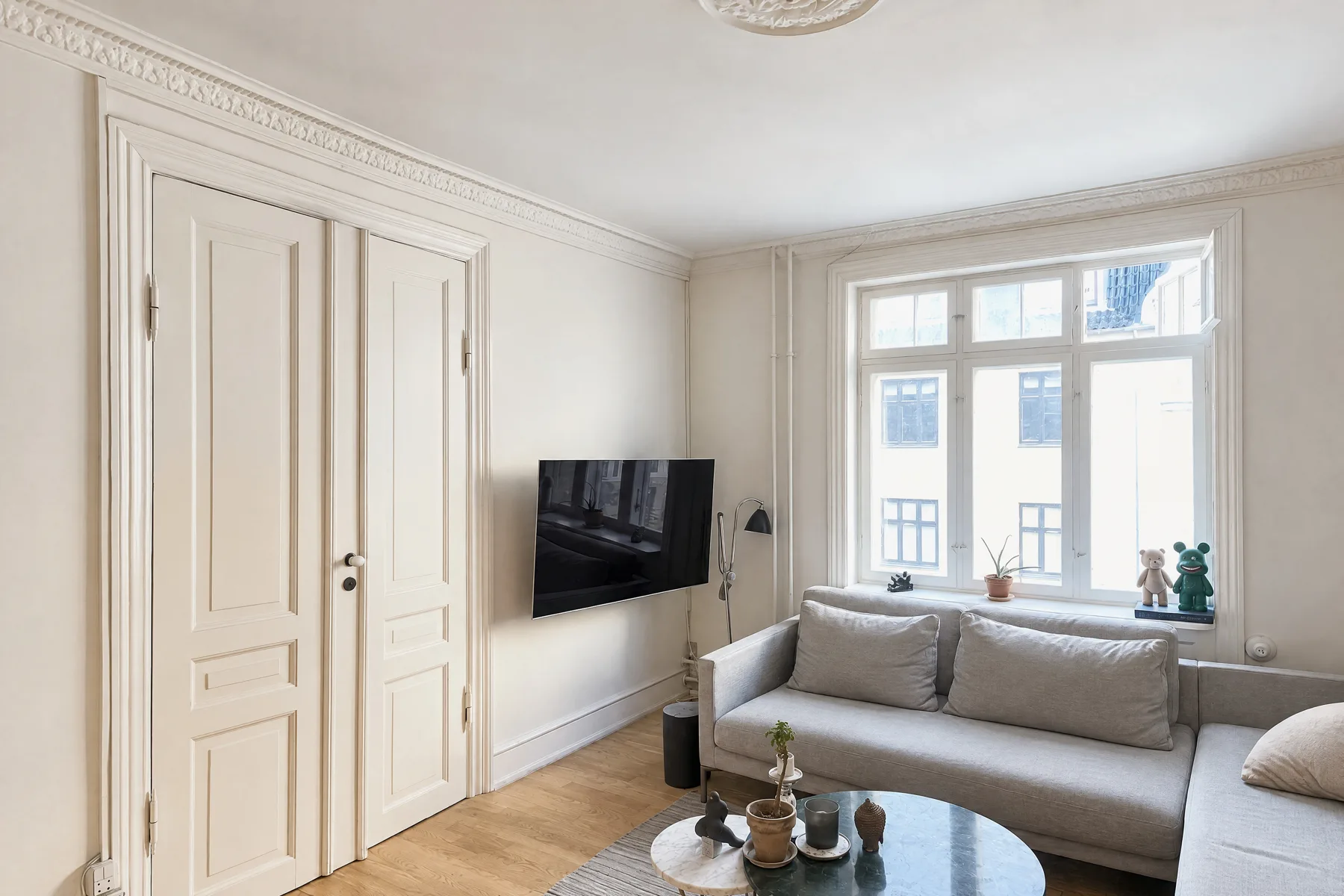
A photo taken square-on to a wall looks flat and shows less of the room than you think. Stand in a corner, or just inside the doorway, and aim diagonally across the room, so the far corner sits near the middle of the frame. HousingWire's guide for agents says to stand in a corner or doorway "to capture as much of the room as possible", and to do it "without making it look unnatural or distorted."
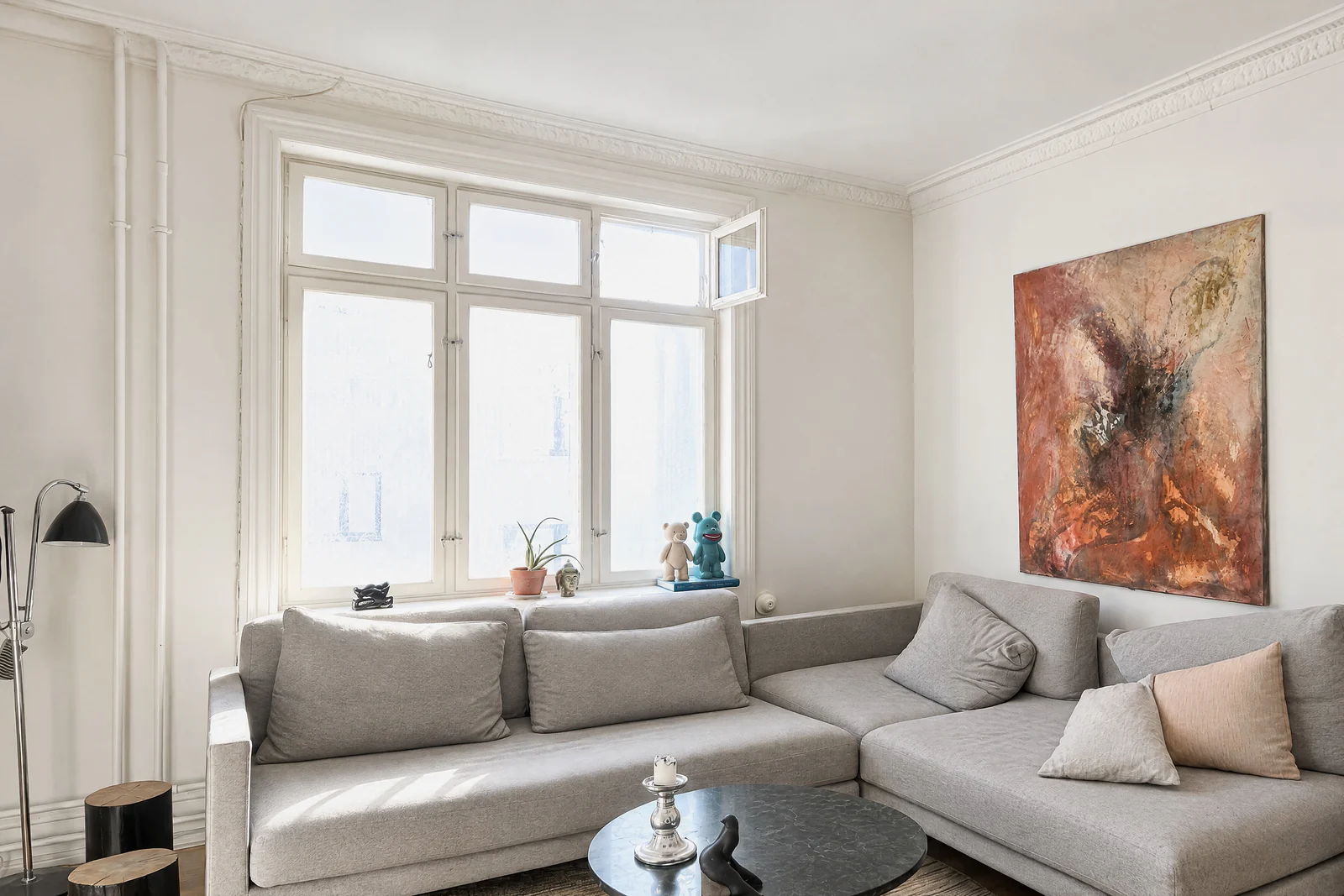
Photographers call this a two-wall or two-point view, and the part to get right is the third wall. NAR's archived photo-tips article quotes Brian Balduf of VHT Studios on the "three-wall rule": frame the photo so you capture three walls, which gives the room balance and scale, and note that a shot from the doorway often shows only one corner and "can make it feel smaller." Virtuance puts the limit the other way: no third wall leaves buyers wondering where the room leads, too much makes the room feel smaller than it is.
- Back all the way into the corner. Every step back fits more room in without going wider. In a living room, step to the side of the sofa rather than shooting over its back; NAR's article shows the same great room looking tighter from behind the sofa and larger from beside it.
- Pick the corner that faces the room's best side. Usually the windows, a fireplace, or the way into the next room.
- Then take a second corner or the doorway. The opposite corner, or the view a visitor gets walking in, shows the wall you had your back to.
- Keep furniture off the edges of the frame. A chair cut in half at the edge looks like a mistake, and at 0.5× it also stretches.
How high to hold the phone, and why level matters more
Hold the phone at about chest height. HousingWire's figure is about 5 feet, "or by positioning the camera around your chest height." Lower than eye level keeps the furniture from looking small and the floor from filling the bottom of the frame. Virtuance's photographers go a little lower in two rooms: kitchens at countertop height and dining rooms at table height, so you see across the surfaces rather than down onto them. Airbnb's small-spaces guide gives a test that works in any room: you should be able to see the tops of beds, countertops and tables while the camera stays level.
Level matters more than height. Tilt the phone down to get more floor and the walls lean in toward the bottom; tilt it up for the ceiling and they lean out. Airbnb's advice is to shoot straight ahead, "without tilting the lens up or down". In our study the median lean of professional photos was 0.00°, while the people in our first phone captures held the phone anywhere from 0° to 8° off level, and 71.3% of their frame lay below the horizon line against 50.4% in the professional photos. So:
- Turn on Grid and Level in Settings > Camera. Apple's guide says they help you "straighten and compose your shot."
- Keep the phone upright, like a window pane, and the horizon near the middle of the frame.
- Too much ceiling? Lower the phone. Too much floor? Raise it. Don't tilt it.
- A small lean can be fixed afterwards: Apple's Photos app can adjust horizontal and vertical perspective. A big one can't be fixed without cropping off the edges of the room.
A tripod helps if you have one. NAR's article calls crooked photos "jarring" and recommends a tripod both for straightness and for sharpness. A shelf, a stack of books and the camera timer (3, 5 or 10 seconds, per Apple) work too.
Fitting the whole room in: 1× or 0.5×?
An iPhone with two or more rear cameras has two ways to go wide. The 1× main camera is 26 mm equivalent on an iPhone 15; the 0.5× Ultra Wide is 13 mm with a 120° field of view (Apple's spec pages). Professionals work in between: the median professional interior in our study was shot at 18 mm, with the middle 80% between 15 and 25 mm. That makes 0.5× wider than roughly 9 in 10 professional photos, and 1× narrower than most.
Too wide is the more common mistake. Larry Lohrman of Photography for Real Estate wrote that the further you go below about 22 mm effective, "the more likely it is you will get negative feedback from clients and viewers"; one home seller called his 16 mm photos "cartoon like". The stretch at the edges is perspective distortion, and unlike the curve of a lens it can't be corrected afterwards. Buyers or guests who walk in find a smaller room than the photo promised.
| 1× (main camera) | 0.5× (Ultra Wide) | |
|---|---|---|
| Equivalent focal length | 26 mm on iPhone 15 (Apple) | 13 mm, 120° field of view (Apple) |
| What the room looks like | Close to how it looks in person | Bigger than in person; edges stretch |
| Use it for | Living rooms, bedrooms, kitchens: anywhere you can back into a corner | Bathrooms, hallways, small bedrooms, walk-ins: when 1× from the corner or doorway still won't fit |
| If you use it | Step back before you zoom out | Phone perfectly level, furniture away from the frame edges, Lens Correction left on |
The rule: back into the corner and try 1× first; switch to 0.5× only if the room still doesn't fit. Apple's Lens Correction, on by default, adjusts Ultra Wide photos "for more natural-looking results", so leave it on. Skip the 2× and digital zoom for room shots; they're for details. Which models have which cameras, and the other settings worth changing, are in our iPhone camera settings guide. Bathrooms, hallways and closets get their own guide: how to photograph small rooms.
Light: daylight, lamps, and the window problem
Airbnb's guide gives the order: turn off the flash, open the blinds, shades and curtains, and only if the room is still too dark, turn on the lights. Take indoor photos when the rooms get the most daylight; HousingWire suggests late morning or early afternoon, and warns that a flash makes a room "darker around the edges and brighter towards the middle."
- Turn on every light in the room, including lamps, once the curtains are open. Bulbs in the same color look better than a mix of warm and cool.
- Don't shoot straight into a bright window from close up. From the corner, the window sits at the side of the frame, which is easier on any camera.
- Let HDR do its job. NAR's article explains that professionals blend several exposures so both the room and the view through the window show; the iPhone does a version of this by itself, taking several photos at different exposures and blending them when HDR is most effective (Apple). If a room still comes out too dark, tap the screen and drag up to brighten it, and touch and hold until AE/AF Lock appears to keep that exposure for the next shots (Apple).
- Go bright, not pale. The professional interiors we measured were bright (a median of 71.8 on a 0 to 100 lightness scale), but in living rooms only a median of 11% of the frame was near white. Brighten the room with light, not by blowing out the whole picture.
More on windows, HDR and exposure is in how to take real estate photos with an iPhone.
Tidy the room first: ten minutes that matter more than the camera
Airbnb's first tip is to clean and declutter, and it quotes a photographer and Superhost: "It's surprising how many people forget to clear their spaces of random objects before taking photos." HousingWire's version: declutter countertops, hide exposed cords and remove anything too personal for a public photo, because clean spaces look bigger and brighter. The quick pass for any room:
- Clear the floor, the tabletops and the counters; leave one or two things that show what the room is for.
- Make the bed, straighten the cushions, close cupboard and closet doors.
- Hide cables, bins, laundry, pet bowls, mail, and anything with a name or photo on it.
- Turn off the TV and ceiling fans; close the toilet lid.
- Check every mirror and glass door for your own reflection before you shoot.
For a whole home, use our room-by-room photo prep checklist. For an Airbnb, show the room as guests will find it; for a rental or roommate ad, photograph the actual room on offer, not a better one in the building.
Room by room: where to stand and how many shots
Airbnb's advice is to plan a shot list that covers each room guests can use "from various perspectives", with a mix of wide, mid-range and close-up photos. A plan that works for most rooms, with the heights from the sections above:
| Room | Where to stand | Phone height | Wide shots |
|---|---|---|---|
| Living room | The corner facing the windows or fireplace; then the opposite corner or the entrance | Chest height | 2–3 |
| Kitchen | A corner or the end of the counters, looking along them; a galley from one end | Countertop height | 2–3 |
| Dining room | A corner, with the table off-center and the way to the kitchen in view | Table height | 1–2 |
| Bedroom | The corner beside the door, looking at the bed from its foot or side, with the window in frame | Chest height | 1–2 (2 for the main bedroom) |
| Bathroom | The doorway, or the hall outside it; to one side of the frame to stay out of the mirror | Chest height | 1 |
| Hallway or stairs | One end, centered, toward a lit room or open door | Chest height | 0–1 per floor |
| Home office or studio | The corner opposite the desk, so the desk and window both show | Chest height | 1–2 |
| Balcony or patio | The doorway, looking out, then the far corner looking back | Chest height | 1–2 |
How many for the whole place? Most homes are well served by 20 to 30 photos, a small apartment by 12 to 15 (see how many photos a listing should have). A roommate ad needs fewer: the room on offer from two corners, plus one each of the kitchen, bathroom and living space you'd share. Leave out any photo that repeats an angle.
Landscape or portrait, and when to use panorama mode
Landscape, almost always. Airbnb says horizontal photos work better because search results crop photos into squares and the listing page shows them in landscape. The exception is a very tight space: Airbnb's small-spaces guide says a vertical "can make for a cleaner outcome" in bathrooms, kitchens, balconies and hallways. Use it as an extra, not as the main photo of a room.
Panorama mode (Pano) sounds like the answer to fitting a room in: swipe to Pano, tap the shutter and pan slowly, keeping the arrow on the center line (Apple). It can make images of up to 63 MP. In a room it has three pitfalls, which Digital Camera World's Rod Lawton describes for any iPhone panorama:
- It bends straight lines. Countertops, ceiling edges and tables close to the phone bow into curves, which looks wrong in a room more than in a landscape. Keep away from anything close to the camera.
- It drifts. The further you pan, the more the phone tilts, and straightening the result afterwards crops a lot of it away. Keep the yellow line on the horizon.
- It gets thin. A Pano is a fixed height, so a long pan makes a strip. Lawton aims for finished images only 2 to 3 times wider than they are tall.
A short, level Pano from a corner can show a long room or a view, but as the main photo of a room, a level 1× or 0.5× shot from the corner is safer. And a Pano isn't a 360° photo: it covers the sweep you pan, not the whole sphere around you. For a true 360° view, see below.
How long it takes, and what a 360° photo of a room needs
Time. A professional shoot of a typical home takes 1 to 2 hours on site, according to PropPhoto, and Snappr reports an average of 98 minutes across 1,626 US real estate bookings in its last year. Doing it yourself, plan on the tidying taking longer than the photos: a few minutes per room for two or three level shots once the room is ready, plus time to look through them before you leave.
360° photos. An iPhone's own camera doesn't take 360° photos. The free Zillow 3D Home app can use the phone's camera to capture panoramas for a virtual tour on Zillow, Trulia and Redfin; for its interactive floor plan it needs a supported 360° camera, such as an Insta360 or a RICOH THETA (its App Store listing). What 360° and 3D tours cost, and when they're worth it, is in our 3D virtual tour cost guide.
Or let the app find the spot for you
Where to stand is the part most people get wrong, and it's the part the October app does for you. It shows you the photographer's spot in each room with an arrow and the distance, keeps the phone level with an on-screen level, tells you to turn only the phone, and takes the photos itself when the shot is right. If a picture is leaning or repeats the last one, it tells you there and then. In a small room it adapts the spots, and where a corner shot isn't possible it says so and leaves it out. It runs on iPhone 12 and newer.
From your capture, an AI image model draws each finished wide photo, with brighter daylight, straight lines and loose items such as bottles, towels, papers and cables left out. The model is told to keep the room's layout, walls, floors, windows, fittings, built-in furniture and view as you captured them, and each photo is checked against your capture. The photos usually come back within a few hours. Look through each one before you publish, and label it as AI-generated or digitally altered where your listing site or MLS requires; the unaltered originals are included. It costs $49 a place (up to 6 rooms), and your first place is free. See pricing and how October makes your photos.
Step by step
Tidy the room
Clear floors, tables and counters, make the bed, hide cables, bins and personal things, turn off the TV and fans, and close the toilet lid.
Set up the light
Turn off the flash, open every blind and curtain, then turn on every light in the room. Shoot when the room gets the most daylight.
Turn on Grid and Level
In Settings > Camera, turn on Grid and Level and leave Lens Correction on.
Back into a corner
Stand in the corner facing the room's best side, or in the doorway of a small room, and aim across the room so two walls meet near the middle and part of a third shows.
Hold the phone sideways at chest height, level
About 5 feet, countertop height in kitchens and table height in dining rooms. Keep the phone upright; lower or raise it instead of tilting it.
Try 1× first, then 0.5× if needed
Use 1× if the room fits from the corner. Switch to 0.5× only if it doesn't, and keep furniture away from the edges of the frame.
Take a second angle and check
Shoot from the opposite corner or the doorway, then look at both photos for leaning walls, reflections and dark corners before you move to the next room.
Questions
How do you take a picture of a whole room?
Back into a corner and aim diagonally across the room with the phone level at chest height. Try the 1× camera first; if the room still doesn't fit, switch to 0.5× and keep the phone perfectly level and furniture away from the edges. One photo rarely shows every wall, so take a second from the opposite corner or the doorway.
Where should you stand to photograph a room?
In a corner, with your back to the wall, looking toward the room's best side, so two walls meet in the frame and part of a third shows. In a bathroom or other small room, stand in the doorway or just outside it. Avoid shooting square-on to a wall or over the back of a sofa.
Should I use 0.5× to take pictures of a room?
Only when the 1× camera from the corner can't fit the room. The 0.5× Ultra Wide is a 13 mm equivalent with a 120° field of view, wider than roughly 9 in 10 professional interior photos in our study (median 18 mm), and it stretches whatever is near the edges of the frame.
How high should I hold the phone?
About chest height, roughly 5 feet, in most rooms; countertop height in a kitchen and table height in a dining room. Keep the phone level: if you see too much ceiling or floor, move the phone down or up rather than tilting it.
How do I keep the walls straight in room photos?
Turn on Grid and Level in Settings > Camera and keep the phone upright, not tilted up or down. Walls lean when the phone points up or down. Small leans can be fixed in the Photos app, which adjusts vertical and horizontal perspective, but big ones crop the room.
Should room photos be portrait or landscape?
Landscape. Airbnb crops photos into squares in search results and shows them in landscape on the listing page, so a vertical photo loses the most. A vertical photo can work as an extra in a very tight bathroom or hallway.
Can I use panorama mode to photograph a room?
Sparingly. A short, level Pano can show a long room or a view, but it bends straight lines close to the phone, drifts as you pan, and turns thin if you pan too far. For the main photo of a room, a level 1× or 0.5× shot from a corner is more accurate.
How long does it take to photograph a house?
A professional takes 1 to 2 hours on site for a typical home (PropPhoto); Snappr's average across 1,626 US real estate bookings was 98 minutes. Yourself, the tidying usually takes longer than the photos: a few minutes per room once it's ready.
Sources
- Apple, iPhone User Guide: Use iPhone camera tools (grid and level, perspective, timer, aspect ratio, exposure and AE/AF Lock)
- Apple, iPhone User Guide: Take panoramic photos
- Apple, iPhone User Guide: Adjust HDR camera settings
- Apple, iPhone User Guide: Change advanced camera settings (Lens Correction)
- Apple, iPhone 12 technical specifications (Ultra Wide 120° field of view, Panorama up to 63 MP)
- Apple, iPhone 15 technical specifications (26 mm main, 13 mm Ultra Wide)
- Airbnb, How to take great photos for your listing
- Airbnb, Photos of small spaces
- NAR (archive), Amateur vs. pro photos: see the difference (March 12, 2018)
- HousingWire, 11 DIY real estate photography tips every agent should know
- Virtuance, Professional real estate photos (verticals, third wall, camera height by room)
- Photography for Real Estate, Perspective distortion in real estate photography (Larry Lohrman, 2011)
- Digital Camera World, 3 reasons why your iPhone panoramas are not as good as they could be (Rod Lawton)
- PropPhoto, What to expect from a real estate photo shoot (August 16, 2026)
- Snappr, Real estate photography pricing (98-minute average across 1,626 US bookings)
- App Store: Zillow 3D Home (phone panoramas for tours; 360° camera for floor plans)