

Guides · Roundup
Is there an app that turns iPhone photos into professional real estate photos?
Yes, several, and which one fits depends on whether the photos already exist: for photos already on your iPhone, Roomify ($49 a listing), Lumo (free for 5 photos, $29.99 a month for 500), PicAid (token packs from $11.99), Autoenhance.ai ($0.75 a photo) and BoxBrownie's human editors ($1.60 a photo, by upload) all take them as they are. If you haven't taken them yet, a camera app does better, because no app can move the camera after the fact: Ovvy and Realty Pro Shots ($2 a photo, checked by a person), Exposio ($0.99 a photo, HDR on the phone), SnapSnapSnap, or October, which guides the capture on an iPhone 12 or newer and returns finished photos from it for $49 a place, but cannot take photos you already have.
By Emil Thomsen, Head of Customer Relations, October · Updated
Reading on Google? Add October to your Preferred Sources to see our guides more often.
Is there an app that turns iPhone photos into professional real estate photos?
Yes, but read the question twice. Some apps take the iPhone photos you already have and make them brighter, straighter and cleaner. Others are cameras: they help you take the photos in the first place and then finish them. The first group is the only option if the shoot is done; the second gives better results if it isn't, because an editor can fix light and colour but not where you stood.
You already have the photos: apps that edit them
| App | What it does | Price (October 2026) | Speed | A person checks it? |
|---|---|---|---|---|
| Roomify | Enhances iPhone photos from your camera roll: lighting, colour and clarity; single-property website | $49 a listing, $199 for 5, $499 for 20; first listing free; up to 150 photos a listing | About three minutes a listing | Not mentioned |
| Lumo | Brightening, window balance, sky and twilight for exteriors, staging, room sorting; imports up to 20 photos at a time; needs iOS 26 | Free for 5 enhancements with a badge; Pro $29.99 a month for 500 photos | Under 30 seconds a photo | No: it asks you to review each photo against the property |
| PicAid | Edits photos you took: object removal, decluttering, lights on, twilight, seasons, virtual staging | Token packs: 1,000 for $11.99 up to 13,300 for $119.99; tokens per edit not stated | Not stated | Not mentioned |
| Autoenhance.ai | Web editor for uploaded photos or brackets: HDR merge, window pulls, sky replacement, perspective and colour | $0.75 a photo pay as you go; $29 a month for 100 on a limited offer | 5 to 10 minutes for a full shoot | No human step described |
| Imagen for Real Estate | Browser app for uploaded photos, with staging, object removal and twilight | $0.32 a photo | Under 10 minutes | 5 human revisions per listing |
| BoxBrownie (website upload) | Human editors work on photos from any phone or camera; also staging, item removal, day to dusk | $1.60 an enhancement, $4 day to dusk, $24 staging; 3 enhancements + 1 day to dusk free | 24 hours; 48 for staging | Yes: human editors |
| Snapseed | Free manual editor: perspective, healing, curves | Free | Your own time | You |
For one listing shot well, Roomify or Lumo are the quickest; Autoenhance.ai and Imagen are built for photographers who upload whole shoots; BoxBrownie is the one with a person doing the edit; PicAid and Lumo add twilight and staging. All of them start from the frame you took. A leaning wall can be straightened and a dark room brightened, but a room shot from the wrong spot or with half of it cut off can't be reshot by an editor. If the photos aren't good enough to edit, the second group is the way back.
You haven't taken them yet: camera apps, and October
| App | How it helps you shoot | What comes back | Price (October 2026) | Speed |
|---|---|---|---|---|
| Ovvy | Camera with exposure and levelling aids | Edited photos, checked by a person | $2 a photo, or $29 a month for 30; 20 free | 12 hours or less guaranteed |
| Realty Pro Shots | Camera that brackets each shot; iPhone and Android | Photos blended and cleaned by its editing team, sky replaced | $2 an image; 10 free | Same day if submitted by 6pm CST; 2-hour rush |
| SnapSnapSnap (BoxBrownie) | Free camera that brackets each shot | Photos edited by BoxBrownie's human editors | Free app; $1.60 an enhancement | 24 hours |
| Exposio | Up to 27 shots a tap, blended into HDR on the phone; iPhone and Android | HDR photos, plus staging, sky and twilight in its AI Studio and a Motion video | Free with a watermark; $0.99 a photo without | Instant |
| October | Shows the photographer's spot with an arrow and the distance, keeps the phone level and takes the photos itself, three spots per room; iPhone 12 or newer | A finished photo of every spot, made from the capture, plus a walkthrough video if you choose it; the unaltered original capture is included | $49 a place (up to 6 rooms) for photos, $99 with walkthrough, $199 with 4K; first place free | Usually within a few hours, room by room |
Ovvy, Realty Pro Shots and SnapSnapSnap are the cheapest way to get a person to finish each photo, at $1.60 to $2 a photo; you still choose where to stand. Exposio is the fastest and cheapest per photo. October is the only one here that decides where you stand, which matters most when the person holding the phone is not a photographer: an agent's assistant, a seller or a host between two guests.
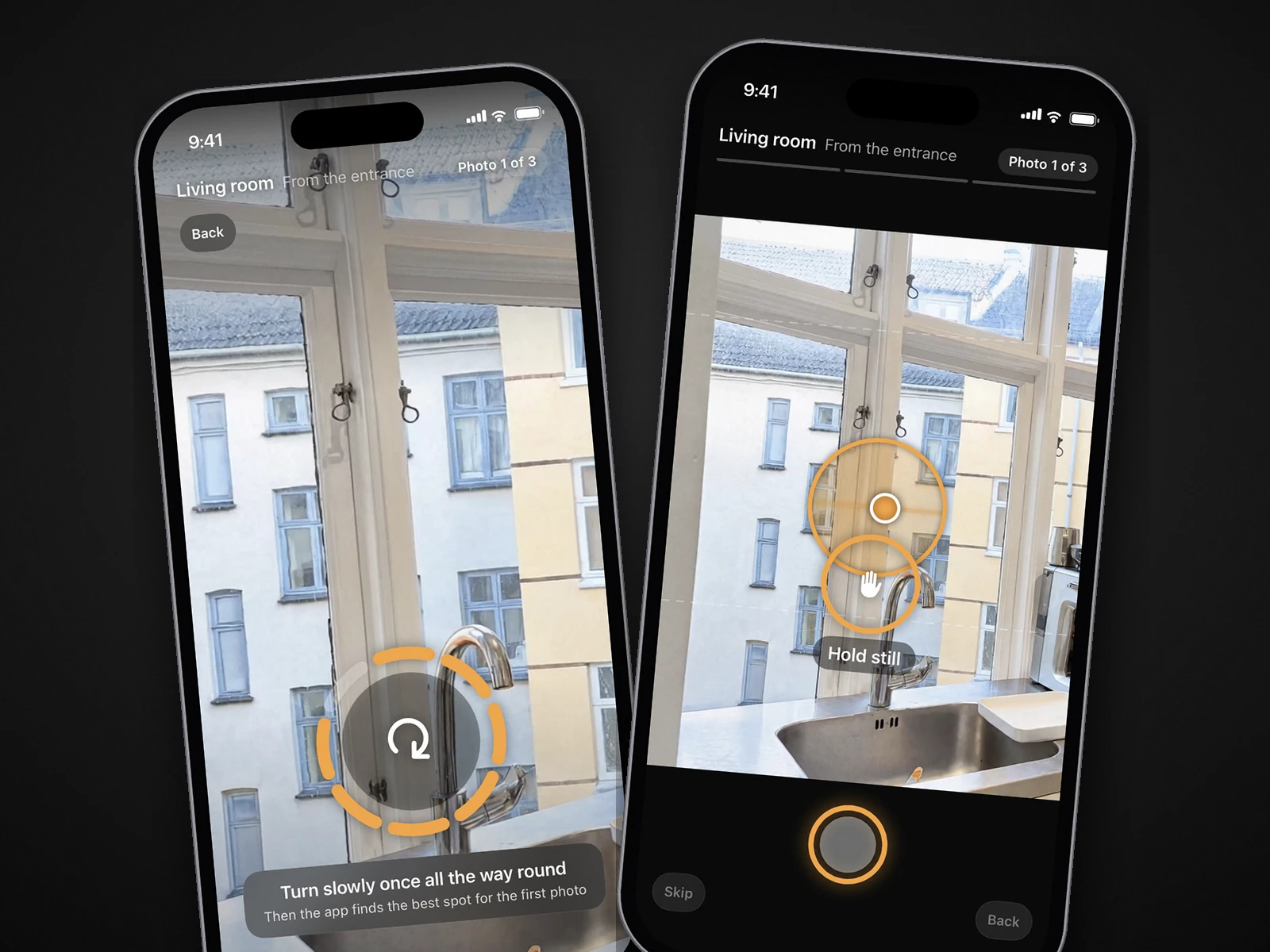
Where October fits, and where it doesn't
October is an iPhone app and a service: you walk the rooms with the October app, and October finishes each photo from the capture of that spot, with a daylight look, straight lines and loose items such as papers, towels and cables left out, while the room's layout, fixed features and view are kept. The finished photos are AI-altered images of the real room; the unaltered original capture of every photo is in your download, for where your MLS or state asks for it. The photos arrive room by room, usually within a few hours, with an email when everything is ready.
- Choose October when nobody on site knows where to stand, when you want photos and a walkthrough video from one walk, or when your first place, free, is enough to try it.
- Choose something else when the photos are already taken (October can't use them), when you want a person to check every photo (October promises no human review; BoxBrownie, Ovvy and Realty Pro Shots do), when you shoot on Android or an iPhone older than the 12, or when you need twilight, drone or a floor plan.
- Choose a photographer when the listing needs aerials, a real dusk shoot or a person choosing every frame. A median photo package is $225 (PropPhoto); see October vs a real estate photographer.
More apps, including Nodalview, ProperShot and the DIY editors, are in the best real estate photography apps, and the camera apps head to head in Ovvy vs Roomify vs Exposio vs October.
Before you publish edited photos
- Look at every photo at full size. Automatic edits can overbrighten, shift colour or redraw a detail, and most of these apps say no person checks the result.
- Label what was altered. Staging, item removal, sky replacement and twilight are alterations under California's AB 723 and most MLS rules, whoever makes them; October's photos are AI-altered, so label them where your MLS, portal or state requires. See AI photo editing and MLS rules.
- Keep the originals. AB 723 also asks for a link to the original photo. Keep your own originals with an editing app; October includes the original capture in the download.
- Start from a good frame. Level, at chest height, from a corner or doorway, every light on. Our iPhone how-to guide covers it, and it is what makes every app on this page look better.
Questions
Is there an app that turns iPhone photos into professional real estate photos?
Yes. For photos you already took: Roomify ($49 a listing), Lumo ($29.99 a month for 500), PicAid (tokens), Autoenhance.ai ($0.75 a photo) or BoxBrownie's human editors by upload ($1.60 a photo). For photos you haven't taken yet: camera apps such as Ovvy and Realty Pro Shots ($2 a photo, checked by a person), Exposio ($0.99), SnapSnapSnap, or October, which guides the capture and returns finished photos for $49 a place, first place free.
Can October edit photos I already took?
No. October only works from a capture made in its own app, which shows you where to stand and takes the photos. For photos already on your phone, use Roomify, Lumo, PicAid, Autoenhance.ai or BoxBrownie.
Which app has a person check the photos?
BoxBrownie (and its SnapSnapSnap camera), Ovvy and Realty Pro Shots say a person edits or reviews every photo. Imagen for Real Estate includes 5 human revisions per listing. Roomify, Lumo, PicAid, Autoenhance.ai, Exposio and October do not promise a human review.
What is the cheapest app for real estate photos?
Snapseed is free if you edit yourself. Exposio is free with a watermark or $0.99 a photo, Imagen for Real Estate is $0.32 a photo, and BoxBrownie's human editors are $1.60. Roomify and October have a free first listing or place, then $49.
Do these apps work on Android?
Realty Pro Shots and Exposio list Android apps, and the web editors (Autoenhance.ai, Imagen, BoxBrownie) take uploads from any phone. Roomify, Lumo, PicAid, Ovvy, SnapSnapSnap and October are iPhone apps; October needs an iPhone 12 or newer, and Lumo iOS 26.
Will an app make my photos as good as a photographer's?
On light and colour, often close; on where the camera stood, only if you stood in the right place. That is the gap camera apps try to close, and October is the one that chooses the spot for you. A photographer still brings drone, twilight, floor plans and a person choosing every frame.
Sources
- App Store: Roomify Real Estate Photos ($49 a listing, $199 for 5, $499 for 20, three minutes, 150 photos, first listing free)
- Lumo: homepage (import up to 20, under 30 seconds a photo, free plan, Pro limits, iOS 26, review each photo)
- App Store: Lumo: AI Real Estate Camera (Pro $29.99/month)
- App Store: PicAid AI Real Estate Photos (token packs, features)
- Autoenhance.ai: pricing ($0.75 pay per image, Essential $29/month for 100 on a limited offer; read October 22, 2026)
- Autoenhance.ai: homepage (features, '5 to 10 minutes', no human step)
- Imagen: Imagen for Real Estate ($0.32 a photo, 5 human revisions per listing, under 10 minutes; read October 22, 2026)
- BoxBrownie: pricing page, United States region (enhancement $1.60, day to dusk $4, staging $24; read October 27, 2026)
- BoxBrownie: homepage (human editors, 24 h / 48 h, free trial)
- App Store: SnapSnapSnap by BoxBrownie.com (free camera app, edits by BoxBrownie)
- App Store: Snapseed (free editor)
- App Store: Ovvy Real Estate Camera ($2 a photo, $29/month for 30, 20 free)
- Ovvy: website ('12 hours or less guaranteed', manual review of all photos)
- Realty Pro Shots: website ($2 an image, 10 free, same day by 6pm CST, sky replacement, Android)
- App Store: Realty Pro Shots camera app (2-hour rush)
- App Store: Exposio Real Estate Camera (free with watermark, $0.99 an HDR photo)
- Exposio: website (up to 27 shots a tap, AI Studio, Motion video, Android)
- PropPhoto: Real estate photography pricing (median package $225; read October 29, 2026)