

Guides · Guide
Real estate camera app: what it does, what it can't, and the options
A real estate camera app replaces the iPhone's camera with one tuned for interiors: it fires a bracket of exposures per shot and blends them so bright windows and dark corners both show, keeps a level on screen, and on some phones stitches frames into a wider view. What it doesn't do is decide where to stand, tidy the room, fix a shot taken from the wrong height or edit the result to a finish, which is why most camera apps are the front end of an editing service (Exposio, SnapSnapSnap, Ovvy, Realty Pro Shots, Nodalview) and why October goes one step further and guides the capture itself, then has an AI image model draw each finished photo from that capture, delivered with an AI walkthrough video, usually within a few hours.
By Emil Thomsen, Founder of October · Updated
Reading on Google? Add October to your Preferred Sources to see our guides more often.
What a real estate camera app adds to the iPhone's own camera
The iPhone camera already does a version of the two things that matter most. Apple's guide says the camera takes several photos in rapid succession at different exposures and blends them, bringing out highlight and shadow detail, automatically when it's most effective; and in Settings > Camera you can turn on a Grid and a Level to straighten and compose the shot. Every iPhone from the 12 on has a 12 MP main camera and, on multi-camera models, an Ultra Wide with a 120° field of view (Apple's iPhone 12 specs). A real estate camera app takes each of those further:
- Deeper HDR brackets. Interiors are high-contrast: a window can be a hundred times brighter than the wall beside it. Camera apps shoot a longer bracket than the stock camera and blend it for the room rather than for a face. Exposio's site says one tap captures up to 27 shots and balances indoor and outdoor exposure automatically; BoxBrownie's launch post for SnapSnapSnap says its camera takes 45 to 70 photos per shot and condenses them into one; Realty Pro Shots' site says the app captures perfectly bracketed images automatically for its editors to blend.
- A level you can't ignore. The stock Level is an option you switch on; the camera apps build it into the shutter. SnapSnapSnap's version history lists a grid with auto-level, and Ovvy's site calls its feature Virtual Tripod: keep your shots straight and level, no gear needed. Leaning walls are the most visible amateur mistake in listing photos, so this matters more than the HDR.
- A wider view. Pro interior photographers work wider than the iPhone's 1× camera but far narrower than its 0.5×. Exposio's site says that when the phone has no wide-angle lens it automatically stitches up to 27 photos into a single, seamless wide shot. October stitches the frames it takes at each spot into one wide view, which its AI image model then draws the finished photo from.
- Presets for rooms. The launch post for SnapSnapSnap says the app automatically adjusts the camera presets to the optimal settings for shooting real estate, so you don't touch exposure, white balance or flash.
Together these fix the three problems that make most phone listing photos look like phone photos: blown windows, dark rooms and tilted walls. Our guide to iPhone camera settings for real estate photos shows what you can get from the stock camera alone.
What a camera app still can't do
Be clear about the limits before you pay per photo. A camera app improves the frame you point it at. It does not:
- Choose where you stand. Camera height, the corner or doorway, how much of the third wall to show and which lens to use are the photographer's judgement, and the apps here leave them to you. A perfectly exposed photo taken at eye level from the middle of the room still shows mostly floor. Our how-to guide covers the method.
- Prepare the room. Clutter, cables, open lids and a reflection in the mirror are in every bracket. Use the prep checklist first.
- Finish the photo. An HDR blend is a starting point, not a listing-ready file: colour casts from mixed bulbs, the last few degrees of a lean, a dim ceiling and loose items are editing work. That is why most of the apps below send the photos to editors (SnapSnapSnap, Ovvy, Realty Pro Shots) or sell editing credits (Exposio, Nodalview), and why October has an AI image model draw a new finished photo from every spot's frames before delivery.
- Deliver instantly if a person is involved. In-app HDR is instant (Exposio's pricing page promises instant HDR photo development with the app). Human editing is hours to a day: Ovvy says 12 hours or less for most photos, Realty Pro Shots same day if submitted by 6pm CST, SnapSnapSnap 24 hours.
- Make video. Of the apps here, Nodalview records video (15 credits per video) and Exposio generates a Motion video from the best of your photos; the others list photos only. October returns an AI-generated walkthrough video that moves between each room's finished photos.
- Keep you on the right side of disclosure rules. Several apps offer sky replacement, twilight or staging a tap away. Those are altered images under rules like California's AB 723; the app won't stop you.
The options, compared
Compared from App Store listings and vendor pages on October 20 to 22, 2026, not from running them. Prices change; check the listing before you pay. October is ours, so it is described from our own pricing and FAQ.
| App | The camera does | Then what | Price (Oct 2026) | Turnaround | Needs |
|---|---|---|---|---|---|
| Exposio Real Estate Camera | Up to 27 shots per tap blended for indoor and outdoor light; stitches a wide shot on phones without a wide lens | HDR developed in the app; AI Studio staging, sky and twilight as paid extras; a Motion video included with every plan | Free with watermark; $0.99 an HDR photo, credit packs, or Exposio Pro $9.99/mo (US App Store); €8.99/mo with 15 credits on its site | Instant for HDR | iOS 16+; also Android |
| SnapSnapSnap (BoxBrownie) | Automatic HDR from a bracket of 45–70 frames; grid with auto-level; real estate presets | You pick the photos to send to BoxBrownie's human editors | Free app; US$1.60 a photo for enhancement, US$4 day to dusk | 24 hours (48 for virtual staging) | iOS 15+ |
| Ovvy | Multiple exposures per shot with automatic exposure, levelling and composition (Virtual Tripod) | Edited by Ovvy with a manual quality check; staging, twilight and a property site as extras | $2 a photo, or $29/mo for 30; 20 free photos, no card | Most photos within a few hours, 12 hours or less guaranteed | iOS 17.6+ |
| Realty Pro Shots | Bracketed exposures with one tap and a shot progress indicator | Human editors blend the brackets, clean up, black out TVs, add a fireplace flame and replace skies at no extra charge | Free app; $2 an edited photo | Same day if submitted by 6pm CST; rush in 2 hours between 8am and 8pm CST | iOS 15.1+; also Android |
| Nodalview | HDR photos, video and 360° panoramas for tours and floor plans | A platform for agencies: tours, floor plans, AI decluttering and restyling, on credits | 20 credits $28.99, 40 for $55 in the app; 1 credit a photo, 15 a video, tour or floor plan; plans by quote; 14-day trial | AI processing 'typically takes a few minutes'; floor plans in under 24 hours | iOS 17+; also Android |
| ImmoPhoto: Real Estate Camera | Framing guides and composition tips for each room type; with an iPhone Pro, a LiDAR scan for a 2D floor plan | Eight AI retouches in the app (enhance, declutter, empty room, sky, staging, garden, eraser, upscale); room-by-room galleries; 360° tours in beta | Free for 1 property and 9 photos; Pro $25.99/mo or $259.99/yr in the US App Store (other tiers listed too); €19.99/mo on its site | Not stated on its pages | iOS 17+; iPhone Pro for floor plans; web app on Android |
| October | Guided capture: the app shows the spot with an arrow and the distance, keeps the phone level and takes the frames itself at three spots per room | October stitches each spot into one wide view; an AI image model draws the finished photo from it (room kept, daylight light, loose items left out); an AI video model makes the walkthrough | $49 photos, $99 with walkthrough, $199 with 4K, per place of up to 6 rooms; first place free | Usually within a few hours, room by room | iPhone 12 or newer |
If you want the long version of each app, with the editing and DIY apps that aren't camera apps, read our roundup of real estate photography apps. For the three capture-and-edit apps against October head to head, see Ovvy vs Roomify vs Exposio vs October.
Exposio: the app the search is named after
Search for "real estate camera app" and the first result is usually Exposio Real Estate Camera, because that is the app's name. It is the main app from Exposio Technologies, a Canadian company whose site says its processing has handled 38 million photos since 2010. The camera blends up to 27 shots into an HDR photo and can stitch a wide shot on phones without a wide lens; it also pairs with selected Canon DSLRs over Wi-Fi so one phone tap triggers the bracket. The App Store listing shows 4.7 from 635 ratings, the most of any capture app on this page. If Exposio is not the right fit, our Exposio alternatives page compares six other options.
It is the purest camera app here: you shoot for free with a watermark and pay 1 credit a photo to remove it, and the editing is automatic in the app rather than by a person. There is no guidance on where to stand, and staging, sky and twilight edits from its AI Studio count as altered images under disclosure rules.
October is not a manual camera app, and that is the point
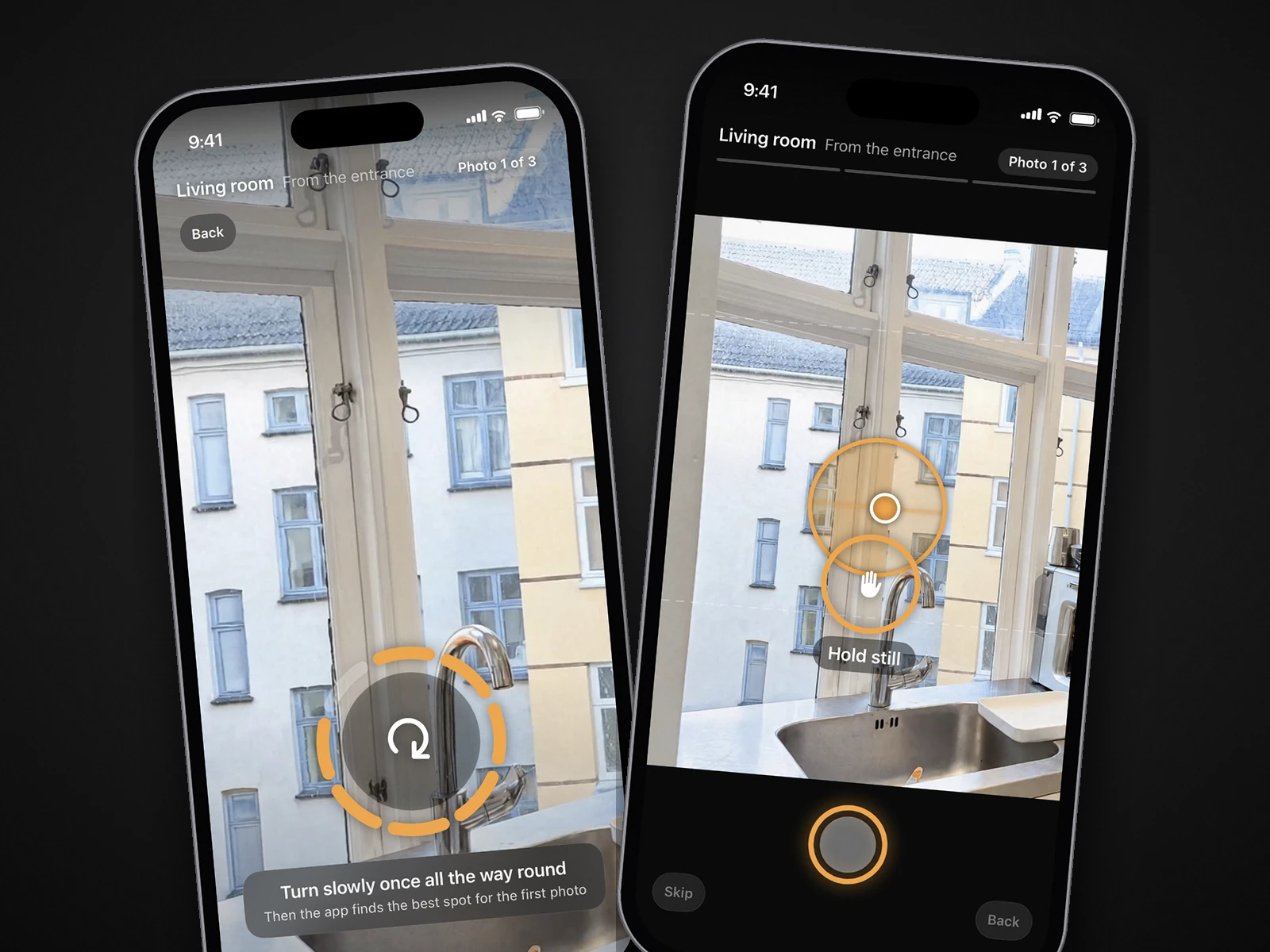
To be honest about where October sits: it is not a camera app in the Exposio sense. You cannot set exposure, pick a lens, frame the shot or import photos you took elsewhere. The October app is a guided capture: it shows you the photographer's spot in each room with an arrow and the distance, asks you to turn only the phone, keeps it level with an on-screen level and takes the frames itself when the shot is right, at three spots per room (from the entrance, from the other end, from a corner). It tells you on the spot if a frame is leaning or repeats the last one and asks for it again, and in a small room it adapts the spots or leaves out a corner shot that can't be made.
The other half is AI. October stitches the frames from each spot into one wide view, and an AI image model (OpenAI's GPT Image) draws a new finished photo from it: light brightened to a daylight look, lines straightened, cushions plumped, beds made, and loose items such as bottles, towels, papers and cables left out. Nothing of the phone photo is pasted back. The model is told to keep walls, floors, windows, fittings, built-in furniture and the view as captured, and each photo is checked against the capture and redrawn if it stretches the room or moves the camera. The walkthrough video, in HD or 4K, is AI-generated motion (Kling) between each room's finished photos. No human editor review is promised, and AI can still get a small detail wrong, so check every photo before you publish. If a room can't be made, you are told, and places you didn't need go back to your account. Photos usually arrive room by room within a few hours.
 As captured
 Delivered by October
It costs $49 a place for photos, $99 with a walkthrough and $199 with a 4K walkthrough, where a place is up to 6 rooms; Start is $149 a month for 2 places and Pro $399 a month for 6, and your first place is free. It runs on iPhone 12 and newer. Full prices are on the pricing page.
Because every October photo is AI-generated, label it as AI-altered or digitally altered where your MLS or state requires (CRMLS Rule 11.5.2 accepts either; California's AB 723 also asks for a link to the original). Only Empty and Staged rooms carry a label on the image. October's download includes the unaltered original of every photo, so you can link or provide it where your MLS or state requires.
A camera app or a capture-to-delivery service: when each makes sense
| Choose | When |
|---|---|
| A camera app with in-app HDR (Exposio) | You know where to stand, you want the photo now, and $0.99 a photo with no person in the loop is the right trade |
| A camera app with human editors (SnapSnapSnap, Ovvy, Realty Pro Shots) | You know where to stand, you want a person to blend and clean each photo, and hours to a day is fine; roughly $1.60–$2 a photo |
| A camera app with AI retouching and a floor plan (ImmoPhoto) | You want declutter, sky and staging edits on the phone and a floor plan from the same walk, have an iPhone Pro for the scan, and are fine with no person in the loop |
| An agency platform (Nodalview) | You need tours, floor plans and a team account more than you need the cheapest photo |
| A guided capture service (October) | Nobody on site is a photographer, you want AI-generated photos and a walkthrough video from one walk within hours, and you list or refresh often enough for $49–$99 a place to beat an hour of your own time |
Two honest cautions. If you mostly shoot 20 to 30 photos of one home and enjoy the craft, Ovvy or Realty Pro Shots at $2 a photo cost less than October's $49 and give you a person checking each photo. If you need a drone, real twilight or a floor plan, none of these apps replaces a photographer; our comparison of October vs a photographer vs DIY covers that split.
Questions
What is a real estate camera app?
An iPhone or Android camera app tuned for interiors: it shoots a bracket of exposures per photo and blends them so windows and dark corners both show, keeps a level on screen and sometimes stitches a wider view. Most are the front end of an editing service that finishes the photos for a per-photo fee.
Is the iPhone's own camera good enough without one?
Often, yes. Every iPhone from the 12 on blends exposures automatically (Apple's HDR) and has a Grid and Level in Settings > Camera. A camera app adds a longer bracket, a level built into the shutter and presets. Where you stand and how you hold the phone matter more than either.
Which real estate camera app is free?
Exposio lets you shoot for free with a watermark and charges $0.99 to remove it. SnapSnapSnap and Realty Pro Shots are free apps that charge per edited photo (US$1.60 and $2). Ovvy gives 20 free photos. October's first place, up to 6 rooms with photos and a walkthrough, is free.
Does a camera app tell me where to stand?
The camera apps compared here do not; they level and expose the shot you choose, and ImmoPhoto adds framing guides for each room type. October's app is different: it shows the spot with an arrow and the distance, takes you to three spots per room and takes the photos itself. The guided apps are compared in which apps tell you where to stand.
Can I send photos I already took to October?
No. October works from captures made in its own app, because its AI draws each photo from the guided frames of that spot. If you have photos already, an enhancement app such as Roomify or an editing service such as BoxBrownie is the right tool; see our apps roundup.
Did you test these apps?
No. This page is compared from App Store listings and vendor pages checked on October 20 to 22, 2026. Only October is described first-hand, because we make it.
Sources
- Apple, iPhone User Guide: Adjust HDR camera settings
- Apple, iPhone User Guide: Use iPhone camera tools (grid and level)
- Apple, iPhone 12 technical specifications
- Exposio Real Estate Camera – App Store listing
- Exposio – website
- Exposio – pricing
- SnapSnapSnap – App Store listing
- BoxBrownie – SnapSnapSnap launch post (2023)
- BoxBrownie – 5 steps for creating an irresistible listing on a budget (SnapSnapSnap prices)
- Ovvy – App Store listing
- Ovvy – website
- Realty Pro Shots – App Store listing
- Realty Pro Shots – camera app site
- Nodalview – App Store listing
- Nodalview – mobile app (works on iPhone and Android smartphones; checked October 22, 2026)
- Nodalview – pricing
- ImmoPhoto: Real Estate Camera – App Store listing (framing guides, AI suite, in-app prices, iOS 17+; checked October 22, 2026)
- ImmoPhoto – website (eight AI retouches, LiDAR floor plans, pricing, Android web version; checked October 22, 2026)